Model icon
ideogram-v4.5
Text to Image
Image to Image
View more Ideogram models
Model:
Use the Ideogram 4.5 API on PoYo for text-to-image generation and image editing, from posters and product images to text-rich branded visuals. With source images, masks, and visual references, you can replace text, change scenes, or refine selected details, connecting initial creation with localization and successive edits.

Input

487/10000

Output

Example Output

This is sample data. Generate a new result to see real output.

Task ID:example-ideogram-4-5-defaultCreated:2026-10-14T11:11:45
Status:finishedProgress:100%
Generated image 1
Examples
Pricing details

Transparent pricing with no hidden fees. Pay as you go.

Ideogramideogram-v4.5
Text to image · low
PoYo price
$0.030/image
6 credits
Official price
-
You save
-
Ideogramideogram-v4.5
Text to image · medium
PoYo price
$0.060/image
12 credits
Official price
-
You save
-
Ideogramideogram-v4.5
Text to image · high
PoYo price
$0.220/image
44 credits
Official price
-
You save
-
Ideogramideogram-v4.5-edit
Image editing · very low
PoYo price
$0.008/image
1.6 credits
Official price
-
You save
-
Ideogramideogram-v4.5-edit
Image editing · low
PoYo price
$0.030/image
6 credits
Official price
-
You save
-
Ideogramideogram-v4.5-edit
Image editing · medium
PoYo price
$0.060/image
12 credits
Official price
-
You save
-
Ideogramideogram-v4.5-edit
Image editing · high
PoYo price
$0.220/image
44 credits
Official price
-
You save
-

* Actual fees are based on the final output.

IDEOGRAM 4.5

Text, source images, masks and visual references in one API

Ideogram 4.5 API for Image Generation and Precise Editing

Bring words and visuals together in posters, product images, and branded designs. Ideogram 4.5 on PoYo combines text-to-image generation with source-image editing, masks, and visual references to take your creative work from first draft to refined visual.

Available Ideogram 4.5 API Models on PoYo

01

Ideogram 4.5 Text to Image

Use ideogram-v4.5 to create images from a text prompt. Choose low, medium or high quality, generate 1–8 images per request, and select a named size or an exact supported pixel size. Medium quality and 1:1 HD are the defaults.
02

Ideogram 4.5 Image Editing

Use ideogram-v4.5-edit with one source image and an edit instruction. Add references or a mask when needed, and select regular or high edit precision. Editing supports very_low through high quality and defaults to auto size.

Key Features of Ideogram 4.5 API

See the editing process for text replacement, product scenes, successive interior revisions, and architectural drawing conversions.

01

Change Packaging Text While Preserving the Layout

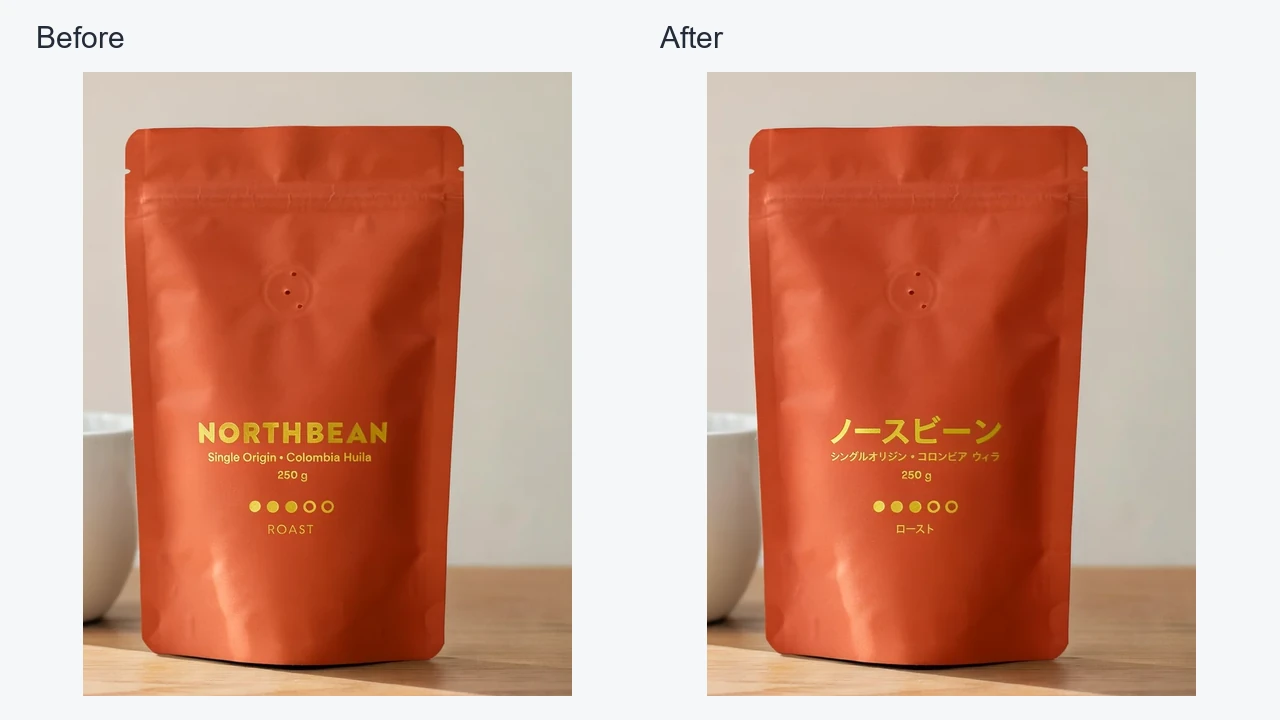
Updating packaging for a new market should not require starting the design again. Ideogram 4.5 can replace or translate text in an existing image while retaining its visual hierarchy. Change English product copy to Japanese, preserve the pouch layout and surrounding scene, and prepare localized artwork from the same design.

  • Replace the copy that needs updating
  • Preserve the existing packaging and layout
  • Localize product artwork for new markets
Before-and-after comparison of English coffee packaging translated into Japanese while retaining the pouch design and typography layout

02

Create New Product Scenes with Consistent Details

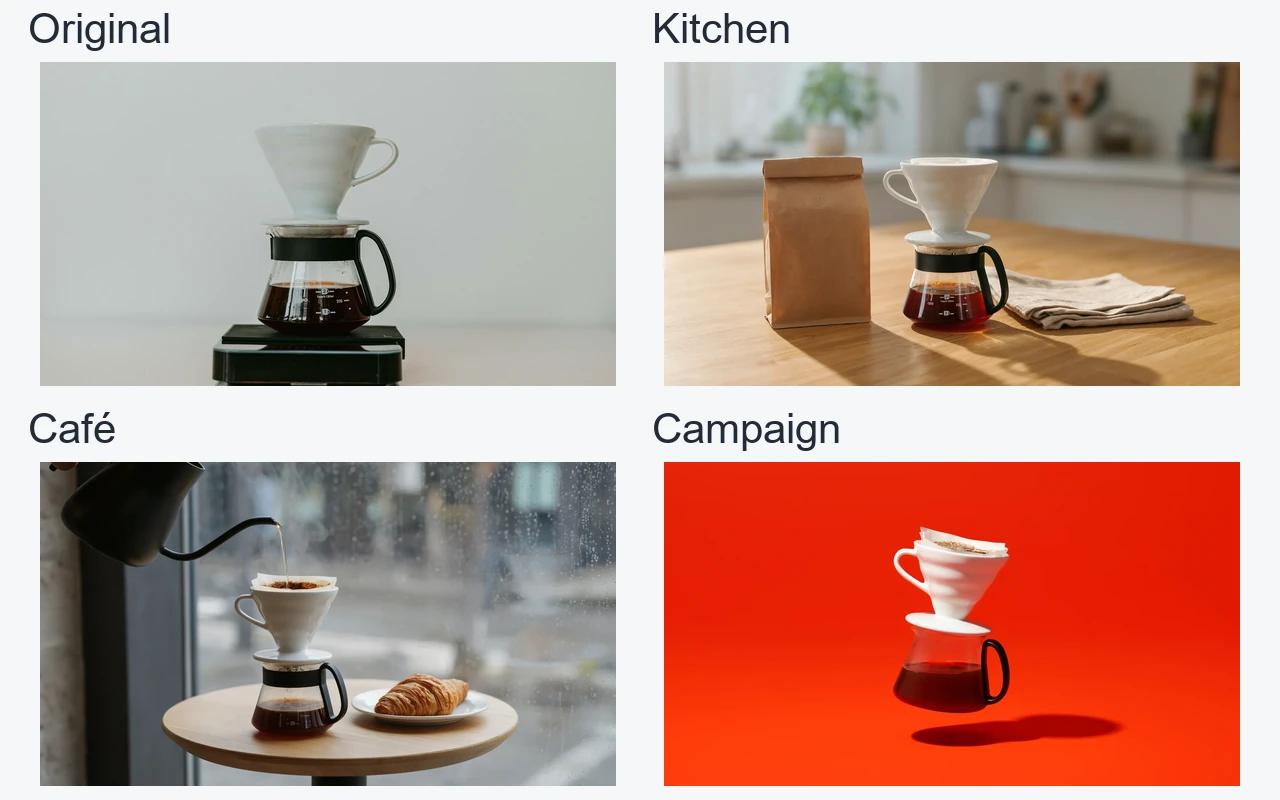
A product campaign often needs several settings built around the same item. Ideogram 4.5 uses your source photo to place the product in new environments and lighting. Take a pour-over set from a kitchen counter to a café and an advertising backdrop while keeping its recognizable shape and materials.

  • Start with your existing product photo
  • Explore different settings and lighting treatments
  • Keep recognizable product shapes and materials
Four-panel comparison of the same pour-over dripper and glass server in the original photo, a kitchen, a café and an orange campaign backdrop

03

Refine Interiors Across Multiple Focused Edits

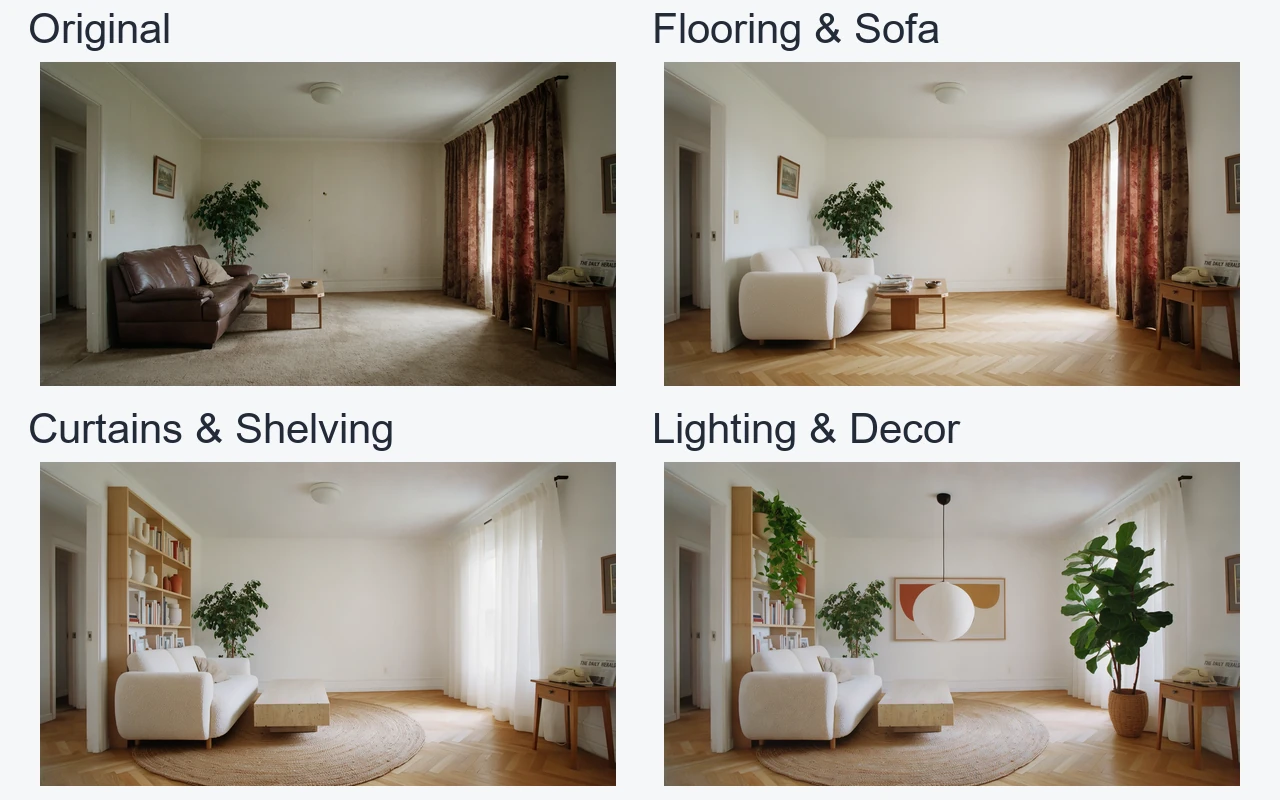
Interior concepts rarely reach the final design in one step. Ideogram 4.5 lets you reuse each result for the next focused change, replacing flooring, furniture, and curtains, then adding lighting, plants, and artwork. Develop a coordinated room concept through successive revisions while retaining the space and camera viewpoint.

  • Update flooring and furniture in stages
  • Add lighting, plants and decorative details
  • Reuse each result for the next revision
Four-panel progression from the original living room to new flooring and sofa, curtains and shelving, then lighting and decor while preserving the room structure

04

Turn Architectural Drawings into Photorealistic Visuals

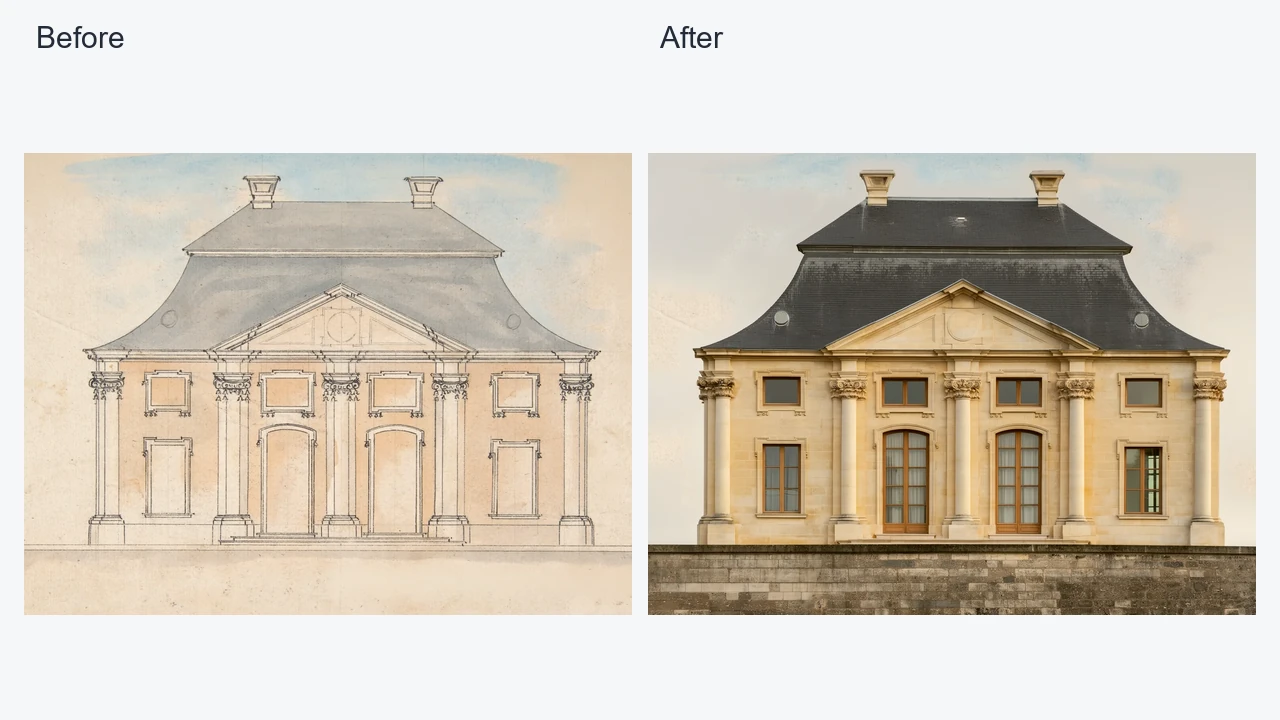
Architectural drawings communicate a design before its materials and atmosphere are easy to picture. Ideogram 4.5 can turn an elevation drawing into a photorealistic interpretation, following instructions for stone finishes, roof materials and lighting. Present a clearer architectural concept while retaining the facade's recognizable columns, openings and proportions.

  • Use an existing elevation as your source
  • Describe the desired materials and lighting
  • Preserve recognizable facade elements and proportions
Before-and-after comparison of an architectural elevation drawing and a photorealistic building render preserving the overall facade and proportions

Who Can Benefit from Ideogram 4.5 API?

01

E-commerce Product Teams

Use Ideogram 4.5 API to explore product scenes, campaign backgrounds and packaging revisions from a source photo. Keep the product recognizable as you test new presentations, then inspect the generated details before publishing store imagery or advertisements.

02

Marketing and Social Teams

Generate poster concepts and social visuals with Ideogram 4.5 API, then edit copy, colors or selected objects as the campaign evolves. Named output sizes help prepare landscape and portrait assets without building a separate integration for each creative format.

03

Interior Designers and Property Teams

Build room concepts with Ideogram 4.5 API by revising materials, furniture and decorative details in separate steps. Add reference images for the items you want to introduce, and reuse the last output as the next source throughout the design review.

04

Brand and Packaging Designers

Explore typography, labels and multilingual packaging with Ideogram 4.5 API. Describe the precise lettering or design change, use a mask for targeted edits when appropriate, and review copy and product details before moving a concept into final production.

05

Architects and Visualization Studios

Use Ideogram 4.5 API to develop a rendered concept from an elevation or source image. Refine materials, landscaping and lighting through successive requests, keeping the design discussion focused on one change at a time rather than restarting the whole scene.

06

Creative Application Developers

Add image creation and editing to your application through Ideogram 4.5 API on PoYo. Reuse the asynchronous submit and status query workflow, choose quality and image count per request, and provide separate controls for source images, reference images, masks and edit precision.

Ideogram 4.5 vs GPT Image 2.5 vs Nano Banana 2.1 — Model Comparison

Compare the image inputs and controls available through each model on PoYo to choose an API for your workflow.

CapabilityIdeogram 4.5GPT Image 2.5Nano Banana 2.1
Image inputsEditing: 1 source + up to 4 references; 3 with a maskUp to 16 input images in totalUp to 10 input images in total
Separate mask inputmask_url with image editingmask_url with image inputsNo separate mask parameter
Transparent background controlNo dedicated background parameterbackground=transparent with PNG or WebPNo dedicated background parameter
Output size controlsGeneration: 6 presets and 36 exact sizes; editing: auto, presets or supported custom sizes1K, 2K and 4K; aspect-ratio presets and supported custom sizes1K, 2K and 4K; aspect-ratio presets
Billing basisQuality tier × n; 1–8 output imagesQuality and resolution; 1 output image per requestResolution; 1 output image per request

Capabilities reflect the parameters exposed by PoYo. Ideogram separates the source image from references; the other models use a combined image input list. GPT Image 2.5 includes Flare and Sunburst.

How to Use Ideogram 4.5 API on PoYo

Step 1: Register and create an API Key.
Sign in to PoYo and create an access key for your application.
Get API Key →

Step 2: Top up credits.
Add credits to your account, compare quality tiers, and view the estimated request credits in the Playground before generating images.
Add Credits →

Step 3: Integrate the API.
Choose a model, send your JSON request to /api/generate/submit, query results through the task ID, or provide a callback URL to receive completion notifications.
View API Reference →

Frequently Asked Questions about Ideogram 4.5 API

What is Ideogram 4.5 API?

Ideogram 4.5 API provides programmatic access to Ideogram's image generation and precise editing model. On PoYo, ideogram-v4.5 creates images from text, while ideogram-v4.5-edit modifies one source image with optional references and a mask. Both models use the same asynchronous submit and status workflow, support up to 10,000 prompt characters, and can return 1–8 images per request.

How is Ideogram 4.5 priced on PoYo?

The total is the selected model's quality rate multiplied by the output count n. See the pricing table for each quality tier and the Playground for the request estimate. The very_low quality tier is available only for image editing. Size, edit precision, references and masks do not add a separate surcharge.

How many source and reference images can I use?

The editing model requires exactly one source in image_urls. You may add up to four separate reference_image_urls, reduced to three when mask_url is present. Image URLs and image data URIs are accepted by the JSON API. The text-to-image model does not accept image inputs.

How do masks and high edit precision affect output size?

If you provide a mask or choose high edit precision, size must be auto. A mask must match the source dimensions, with black indicating the area to edit and white indicating the area to preserve. Unmasked regular editing also supports named presets and custom dimensions within the documented limits.

Which output sizes are supported?

Text-to-image generation offers six named presets and 36 exact pixel sizes, including 2048x2048. Editing also supports auto and custom dimensions: each side must be at least 256 and a multiple of 32, total area must not exceed 4,194,304 pixels, and the aspect ratio must not exceed 6:1.

How can I make several successive edits?

Use a completed output image as the source image for the next editing request, describe the next specific modification, and continue after checking the result. Each step is an independent asynchronous request with its own task ID and is charged by quality and image count. No additional conversation session parameter is required.

How long does generation take?

Image generation is asynchronous, and processing time varies with quality, output count and service load. Save the task ID returned by the submit endpoint and keep querying until finished or failed. If a temporary status query fails, retry the query without submitting a new generation task.

Can I use the generated images commercially?

Before commercial publication, review the applicable model and platform terms and ensure you have permission to use source images, reference images, brands and other request materials. Before releasing the final work, check generated text, product details and other visual content that requires confirmation.

Why Use PoYo for Ideogram 4.5 API Access

01

Access Both Ideogram Models

Connect text-to-image generation and image editing through one API. Choose the model for your task while keeping the same authentication, submission and result-handling flow in your application.

02

Pay for the Images You Request

Choose a quality tier and image count before submitting. The pricing table and Playground estimate use the same rates, making the cost of each request clear without a subscription.

03

Test Requests in the Playground

Prepare requests with the form or edit JSON directly. Check the supported fields and image inputs before integrating, and keep separate drafts when switching between generation and editing.

04

Track Tasks or Receive Callbacks

Save the task ID to check generation progress, or provide a callback URL for completion notifications. Retrieve the finished image URLs through the same asynchronous workflow.