

Model icon
claude-haiku-5-5
Model:
Anthropic’s lightweight model combines fast responses, adaptive reasoning, and a 1M-token context for classification, extraction, summaries, and subagent tasks.
Chat

This Playground is for demo purposes. Data is only valid in the current window and will be cleared on refresh.

Type a message...

Configuration
Pricing details

Transparent pricing with no hidden fees. Pay as you go.

Anthropicclaude-haiku-5-5
Input
PoYo price
$0.080/1M tokens
16 credits
Official price
-
You save
-
Anthropicclaude-haiku-5-5
Output
PoYo price
$0.400/1M tokens
80 credits
Official price
-
You save
-
Anthropicclaude-haiku-5-5
Cache Read
PoYo price
$0.008/1M tokens
1.6 credits
Official price
-
You save
-
Anthropicclaude-haiku-5-5
Cache Write 5m
PoYo price
$0.100/1M tokens
20 credits
Official price
-
You save
-
Anthropicclaude-haiku-5-5
Cache Write 1h
PoYo price
$0.160/1M tokens
32 credits
Official price
-
You save
-

* Actual fees are based on the final output.

CLAUDE HAIKU 5.5

Fast responses, adaptive reasoning, and focused agents across a 1M-token context

Claude Haiku 5.5 API for Fast, High-Volume Workflows

Claude Haiku 5.5 brings fast responses to everyday knowledge work, from classifying requests and extracting records to summarizing documents and coordinating focused subagents. Its 1M-token context combines long documents, text, and images in a single request.

Adaptive reasoning adjusts thinking depth to the task, with low, medium, high, xhigh, and max effort settings for routine processing and deeper analysis.

Key Features of Claude Haiku 5.5 API

From document classification, extraction, and summarization to code inspection and chart understanding, Claude Haiku 5.5 handles a range of workflow tasks. Adaptive reasoning adjusts thinking depth to each task, while focused subagents turn findings into reusable records and summaries.

01

Process Knowledge Work at Scale

Haiku 5.5 handles recurring extraction, classification, and summarization tasks, turning source material into records and concise findings for downstream workflows. Focused subagents can process these steps independently and return results to a coordinating agent. Anthropic’s GDPval-AA v2.1 chart shows its knowledge-work performance across effort levels.

  • Classify and route incoming requests
  • Extract records from longer source material
  • Summarize focused sections for downstream agents
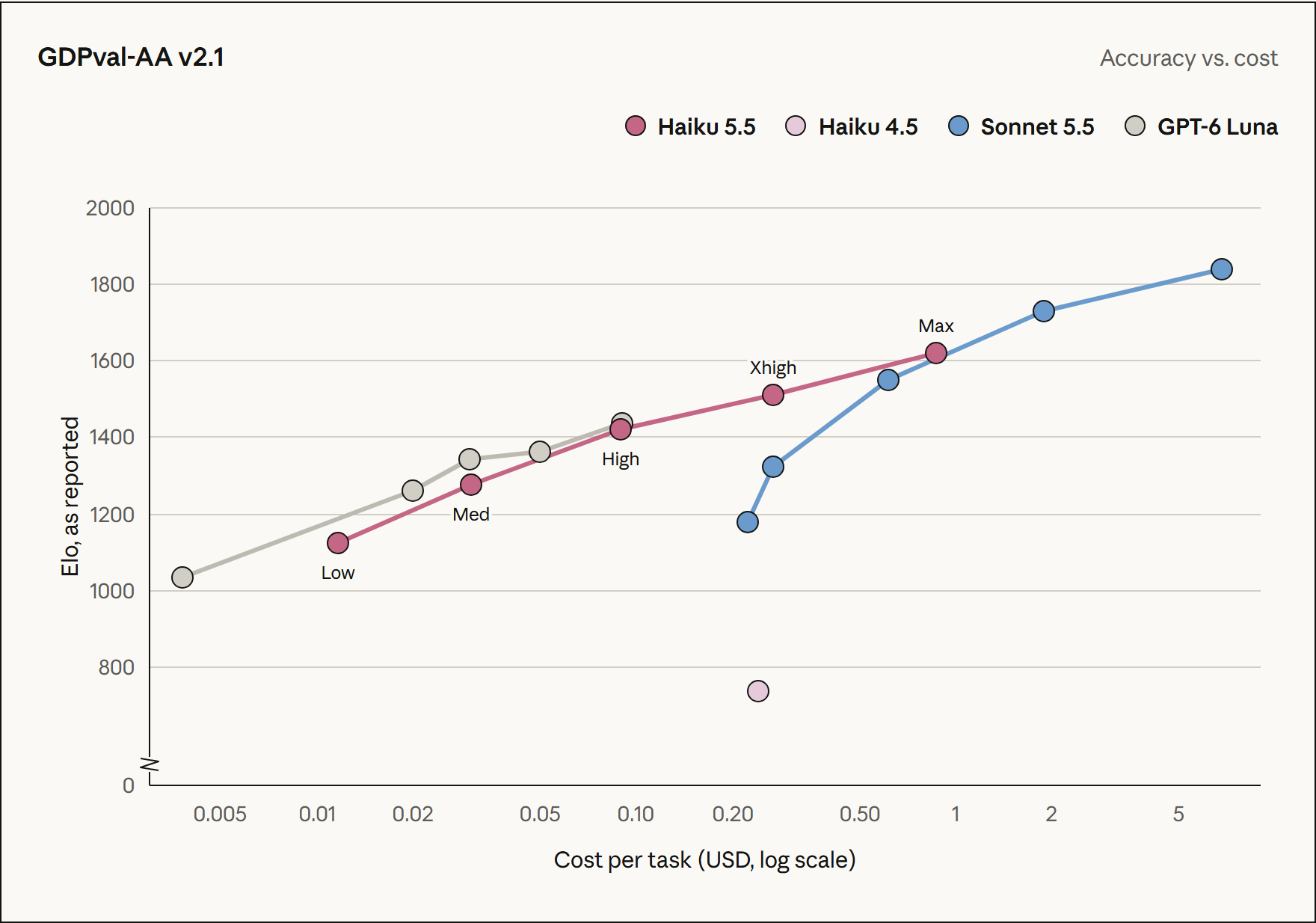
Anthropic GDPval-AA v2.1 knowledge-work chart with Haiku 5.5 results by effort

02

Match Reasoning Effort to the Task

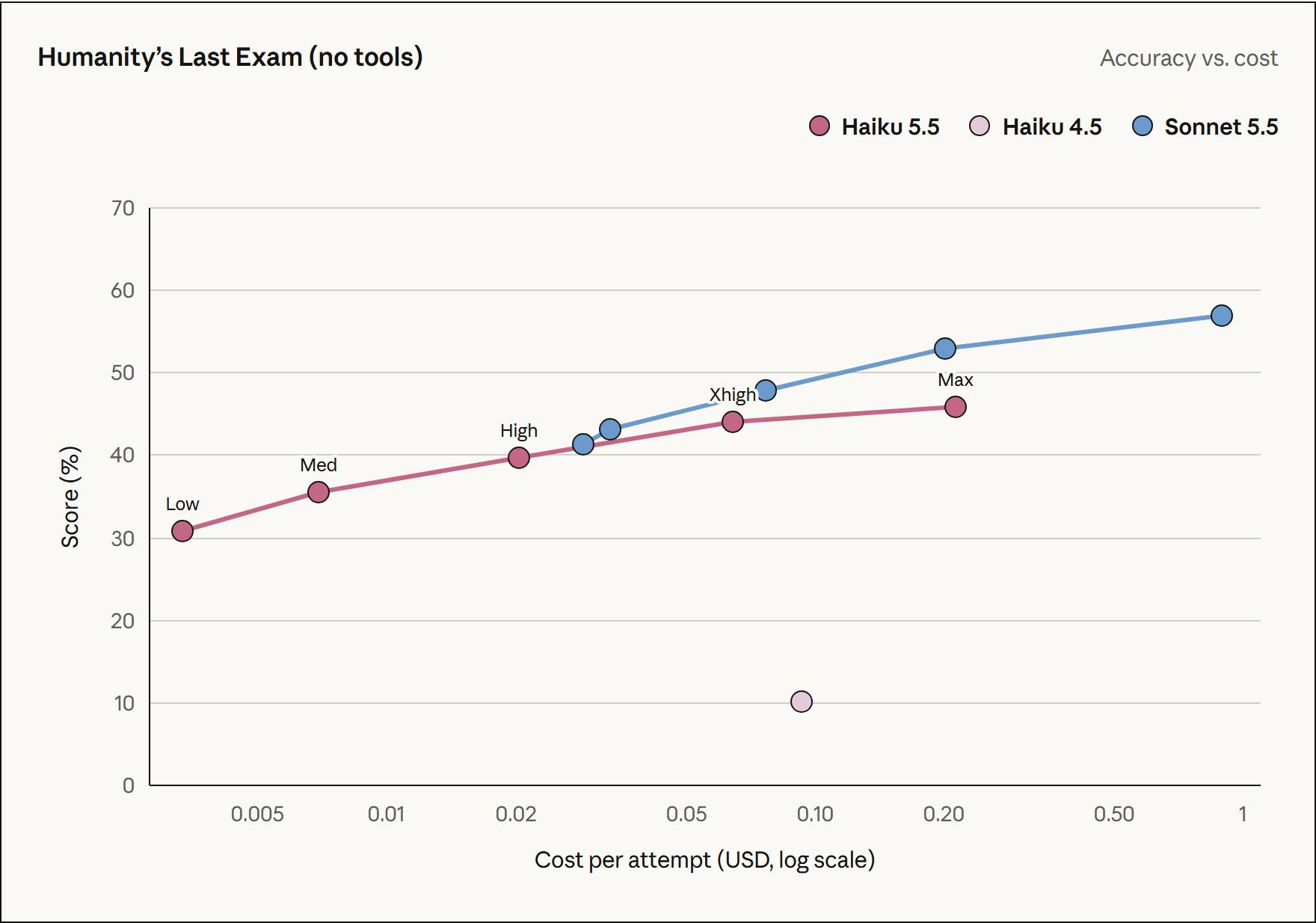
Adaptive thinking adjusts reasoning depth to each task. Choose from low, medium, high, xhigh, and max effort, starting at the default medium level. Match routine classification, document processing, or deeper analysis with the appropriate reasoning depth. Anthropic’s Humanity’s Last Exam chart shows results across effort levels under the same no-tools evaluation condition.

  • Choose low, medium, high, xhigh, or max effort
  • Let adaptive thinking allocate reasoning depth
  • Match reasoning effort to workflow needs
Anthropic Humanity’s Last Exam no-tools chart showing Haiku 5.5 at different effort levels

03

Delegate Focused Coding Work to Subagents

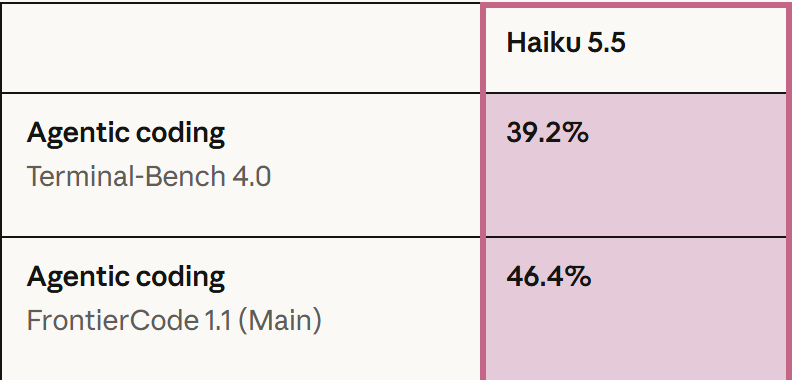
Haiku 5.5 supports focused code inspection, lookups, and summaries as part of an agent workflow. A lead agent can delegate scoped tasks and combine the returned findings into a development plan. Anthropic reports 39.2% on Terminal-Bench 4.0 and 46.4% on FrontierCode 1.1 (Main).

  • Inspect narrowly scoped code and changes
  • Prepare concise findings for a lead agent
  • Coordinate findings across coding subagents
Official Haiku 5.5 coding results: Terminal-Bench 4.0 39.2% and FrontierCode 1.1 46.4%

04

Read Charts and Screenshots Alongside Text

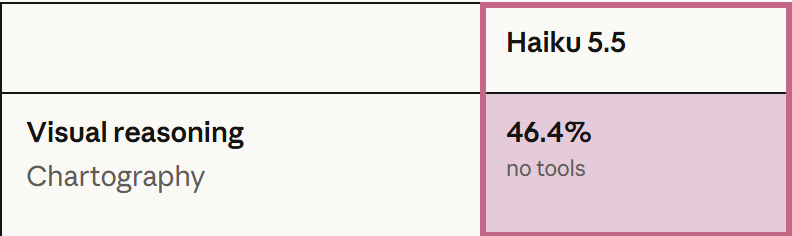
Haiku 5.5 combines text and image understanding to analyze charts, screenshots, and visual details alongside written context. Use it to extract chart findings, summarize interface content, and connect visual evidence with document passages. Anthropic reports 46.4% on Chartography under the no-tools evaluation condition.

  • Extract information from charts and screenshots
  • Connect visual details with written context
  • Summarize visual findings for downstream workflows
Official Chartography no-tools result for Haiku 5.5: 46.4%

Who Can Benefit from Claude Haiku 5.5 API?

01

Customer Support Teams

Use Claude Haiku 5.5 to summarize conversations, draft replies, and extract the details needed to route a customer request to the right team.

02

Classification and Routing Builders

Label incoming messages, identify intent, and send well-scoped requests to the appropriate workflow or specialist agent.

03

Data Extraction Teams

Extract records from document passages and images for database updates, application validation, and review queues.

04

Document and Research Teams

Summarize long source material, find requested facts, and prepare concise context that reviewers and downstream agents can reuse.

05

Coding Agent Developers

Delegate focused code lookups, inspection, and summaries to a Haiku 5.5 subagent while a lead model coordinates the larger development task.

06

Enterprise Operations Teams

Build recurring CRM reviews, report summaries, and document processing workflows with reusable prompts and visible API usage.

Claude Haiku 5.5 vs Sonnet 5.5 vs Opus 5.5

Compare three Claude models available on PoYo by workflow fit, context, and reasoning configuration.

CapabilityClaude Haiku 5.5Claude Sonnet 5.5Claude Opus 5.5
Typical tasksHigh-volume classification, extraction, summaries, and focused subagentsSoftware development, code review, and multi-step agent tasksLong-running agentic coding and complex knowledge work
Input typesText and imagesText and imagesText and images
Context window1M tokens1M tokens1M tokens
Max output128K tokens128K tokens128K tokens
Thinking modeAdaptive thinkingAdaptive thinkingAlways-on adaptive thinking
Default effortmediumhighmedium

How to Use Claude Haiku 5.5 API on PoYo

Step 1: Register and Create an API Key
Sign in to PoYo and create a key for your application.
Create API Key →

Step 2: Add Credits
Fund your account and review the token rates in the pricing table above.
Add Credits →

Step 3: Integrate and Validate
Send model claude-haiku-5-5 through Claude Messages or Chat Completions. Use native Messages for output_config.effort, tools, and cache configuration. Omit temperature, top_p, and top_k.
View Integration Reference →

Frequently Asked Questions about Claude Haiku 5.5 API

What is Claude Haiku 5.5 API?

Claude Haiku 5.5 is Anthropic’s lightweight language model for fast, high-volume classification, extraction, summarization, and focused subagent work. It supports text and image input, adaptive reasoning, and a 1M-token context window. Access it on PoYo with the claude-haiku-5-5 model ID through Claude Messages or OpenAI-compatible Chat Completions.

Which API endpoints does PoYo support?

PoYo supports /v1/messages and /v1/chat/completions. Native Messages is the default in the Playground and provides thinking, output_config, tool, cache, and context configuration. Use Messages to configure output_config.effort, or choose Chat Completions to integrate an existing OpenAI-compatible client.

How do I control adaptive reasoning?

Use native Messages with thinking.type set to adaptive and output_config.effort set to low, medium, high, xhigh, or max. The model default is medium. Choose low for routine tasks and high for deeper analysis; evaluate xhigh or max for demanding work. JSON also accepts thinking.type set to disabled at low, medium, or high effort. Omit budget_tokens, temperature, top_p, and top_k; use the JSON editor to add tools, cache, and context configuration.

Can I analyze images and long documents?

Yes. Haiku 5.5 supports text and image inputs with a 1M-token context window and up to 128K output tokens. Combine document passages, charts, and screenshots in the same context. Use the chat composer for text or the native Messages JSON editor for image content blocks. The output budget covers both thinking and response tokens.

How is token usage billed on PoYo?

Charges are based on actual token usage. Per million tokens, input costs 16 credits and output costs 80 credits. Cache reads cost 1.6 credits; cache writes cost 20 credits for 5 minutes or 32 credits for 1 hour. A positive charge has a minimum of 0.001 credits. Refer to the pricing table above for token rates and review consumption in your account usage records.

How does Haiku 5.5 fit into a coding agent?

Assign code lookups, local inspection, and concise summaries to Haiku 5.5 subagents. Define each task’s scope and expected output, then have a lead agent combine the findings into a development plan. This division of work supports parallel investigation and reusable context across coding tasks.

Why Use PoYo for Claude Haiku 5.5 API Access

01

Compatible API Interfaces

Use Claude Messages for native reasoning, tools, and caching, or connect an existing OpenAI-compatible client through Chat Completions.

02

One Platform Key

Access Haiku and other models available on PoYo with one API key, keeping credentials together as your workflows expand.

03

Usage-Based Billing

Pay for actual input, output, and cache token usage. Use the published rates and your usage records to plan and review workflow costs.

04

Visible Calls and Usage

Review chat records and token consumption in your PoYo account to track requests and manage day-to-day usage.