CLAUDE SONNET 5.5 · COMING SOON TO POYO

Faster coding, adaptive thinking, and visual understanding across a 1M-token context

Claude Sonnet 5.5 API: Faster Coding and Agent Workflows

Claude Sonnet 5.5 is Anthropic's Sonnet model for well-scoped software development and multi-step professional work. It helps teams build features, fix bugs, use tools, and prepare documents, with output Anthropic reports is more than 30% faster than Sonnet 5.

Its 1M-token context window connects large codebases and long documents, while adaptive thinking lets developers tune effort to the task. Vision support adds charts and screenshots to the same workflow, making it useful for agent systems that work across code, text, and interfaces.

Key Features of Claude Sonnet 5.5 API

A practical overview of the model's coding, reasoning, speed, and multimodal capabilities.

01

Coding and Agent Workflows

Claude Sonnet 5.5 is built for well-scoped development tasks and multi-step professional work. Anthropic reports a 70.6% score on Terminal-Bench 4.0, compared with 10.3% for Sonnet 5 under its evaluation setup. It can inspect code, use tools, fix bugs, and produce polished documents while keeping routine agent workflows responsive.

  • Handle feature development and bug fixes
  • Work through multi-step tool use
  • Produce clear, usable professional documents
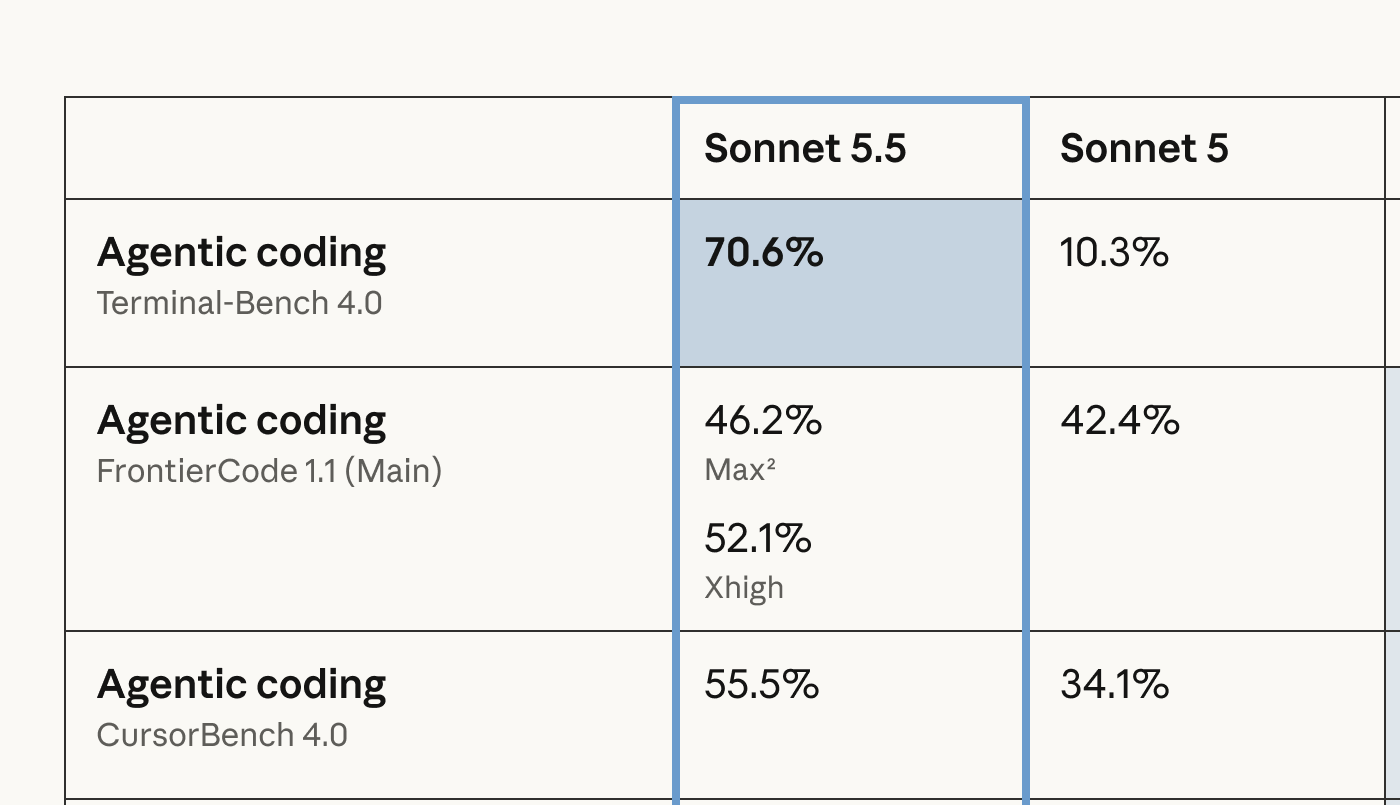
Anthropic's agentic coding benchmarks comparing Sonnet 5.5 and Sonnet 5, including Terminal-Bench 4.0

02

Adaptive Thinking and Effort Control

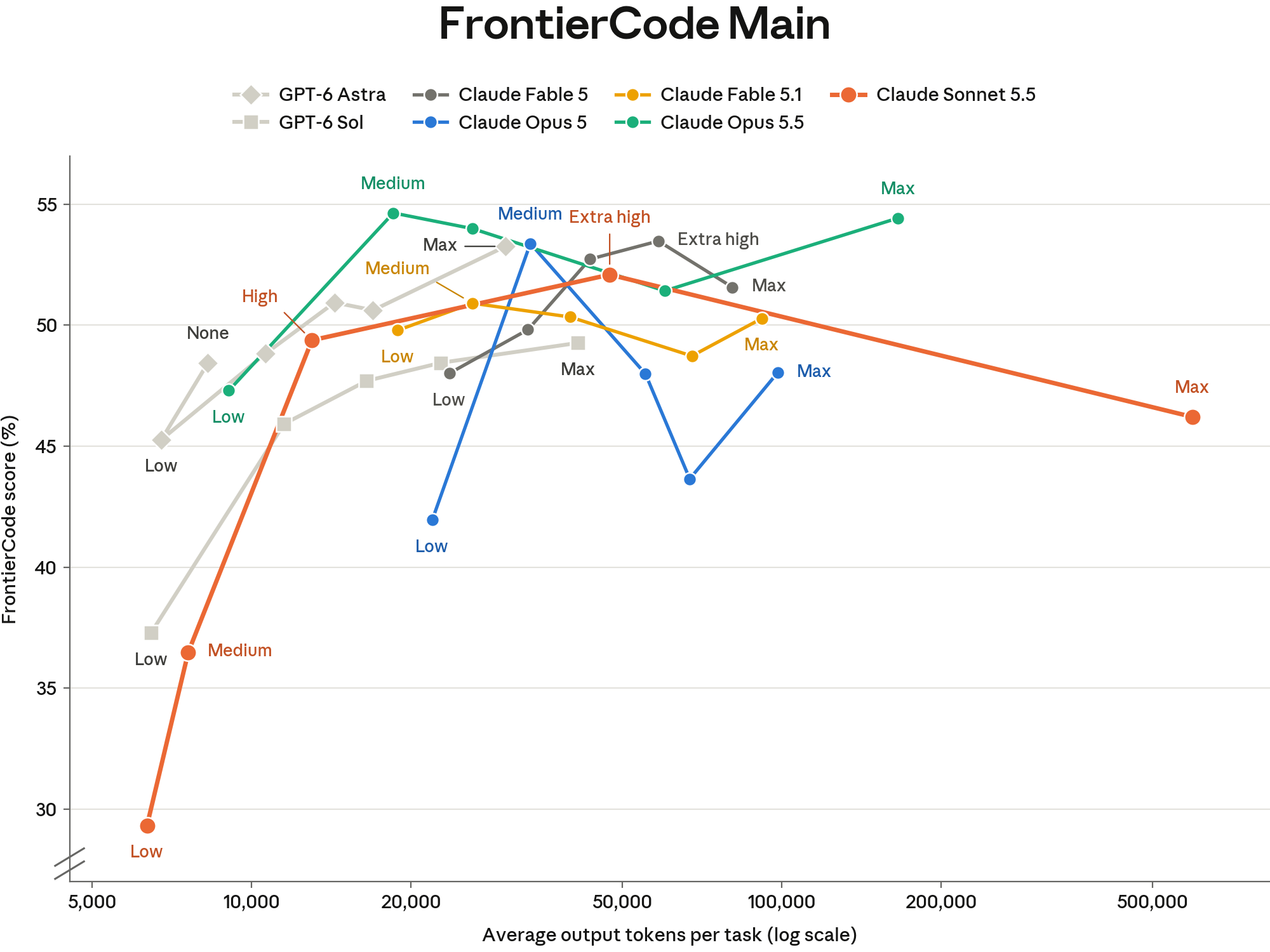
Adaptive thinking lets Sonnet 5.5 scale its reasoning to the task. Developers can choose an effort level to balance answer quality, latency, and token use instead of assigning a fixed thinking budget. Anthropic sets Medium as the default in Claude apps and High on the Claude Platform, so testing at the intended effort level matters for production workloads.

  • Adjust reasoning depth with effort
  • Balance latency against task complexity
  • Test agents at their intended effort level
Anthropic's FrontierCode chart showing Claude Sonnet 5.5 results at different effort levels

03

Faster Output and More Efficient Tool Use

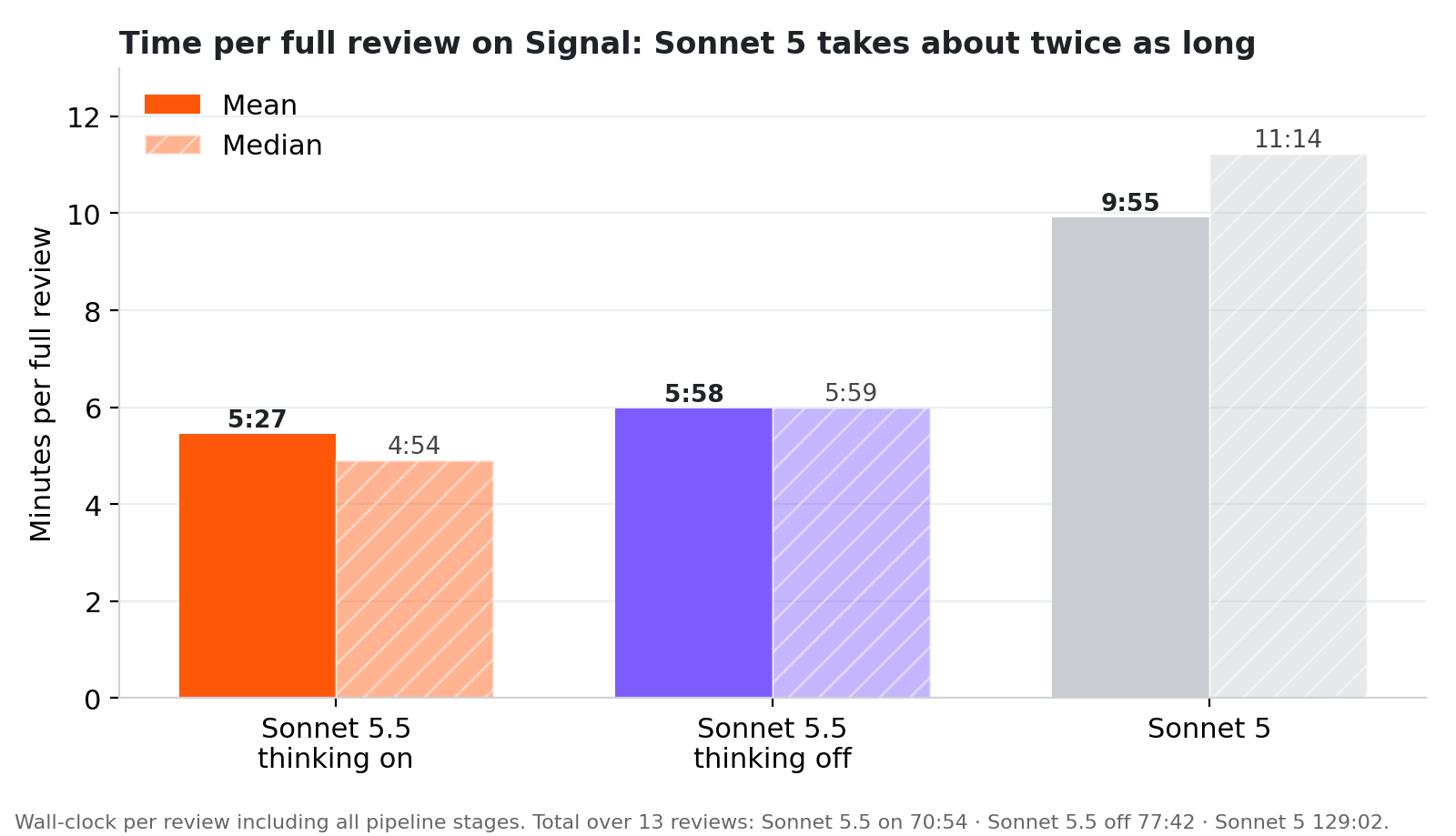
Anthropic reports that Sonnet 5.5 generates output more than 30% faster than Sonnet 5. In head-to-head coding tests, it batches tool calls more effectively and works through tasks in fewer steps. In a separate 13-case code-review test, CodeRabbit measured an average full-review time of 5:27 with Sonnet 5.5 versus 9:55 with Sonnet 5; the chart shows that workflow result.

  • More than 30% faster output in Anthropic testing
  • Batch tool calls more effectively
  • Move through coding tasks in fewer steps
CodeRabbit's 13-case code-review test: mean full-review time was 5:27 for Sonnet 5.5 with thinking on and 9:55 for Sonnet 5

04

Visual Understanding and Long Context

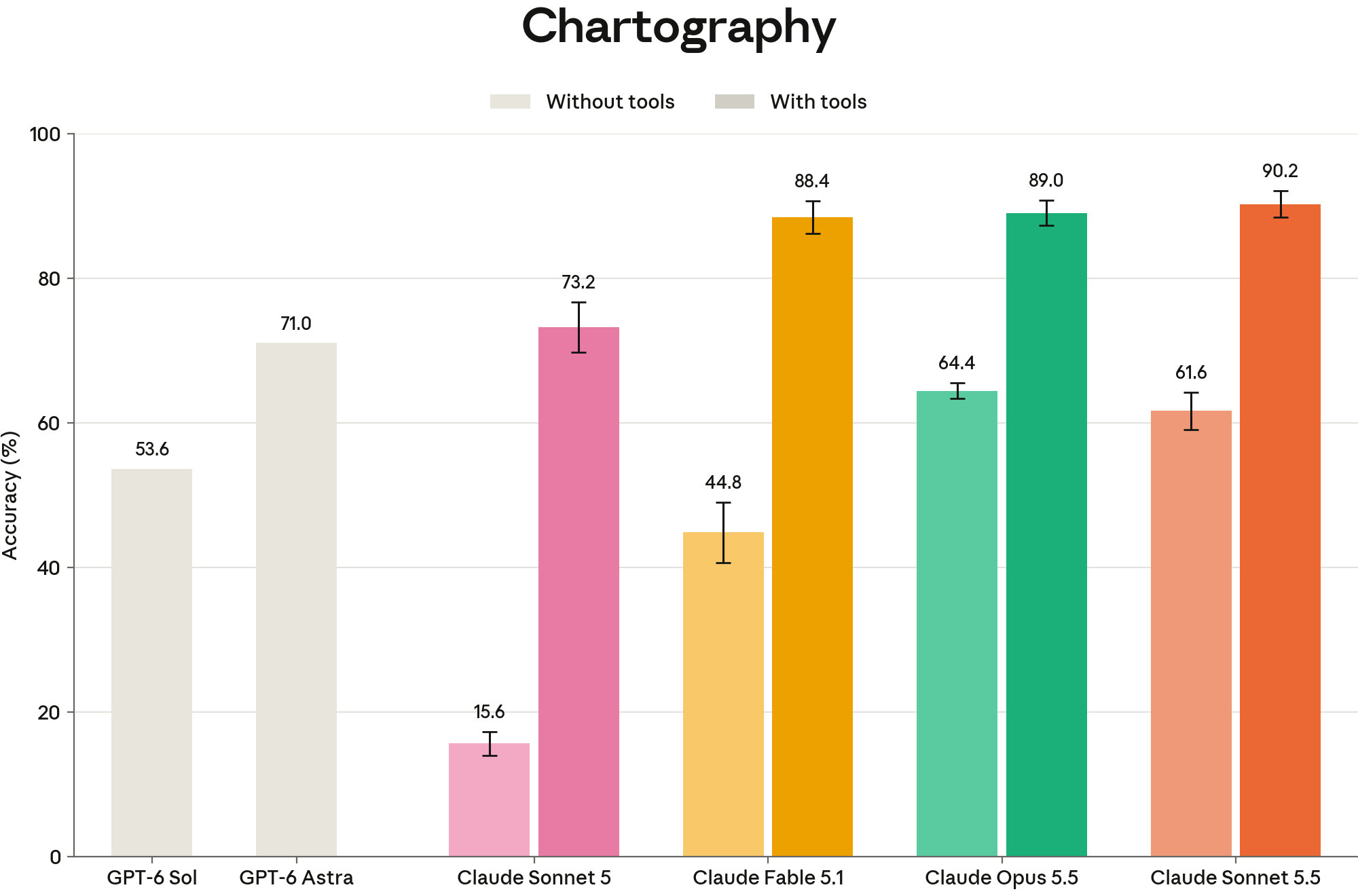
Sonnet 5.5 interprets charts, screenshots, and other image inputs for visual analysis and computer-use tasks. In Anthropic's Chartography evaluation, it scores 61.6% without tools, compared with 15.6% for Sonnet 5. Its 1M-token context window also supports work across large codebases, long documents, and extended conversations.

  • Analyze charts and screenshots
  • Read up to 1M tokens of context
  • Connect details across documents and interfaces
Anthropic's Chartography chart comparing Claude Sonnet 5.5 visual understanding with and without tools

Who Can Benefit from Claude Sonnet 5.5 API?

01

Software Development Teams

Use Claude Sonnet 5.5 to inspect a codebase, implement scoped features, debug failures, and review changes across a multi-step development workflow.

02

Agent Builders

Build agents that plan, call tools, check results, and continue through routine tasks while tuning effort for the required quality and response time.

03

Document and Research Teams

Analyze long source material, combine findings, and draft clear reports or briefs with the context needed to preserve important details.

04

Data Analysts

Interpret charts and reports, summarize evidence, and explain patterns across visual and written material in a single workflow.

05

Design and Content Teams

Turn requirements and visual references into structured copy, presentation drafts, and interface feedback for quick review and revision.

06

Operations Teams

Prepare spreadsheets, slide decks, and repeatable knowledge-work outputs while using tool calls to verify intermediate results.

Claude Sonnet 5.5 vs Sonnet 5 — Model Comparison

Anthropic positions Sonnet 5.5 as a faster and more capable successor to Sonnet 5 for everyday professional and agentic tasks. The figures below come from Anthropic's published evaluations.

CapabilityClaude Sonnet 5.5Claude Sonnet 5
Output speedMore than 30% fasterBaseline
Terminal-Bench 4.070.6%10.3%
Context window1M tokens1M tokens
CursorBench 4.055.5%34.1%
Chartography (no tools)61.6%15.6%
GDPval-AA v2.11844 Elo1449 Elo

Source: Anthropic's Claude Sonnet 5.5 launch announcement. Benchmark results depend on evaluation setup, effort, and workload.

Frequently Asked Questions about Claude Sonnet 5.5 API

What is Claude Sonnet 5.5?

Claude Sonnet 5.5 is Anthropic's Sonnet-class model for coding, agent workflows, visual analysis, and everyday professional work. It succeeds Claude Sonnet 5 with faster output and stronger results on Anthropic's published evaluations.

How does Sonnet 5.5 compare with Sonnet 5?

Anthropic reports more than 30% faster output and stronger performance on several coding and knowledge-work evaluations. Sonnet 5.5 also batches tool calls more effectively in head-to-head coding tests. Results for a specific application depend on prompts, tools, and effort settings.

What is the context window of Claude Sonnet 5.5?

Claude Sonnet 5.5 supports a context window of 1 million tokens. That capacity can help with long documents, large codebases, and extended agent conversations, although useful results still depend on how the input is organized.

How does adaptive thinking work?

Adaptive thinking adjusts the model's reasoning for the task. The effort setting controls how thoroughly it works, allowing developers to trade latency and token use against deeper analysis. Anthropic's default effort differs between Claude apps and the Claude Platform.

Can Claude Sonnet 5.5 analyze images?

Yes. Sonnet 5.5 can interpret image inputs, including charts and screenshots. Anthropic highlights its visual understanding and computer-use results, which are useful when a task combines interface images with text or tool output.

How does Sonnet 5.5 support agent workflows?

Sonnet 5.5 can use tools across multi-step tasks, inspect results, and continue working with the available context. Anthropic reports more effective tool-call batching than Sonnet 5 in head-to-head coding tests. Developers can also adjust effort to match the depth of reasoning to each task.

Why Follow the Claude Sonnet 5.5 API on PoYo

01

Understand the Core Capabilities

Review coding, agents, adaptive thinking, vision, and 1M-token context in one focused overview so teams can judge where Sonnet 5.5 fits.

02

Compare with Sonnet 5

Use published speed, coding, visual, and knowledge-work results to assess what changed between the two Sonnet generations.

03

Evaluate It Beside Other Chat Models

Place Sonnet 5.5 in PoYo's wider chat model catalog and compare the work each model handles best, from routine coding to longer agent tasks.

04

Plan an Integration Path

Map effort settings, context needs, visual inputs, and tool workflows before choosing how to incorporate Sonnet 5.5 into a product.