


Model icon
omni-moderation-latest
Model:
Omni Moderation is OpenAI’s multimodal model for identifying potentially harmful text and images across languages, including posts, chat messages, and product content. PoYo provides free API access to this model. Submit text, one image supplied through an HTTPS URL, or both, and receive category flags and confidence scores.
Input
Added 0/1

Drop files here, paste files, or add a URL. JPG, PNG, WebP, GIF

Output

Example Output

This is a real review response. After editing the input, select Run for a new result.

Task ID:ZKPUY2WZFZZBQR99Created:2026-10-15T09:15:13
Status:finishedProgress:100%
No potential risk flagged
CategoryFlaggedScoreInput types
harassmentfalse0.00001941131867789626text
harassment/threateningfalse0.000005307507822667365text
hatefalse0.000007843789122138342text
hate/threateningfalse0.0000014285517650093407text
illicitfalse0.007524802741322494text
illicit/violentfalse0.00006667023092435894text
self-harmfalse0.0005140312645402674text
self-harm/instructionsfalse0.0002411633099620722text
self-harm/intentfalse0.0002785803623326577text
sexualfalse0.0008000313556104121text
sexual/minorsfalse0.0001206589712246389text
violencefalse0.0005012746277703161text
violence/graphicfalse0.000011235328063870752text

Examples

Select an example to view its real input and result.

Free Omni Moderation API

Calling this model through PoYo is free. Sign in and use your PoYo API key to review text and images.

OpenAIomni-moderation-latest

Text / one image (HTTPS URL)

Free
OMNI MODERATION

Free API access through PoYo for multilingual text and image moderation

Free Omni Moderation API for Multilingual Text and Images

Omni Moderation identifies potential risks in multilingual text and images, returning category flags and confidence scores to support publishing and human review. Image support varies by category; calibrate score thresholds on your own content.

PoYo is a model API platform offering free access to this model, task tracking, and completion callbacks. Create an API key, test requests in the Playground, then integrate the API into your application.

Key Features of Omni Moderation API

Call Omni Moderation for free through PoYo to review multilingual text and images with category flags and confidence scores. Image support varies by category.

01

Review Text and Images Together

Post captions, product descriptions, and their images often need review together. Omni Moderation accepts text, one image, or both in a single request to help identify potential risks before publication. Text supports all 13 categories; images support six categories covering sexual content, violence, and self-harm. Other categories are text-only.

  • Review text alongside one image supplied through an HTTPS URL
  • Check text across 13 moderation categories
  • Respect category-specific support for image inputs

Image category support described in OpenAI’s official release post

02

Inspect Category Flags and Confidence Scores

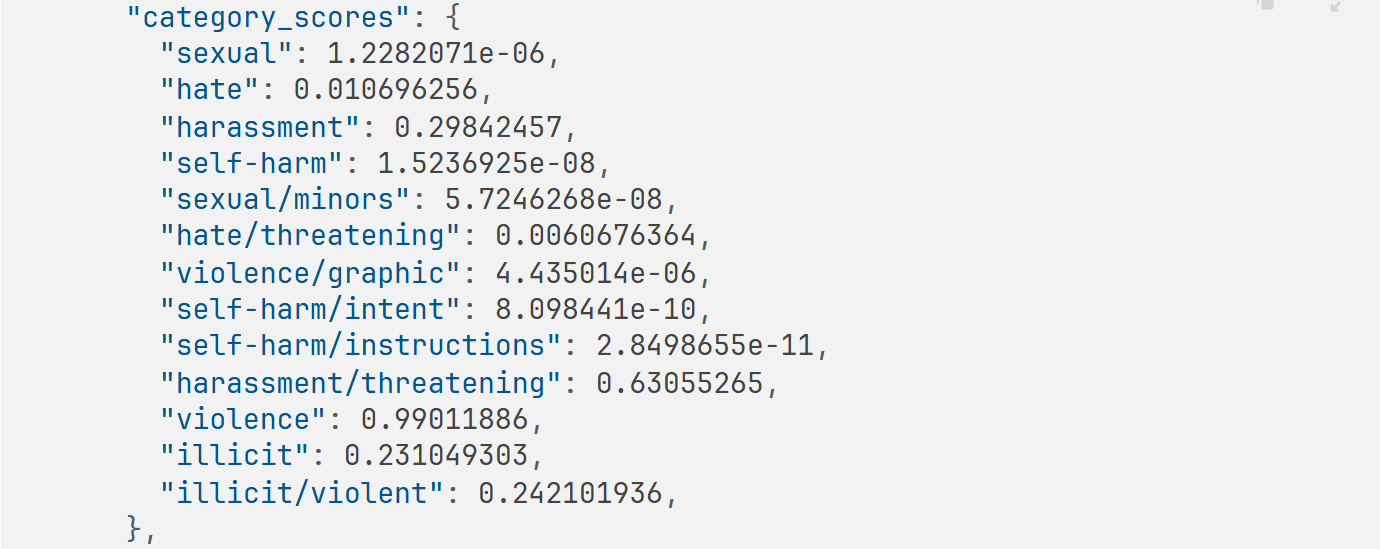
A single risk flag does not explain why content may need review. Omni Moderation also returns category flags, confidence scores, and the input types supported by each category, helping your application route content to the appropriate workflow. Calibrate thresholds on your own content and reassess them after model updates.

  • Inspect the categories behind each risk flag
  • Set score thresholds using your own content samples
  • Check which categories support text and image inputs
Category confidence scores in OpenAI’s official response example

03

Identify Potential Risks Across Multiple Languages

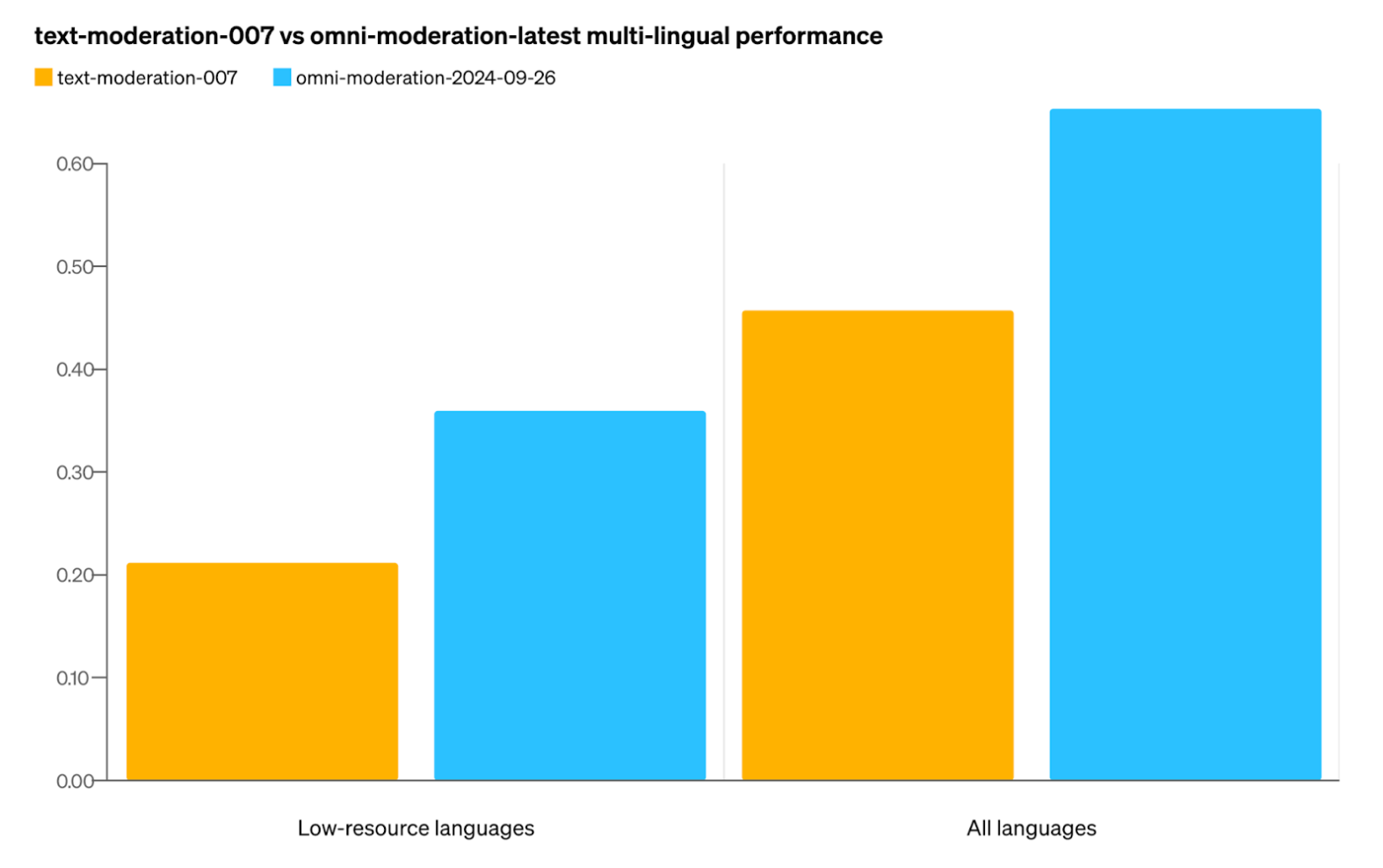
International communities and products need to review content beyond English. Omni Moderation supports multilingual text and improved on OpenAI’s previous moderation model in its published multilingual evaluation. Use one model for submissions across languages, validate behavior on language-specific samples, and keep a human review path for ambiguous content.

  • Review multilingual user submissions
  • Support international community review workflows
  • Validate behavior with language-specific examples
OpenAI’s published multilingual evaluation of its previous model and Omni Moderation

Who Can Benefit from Omni Moderation API?

01

Community Platforms

Check posts and comments for potential risks before publication. Apply your community rules and send content that needs further assessment to human reviewers.

02

Chat Applications

Review user messages and model-generated replies, connect the results to your chat application’s content workflow, and track moderation tasks separately.

03

Image Sharing Products

Submit an uploaded image with its caption, inspect supported image categories and scores, and use the results to inform publication and human review.

04

Marketplaces

Check product descriptions and one product image for potential risks, then route listings that need review to a queue before publication.

05

Educational Products

Review learner submissions and discussion text, interpret results in their educational context, and keep a human review path for ambiguous content.

06

Games and User-Generated Content

Review player messages, community posts, and uploaded images to help community teams manage publicly displayed user-generated content.

How to Use Omni Moderation API on PoYo

1. Get an API key.Sign in to PoYo and create your API key. PoYo provides API access to Omni Moderation, and calls to this model are free. Create API key →

2. Submit content.Set model to omni-moderation-latest and provide input.prompt, input.image_urls, or both. Each request accepts at most one image supplied through an HTTPS URL. Try the Playground →

3. Retrieve the review.Query the task_id or set a top-level callback_url to receive a completion callback. Once the task finishes, read category flags and scores from data.output.results. Read the API contract →

Frequently Asked Questions about Omni Moderation API

What is Omni Moderation API?

Omni Moderation is OpenAI’s multimodal model for identifying potentially harmful text and images across languages. PoYo is a model API platform providing access to omni-moderation-latest, task tracking, and completion callbacks. Calling this model through PoYo is free. Results include category flags, confidence scores, and the input types supported by each category.

Is Omni Moderation API free on PoYo?

Yes. Calling Omni Moderation through PoYo is free for text, image, and combined inputs. Authenticate with a PoYo API key. Other models follow their own pricing.

Which inputs does PoYo support?

Provide input.prompt as a text string, input.image_urls as an array containing at most one HTTPS image URL, or both. At least one valid input is required. PoYo’s endpoint for this model does not accept Base64 images or multiple images in one request.

Does every category support images?

No. Images support sexual, violence, violence/graphic, self-harm, self-harm/intent, and self-harm/instructions. Other categories, including sexual/minors, hate, harassment, and illicit, are text-only. Check category_applied_input_types for support. A zero score for an unsupported image category does not mean that category was evaluated.

How should I use category scores?

category_scores contains confidence values between 0 and 1. Higher values indicate stronger model confidence that the category applies. Validate thresholds on your own content, support human review, and reassess policies after model updates. Scores are not a guarantee of safety.

Does flagged content mean the task failed?

No. flagged=true means the content was marked as potentially risky, and the review still completes with status finished. A failed status indicates a processing failure. Read the full review from data.output.results. The files array is empty because this API returns structured data.

How do asynchronous requests and callbacks work?

Submit to /api/generate/submit, then poll /api/generate/status/{task_id} until finished or failed. You may optionally provide callback_url at the request top level. The callback body is the status data object without the outer code/data wrapper. Streaming is not supported.

Can I submit audio or video?

This endpoint accepts text and one image supplied through an HTTPS URL, not audio or video files. To review audio transcripts or video frames, transcribe or extract frames separately, then submit the supported text or image as a moderation task.

Why Use PoYo for Omni Moderation API Access

01

Free Model Access with One API Key

PoYo provides free API access to Omni Moderation using the same authentication workflow as other supported APIs, keeping credential management in one place.

02

Task Tracking and Completion Callbacks

Query a task ID or receive a completion callback, then connect the review results to your application’s publishing and human review workflows.

03

Test Requests and Inspect Results

Try text, image, and combined inputs in the Playground, inspect category flags and scores, then integrate the tested request into your application.

04

API Reference and LLM Documentation

Use the embedded API reference to inspect requests and responses, or provide the LLM documentation to your development tools for the API contract.