Model icon
minimax-h3-image
Text to Image
Image to Image
View more MiniMax models
Model:
MiniMax H3 Image is MiniMax's new image model for generating and editing pictures through a single API. It renders native 4K detail across 10 aspect ratios, keeps Chinese and English text sharp on posters and packaging, and blends up to 16 reference images into one consistent scene. Call it on PoYo with one API key and pay per image.
Input
219/5000
Added 0/16

Drop files here, paste files, or add a URL. JPEG, PNG or WebP · up to 20 MB each · 128–8,192 px per side · up to 16 images

Custom size: whole-number width and height, 655,360 to 20,000,000 pixels in total, aspect ratio from 1:3 to 3:1. Up to 4,500,000 pixels is billed at the 1K/2K price, larger sizes at the 4K price.

Custom sizes render at their exact width and height.

Output

Example Output

This is sample data. Generate a new result to see real output.

Task ID:79033f2b722eaab24bb9c8ed271ceee1Created:2026-11-12T06:59:33
Status:finishedProgress:100%
Generated image 1
Examples
Pricing details

Pay as you go. No subscription, no hidden fees.

1 credit = $0.005
TierPoYo priceOriginal / discount
Generation & edit · 1K/2K
$0.016/image
3.2 credits/image
10 images: $0.160
$0.020/imageSave 20%
Official
Generation & edit · 4K
$0.056/image
11.2 credits/image
10 images: $0.560
Add-ons
TierPoYo price
Reference image
$0.0025/image
0.5 credits/image
10 images: $0.025
How it's billed: Billed per output image. Add-ons are billed on top of the base price.

Charges are based on the final output.

MINIMAX H3 IMAGE API

MiniMax's open-weight image model for 4K text-to-image and multi-reference editing

MiniMax H3 Image API - 4K Text-to-Image and Multi-Reference Editing

Access the MiniMax H3 Image API instantly on PoYo, no waitlist required. MiniMax released MiniMax-H3-Image on November 10, 2026 as an open-weight model that handles text-to-image and image editing in a single checkpoint. Send a prompt to generate an image, or add up to 16 reference images in image_urls to edit them or compose them into one scene.

Pick one of 10 aspect ratios at 1K, 2K or 4K, use auto to follow your first reference image, or set an exact WIDTHxHEIGHT from 655,360 to 20,000,000 pixels. Prompt expansion turns a short prompt in any language into a detailed scene description, and each request returns one PNG or JPEG image.

Key Features of MiniMax H3 Image API

Text-to-image and multi-reference editing in one model, with about 16 MP output, readable in-image text and instruction-based edits.

01

16-Megapixel Images at Every Aspect Ratio

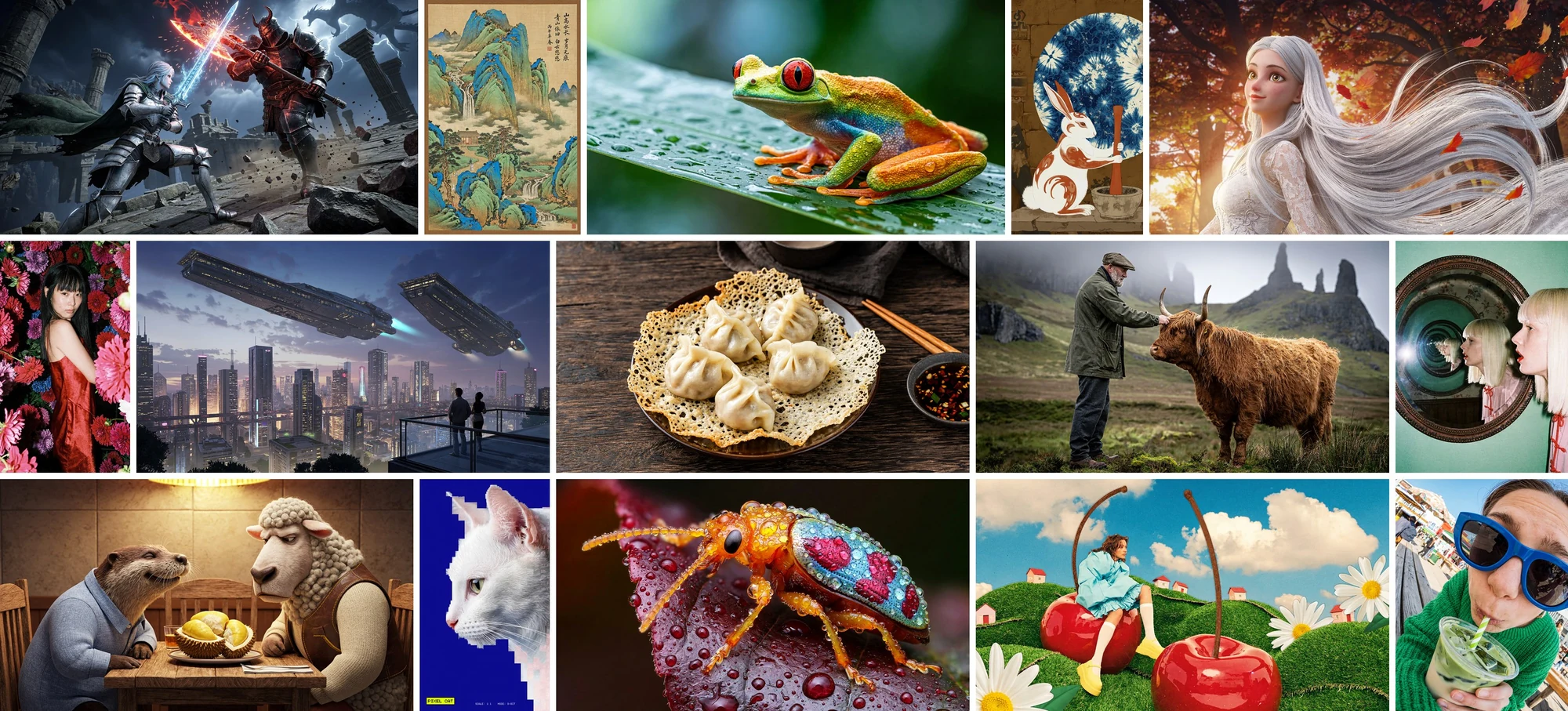
Most image models stop at 1 to 4 megapixels, which leaves little room to crop for print, large banners or detailed product pages. MiniMax H3 Image generates about 16 megapixels directly at every aspect ratio, from 4096×4096 at 1:1 to 6272×2688 at 21:9, with no separate upscaler. MiniMax's official showcase spans landscape and portrait frames in many styles, from macro photography and food shots to 3D characters, ink landscapes and pixel art.

  • About 16 MP at 4K, from 1:1 to 21:9
  • 1K, 2K and 4K tiers in one model
  • Photography, 3D, painting and pixel art
Official MiniMax H3 Image showcase of fifteen text-to-image results in landscape and portrait formats, including a 3D fantasy battle, a blue-green landscape painting, a tree frog, dumplings, a highland cow, a pixel art cat and a jewel beetle

02

Photorealistic Detail Beyond the AI Look

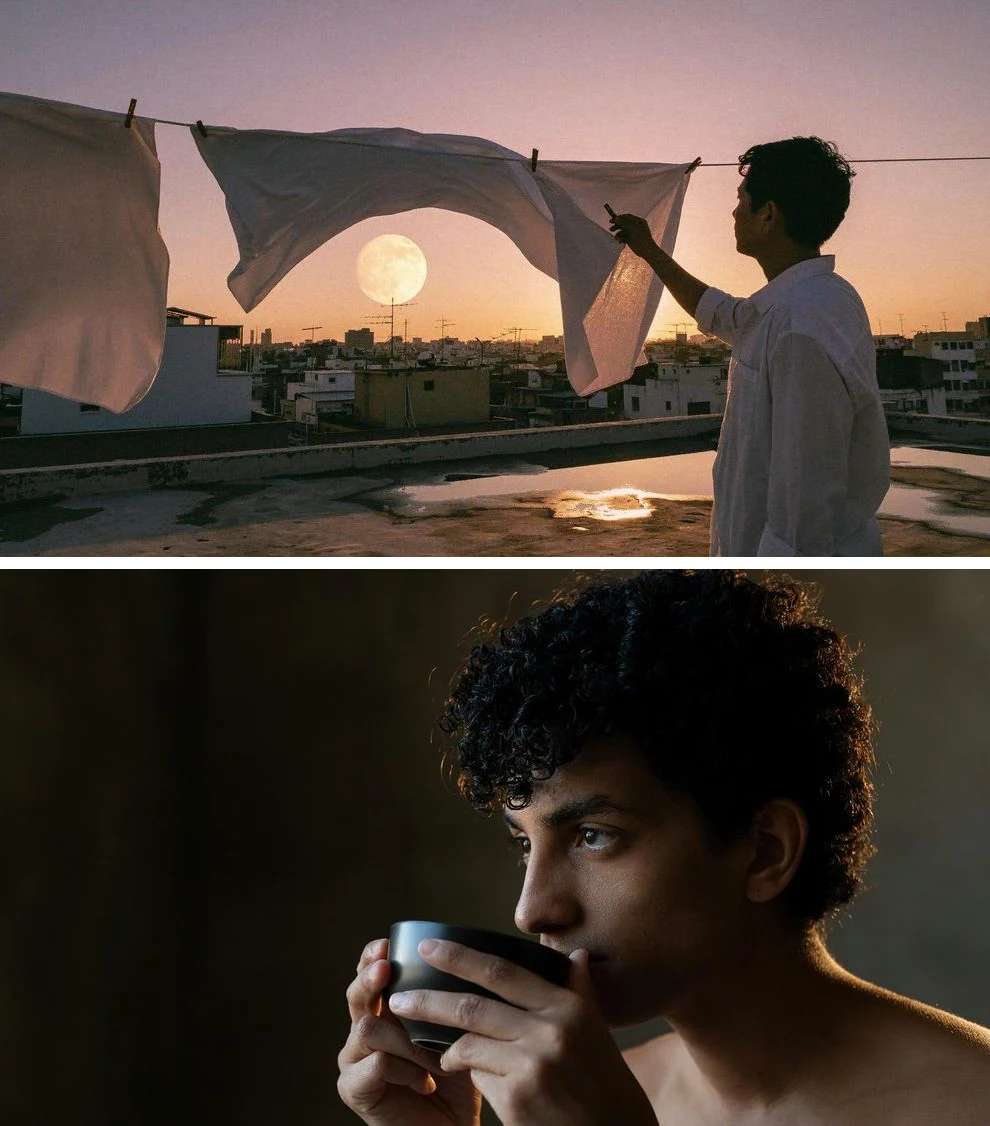
Generated photos often give themselves away with plastic skin and overly smooth surfaces. MiniMax built H3 Image for rich, natural detail and real-world realism that goes beyond the familiar AI look, from skin and hair to fabric and evening light. Describe the subject, lens and lighting, and the result reads like a photograph you can drop into a campaign or an editorial layout.

  • Natural skin, hair and fabric texture
  • Lens, light and mood cues in the prompt
  • Portraits, lifestyle and documentary scenes
Official MiniMax H3 Image samples: a person hanging white sheets on a rooftop at dusk under a full moon, and a close-up of a curly-haired young man drinking from a cup

03

Clear Text in Chinese and English

Posters, infographics and diagrams only work when the words come out right. MiniMax's official showcase shows H3 Image rendering logic puzzles in Chinese and English with the answers worked out on the board. Quote every word you want in the image and say where it goes, and the model lays out headlines, labels and tables as part of the design. In PoYo tests, a travel poster's headline and subtitle came out exactly as written.

  • Quote exact copy and give its position
  • Chinese and English text in one layout
  • Posters, infographics, charts and diagrams
Official MiniMax H3 Image samples: a Chinese staff-selection logic puzzle board with its answer, and an English Confidential File Missing puzzle board with six suspects and a verification table

04

Combine up to 16 Reference Images in One Scene

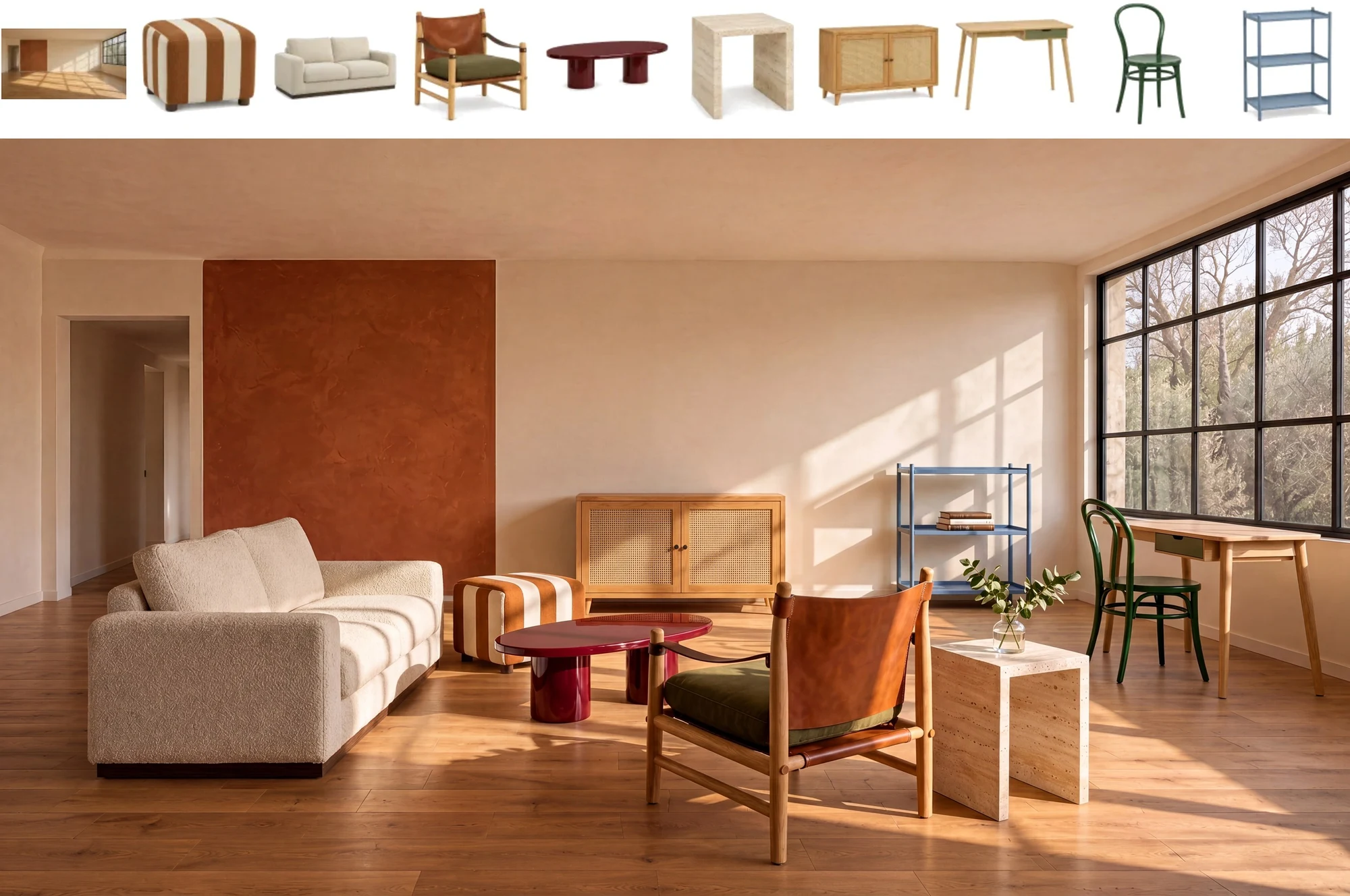
Staging a room or a product scene usually means compositing many separate assets by hand. Pass up to 16 images in image_urls, refer to them in the prompt as <Picture 1>, <Picture 2> and so on, and say what each one contributes. In MiniMax's example, an empty sunlit room and nine pieces of furniture become one furnished living room with matching light and shadows.

  • Up to 16 reference images per request
  • Give each image a role in the prompt
  • Rooms, products, outfits and group shots
Official MiniMax H3 Image multi-reference example: ten references, an empty sunlit room and nine pieces of furniture, above the living room furnished with all nine pieces

05

Precise Edits That Keep the Rest of the Scene

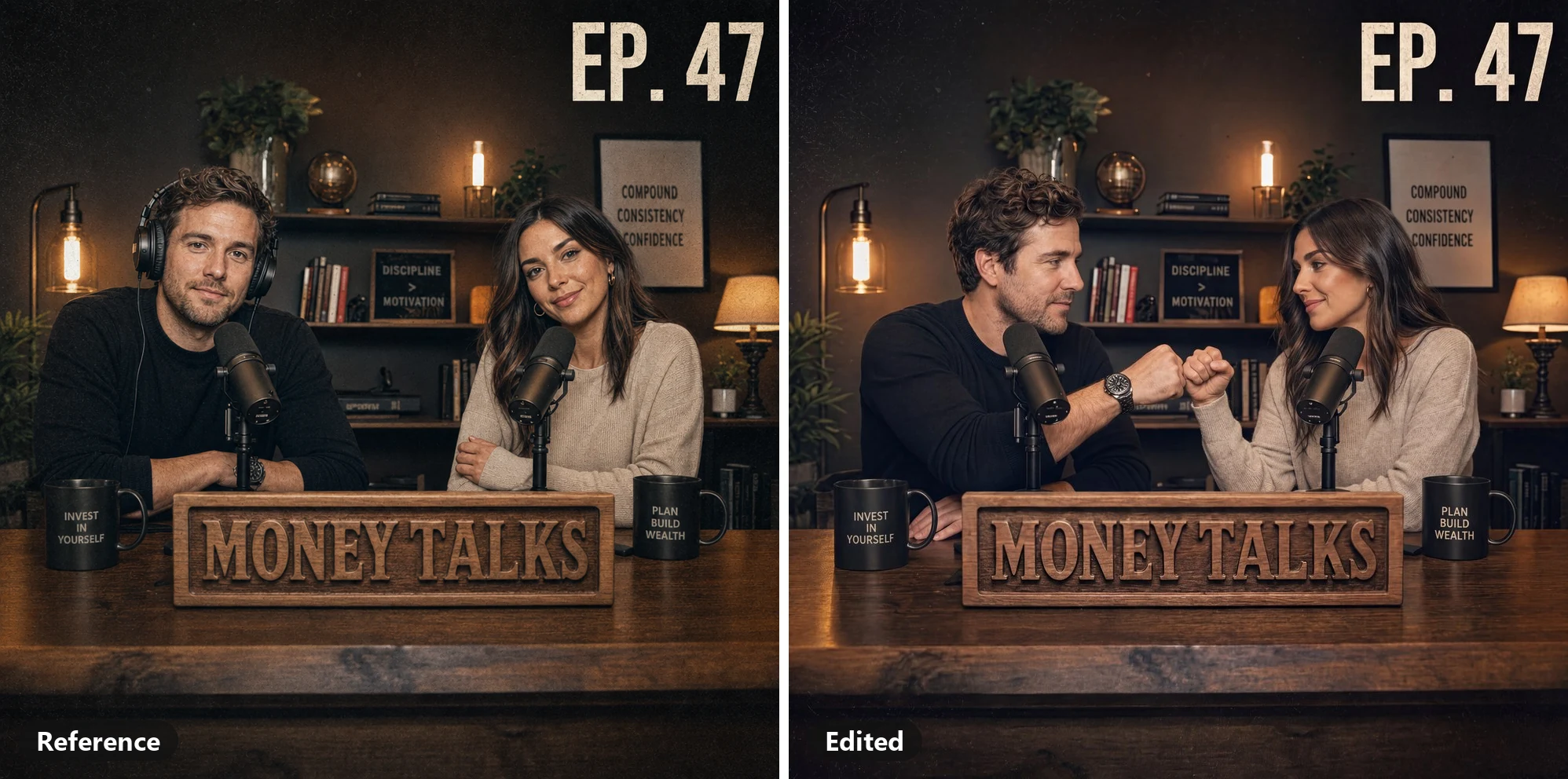
Reshooting a scene to fix one detail costs time, and broad edits tend to change things you wanted to keep. Send the image in image_urls and say exactly what should change. In MiniMax's official example, the instruction takes the headphones off the host on the left, fills in his hair and has both hosts fist-bump above the desk sign, while the set, the MONEY TALKS sign, the mugs and the EP. 47 title stay in place.

  • Remove, add or re-pose people and objects
  • Keep signs, text and background intact
  • Refer to the image as <Picture 1>
Official MiniMax H3 Image edit example: the reference photo of two podcast hosts with the man wearing headphones, next to the edited result where the headphones are gone and the hosts fist-bump above the MONEY TALKS sign

06

Turn 3D Renders into Finished Scenes

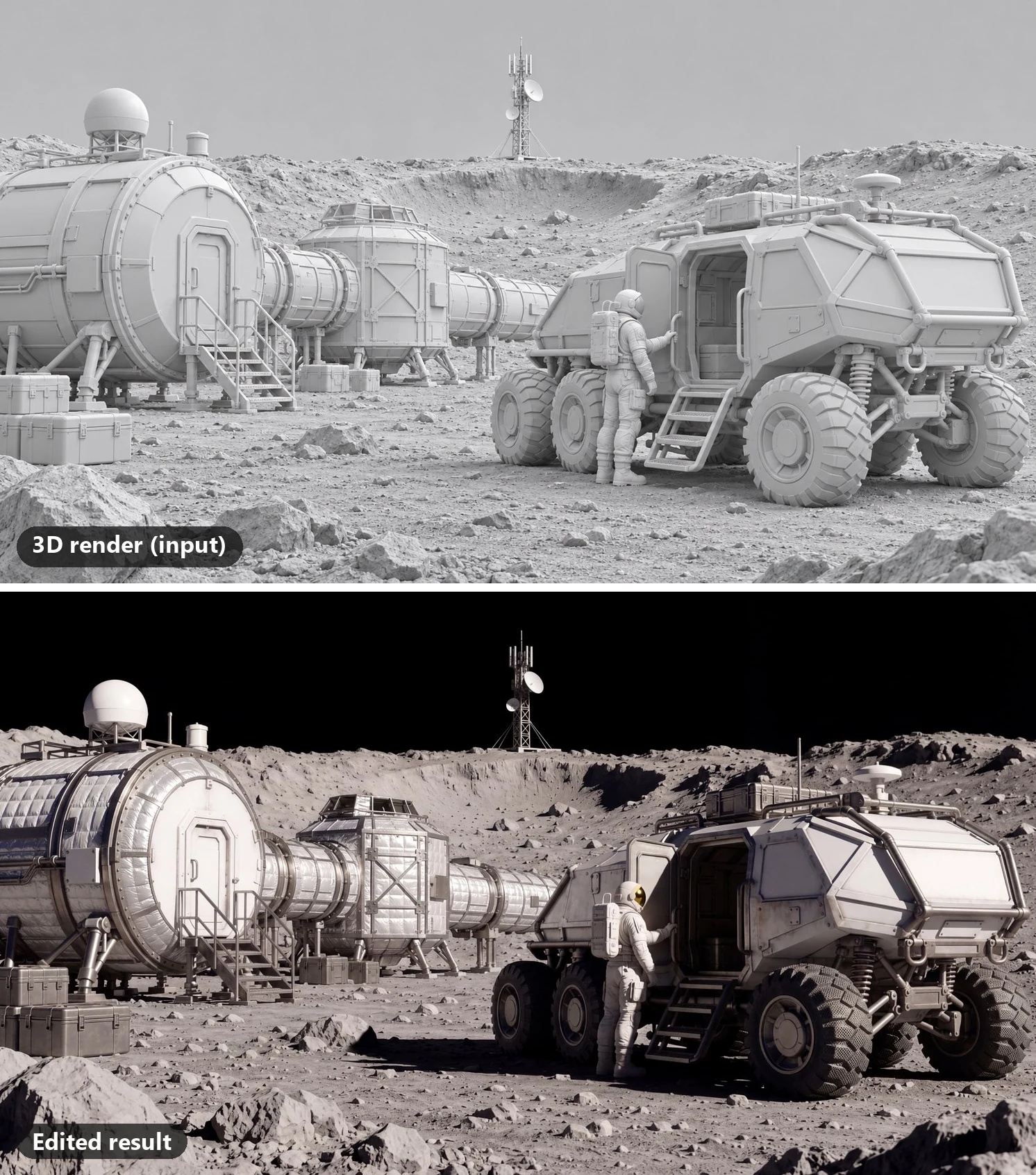
Grey-box renders and blockouts show the layout but not the final look, and turning them into a finished frame usually takes a full lighting and texturing pass. Send the render with a description of the look you want, and MiniMax H3 Image keeps the composition while adding materials and light. MiniMax's official example turns an untextured 3D render of a lunar base into a photorealistic film still with the same modules, rover and astronaut in place.

  • Keep the camera angle and layout
  • Add materials, lighting and atmosphere
  • Previs, concept art and pitch frames
Official MiniMax H3 Image editing example: an untextured grey 3D render of a lunar base with a rover and an astronaut, above the edited photorealistic film still of the same scene

Who Can Benefit from MiniMax H3 Image API?

01

E-Commerce Product Visuals

Combine a product shot with background and style references to build lifestyle scenes, or edit one photo into seasonal variants. MiniMax H3 Image keeps 4K detail for zoomable product pages.

02

Marketing and Advertising Teams

Generate posters, banners and key visuals with the headline already in the image, then render each placement at its exact size, from 21:9 web banners to 9:16 stories, with MiniMax H3 Image.

03

Interior Design and Real Estate

Compose an empty room and furniture references into one staged interior with MiniMax H3 Image, so clients can preview layouts and styles before buying or renovating.

04

Game Art and Concept Design

Explore environment concepts, characters, creatures and props, or turn grey 3D renders and maps into finished scenes. MiniMax H3 Image covers photoreal, painterly and illustrated styles.

05

Publishing and Education

Create infographics, technical figures, exploded views and posters with Chinese or English labels. Give MiniMax H3 Image the exact data and wording, then review the result before publishing.

06

AI Image Apps and Agents

Add text-to-image and multi-reference editing to your product with one REST call. Submit a task, get a task_id at once, and collect the image by polling or webhook.

How to Use MiniMax H3 Image API on PoYo

Step 1: Register & Create API Key
Sign in to PoYo and create an API key in the dashboard. The same key works for MiniMax H3 Image and every other model on PoYo.
Create API Key →

Step 2: Top Up Credits
Add credits to your account. Each image costs 3.2 credits at 1K or 2K and 11.2 credits at 4K, plus 0.5 credits per reference image, and the playground shows the estimate before you run.
Add Credits →

Step 3: Integrate the API
Send POST https://api.poyo.ai/api/generate/submit with "model": "minimax-h3-image" and an input object with prompt, plus optional image_urls, size, resolution, enable_prompt_expansion and output_format. Poll the returned task_id or pass a callback_url to receive the finished image.
View Documentation →

Frequently Asked Questions about MiniMax H3 Image API

What is MiniMax H3 Image?

MiniMax H3 Image (MiniMax-H3-Image, also written H3-Image) is MiniMax's open-weight image generation and editing model, released on November 10, 2026 and built on the MiniMax H3 architecture. One model handles text-to-image and image editing with up to 16 reference images, and it outputs about 16 megapixels natively at 4K. PoYo offers it as minimax-h3-image through one REST API, with a playground on this page.

Can MiniMax H3 generate images?

Yes, through MiniMax H3 Image. MiniMax H3 is MiniMax's video and audio model, and MiniMax H3 Image (MiniMax-H3-Image) is the separate still-image model MiniMax released on November 10, 2026, built on the same architecture with the audio layers removed. It generates images from text and edits images with up to 16 references. On PoYo, call minimax-h3-image for images and minimax-h3 for video.

How much does the MiniMax H3 Image API cost?

PoYo bills MiniMax H3 Image per image, with no subscription: 3.2 credits ($0.016) at 1K or 2K and 11.2 credits ($0.056) at 4K. Each reference image in image_urls adds 0.5 credits ($0.0025), so a 2K edit with 3 reference images costs 4.7 credits. A custom WIDTHxHEIGHT up to 4,500,000 pixels uses the 1K/2K price, and a larger one uses the 4K price. Credits are charged only when the image is generated.

How do I use the MiniMax H3 Image API on PoYo?

Create an API key in your PoYo dashboard, then send a POST request to /api/generate/submit with "model": "minimax-h3-image" and your prompt in input. The response returns a task_id: poll /api/generate/status/{task_id}, or pass a callback_url to receive the result. To edit images, add image_urls to the same request. Try the parameters in the playground on this page first; the API documentation lists the full request format.

Does MiniMax H3 Image support 4K and custom sizes?

Yes. Set resolution to 1K, 2K or 4K and pick one of 10 aspect ratios: 1:1, 5:4, 4:5, 4:3, 3:4, 3:2, 2:3, 16:9, 9:16 or 21:9. 4K produces about 16 megapixels at every ratio, for example 4096×4096 at 1:1 or 5472×3072 at 16:9, and 2K is the default. For a custom size, pass an exact WIDTHxHEIGHT from 655,360 to 20,000,000 pixels with an aspect ratio between 1:3 and 3:1, and the image comes back at exactly that size. For edits, size auto follows the first reference image.

How many reference images can I use, and how do I refer to them?

Add 1 to 16 public image URLs in image_urls. Images are numbered in the order you send them, so refer to them in the prompt as <Picture 1>, <Picture 2> and so on, and give each one a role, for example: put the sofa from <Picture 2> into the room in <Picture 1> and keep the window and floor as they are. Each reference image can be a JPEG, PNG or WebP file of up to 20 MB, 128 to 8,192 pixels per side.

Can MiniMax H3 Image render text in Chinese and English?

Yes. MiniMax's official showcase includes logic-puzzle boards in Chinese and English with the text and answers rendered correctly, and in PoYo tests a travel poster's headline and subtitle came out exactly as written. Put every word you want in quotes, say where it goes and how the lines break, and write that the image should contain no other text when the rest of the design should stay clean.

MiniMax H3 Image open weights or API: which should I use?

MiniMax publishes the weights on Hugging Face under the MiniMax-H3-Image Community License. Self-hosting means downloading about 135 GB of model and text-encoder weights and running them on your own GPUs, and the license sets territory limits and asks for MiniMax's written authorization for hosted services or above $1M in annual revenue. If you want the model in your product without managing GPUs, the PoYo API gives you hosted access with one API key and per-image pricing.

How long does MiniMax H3 Image take to generate an image?

In PoYo tests in November 2026, a 1K or 2K image took about 12 seconds, a 4K image about 22 to 25 seconds, and an edit with three reference images about 44 seconds. Times vary with size, reference images and queue load. Submitting returns a task_id immediately, so poll the status endpoint or pass a callback_url to be notified when the image is ready.

What does prompt expansion do?

With enable_prompt_expansion on, which is the default, a language model rewrites your prompt into a detailed description of the whole image before generation, so a short idea in any language still becomes a complete scene. For text-to-image, turn it off when you want a long, carefully written prompt followed as written. Image edits always use prompt expansion.

Can I use MiniMax H3 Image outputs commercially?

MiniMax's Community License states that MiniMax claims no rights over the outputs you generate and that you are responsible for the outputs and how you use them. For any project, follow the acceptable use policy in MiniMax's license and PoYo's terms of service.

Why Use PoYo for MiniMax H3 Image API Access

01

Unified API Access

Call minimax-h3-image with the same request format and API key you use for every other image, video and audio model on PoYo.

02

Transparent Per-Image Pricing

See the per-image price for each resolution and the reference image add-on, and check the estimate in the playground before you submit.

03

Playground Testing

Try prompts, aspect ratios, custom sizes, reference images and prompt expansion in the browser, then copy the JSON request into your code.

04

Developer-Friendly Integration

Use documented request fields, task polling and callback URLs, so long 4K renders and multi-image edits never block your application.