
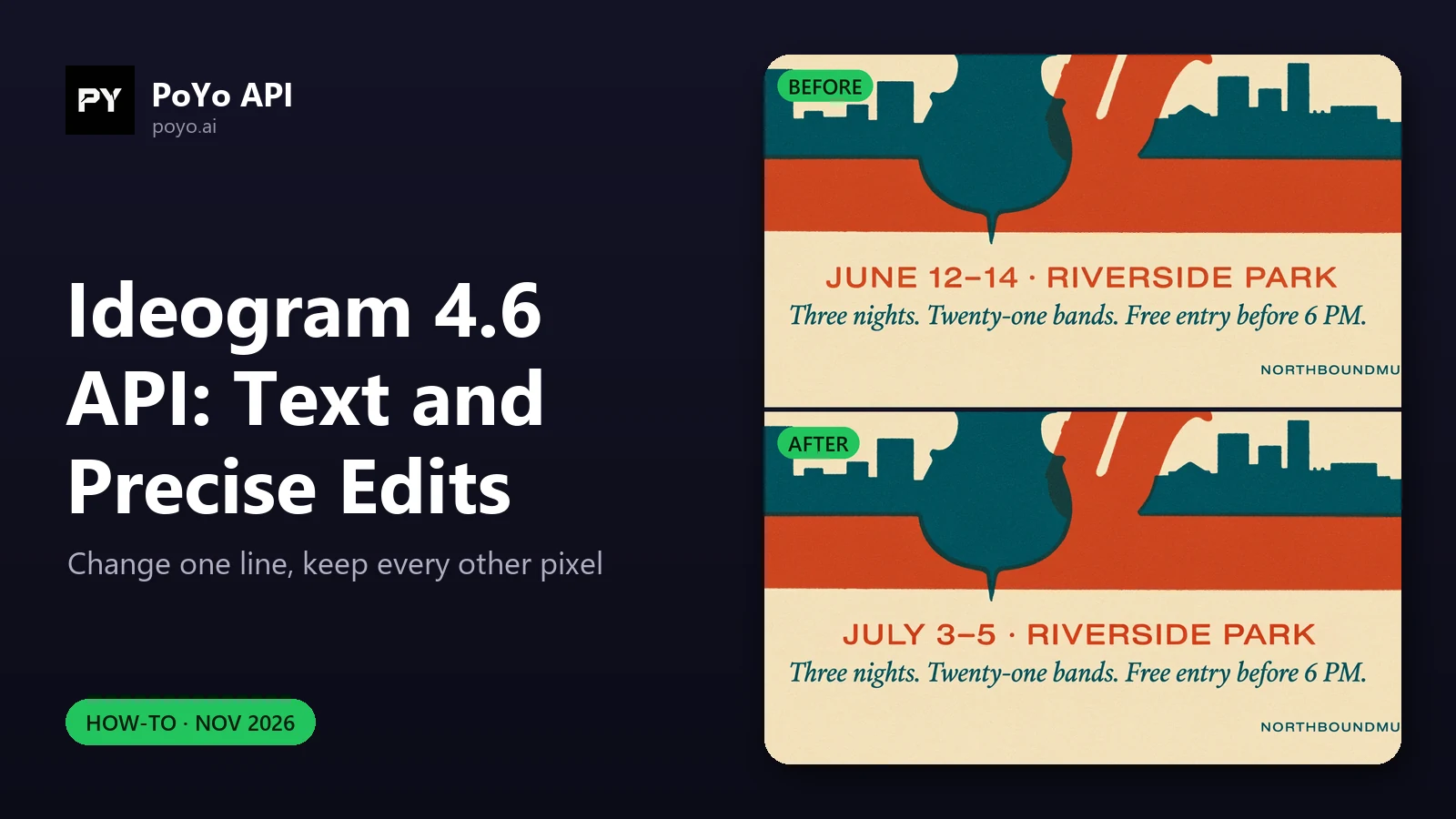
The Ideogram 4.6 API is built for a workflow most image APIs handle badly: generate a poster with exact words on it, then change one line of that text without redrawing the rest. This how-to covers both halves with request bodies: on-image text with ideogram-v4.6, and high-precision, masked and localized edits with ideogram-v4.6-edit. Everything here runs against the Ideogram 4.6 model on PoYo, and the numbers come from our launch-day test on November 20, 2026.
Part 1: exact on-image text with the Ideogram 4.6 API
The PoYo docs give one rule for text: put the exact on-image text in quotes in the prompt. Describe where each line goes and how big it is, the same way you would brief a designer.
This is the request from our launch-day test (task M4WA9OIQXVV80DHG):
{
  "model": "ideogram-v4.6",
  "input": {
    "prompt": "Screen-printed concert poster for \"NORTHBOUND JAZZ FESTIVAL\". Big bold condensed headline at the top, a stylized upright bass and saxophone silhouette over a river at dusk in deep teal, burnt orange and cream. Below the art, the line \"JUNE 12-14 · RIVERSIDE PARK\" and a smaller line \"Three nights. Twenty-one bands. Free entry before 6 PM.\" Fine paper grain, crisp letterforms, generous margins.",
    "size": "2304x3072",
    "quality": "high",
    "n": 1
  }
}
It returned one 2304×3072 PNG of about 10.8 MB and was charged 40 credits ($0.20), the 4K high rate. All three quoted lines were rendered as written, including the small italic line. The same prompt at quality: very_low and size: 3:4 (task BS7M64COKT80JSLX) returned a 768×1024 draft for 1.6 credits ($0.008), also with correct text but a different composition.
Three habits make text requests more reliable in production:
| Habit | Why |
|---|---|
| One quoted string per line of text | Each line is a separate unit you can check and later edit |
| Say the size and position of each line ("big headline at the top", "a smaller line below") | Hierarchy is part of the request, not left to chance |
| Check the output before publishing | Ideogram itself advises: "Check spelling and placement in the final result." |
Prompt expansion is always on for this API, so the model can add details you did not ask for. In our poster it added a small "EST. 1987" and a web address in the bottom corners. If a layout must contain only your words, say so in the prompt and check the result, or remove extras with an edit.
Part 2: three ways to edit with ideogram-v4.6-edit
Every edit takes exactly one source image in image_urls and a prompt. The settings below decide how much of the image the model may touch. If your app lets users upload the source, screening it first saves failed tasks; the image moderation guide shows one way.
| Mode | Settings | What is kept | Output size |
|---|---|---|---|
| Regular edit | edit_precision: regular (default) | The image is regenerated from the prompt | auto or any preset/custom size without a mask |
| High-precision edit | edit_precision: high, context_window: none | Unchanged pixels are restored | Source resolution |
| Localized edit | edit_precision: high, context_window: auto, mask_url | Every pixel outside the region around the mask | Source resolution |
Ideogram says 4.6 "leaves far less pixel drift outside your edits", and reports 90% for masked edits ("change only the painted area") against 82% for Ideogram 4.5 on its model page. Those are Ideogram's scores. Here is what we measured.
High-precision edit: change one line of text
{
  "model": "ideogram-v4.6-edit",
  "input": {
    "prompt": "Change only the date line to \"JULY 3-5 · RIVERSIDE PARK\". Keep everything else exactly the same.",
    "image_urls": [
      "https://example.com/northbound-poster.png"
    ],
    "edit_precision": "high",
    "context_window": "none",
    "size": "auto",
    "quality": "high",
    "n": 1
  }
}
In our test (task 672JRU198S22NS8D), the source was the 2304×3072 poster from Part 1. The output was 2304×3072 with the new date line. A pixel diff against the original put every changed pixel inside one box, from (471, 2699) to (1826, 2756): the date line, about 1.1% of the image. The headline, the art and the small italic line were unchanged. The charge was 120 credits ($0.60), because a high-precision edit keeps the source resolution and 2304×3072 is above 4,194,304 pixels.
Two rules to remember: edit_precision: high requires size: auto (or no size), and it rejects background.
Masked edit: limit the change to one area
A mask removes the guesswork about where the edit goes. It must have the same dimensions as the source, black where the model may edit, white where it must keep, and contain both. This Python snippet builds one from a box:
from PIL import Image, ImageDraw

source = Image.open("poster.png")
mask = Image.new("L", source.size, 255)                       # white = keep
ImageDraw.Draw(mask).rectangle((440, 2660, 1860, 2800), fill=0)  # black = edit
mask.save("date-line-mask.png")
Upload the mask (public URL or base64 data URI) and add it to the request:
{
  "model": "ideogram-v4.6-edit",
  "input": {
    "prompt": "Change the sign text to \"OPEN LATE\"",
    "image_urls": [
      "https://example.com/storefront.png"
    ],
    "mask_url": "https://example.com/sign-mask.png",
    "edit_precision": "high",
    "context_window": "auto",
    "quality": "high"
  }
}
With context_window: auto, only the region around the mask is edited and the source resolution is kept. A mask that is too large falls back to whole-image editing. context_window: auto without both mask_url and edit_precision: high is rejected, and a mask always needs size: auto. You can add up to 3 reference images with a mask, for example a logo or a font sample, in reference_image_urls.
Part 3: verify the edit in your pipeline
If your app promises "only the text changed", check it. This is the same kind of check we ran on the launch-day edit:
from PIL import Image, ImageChops

before = Image.open("before.png").convert("RGB")
after = Image.open("after.png").convert("RGB")
assert before.size == after.size, "high-precision edits keep the source size"

diff = ImageChops.difference(before, after).convert("L").point(lambda v: 255 if v > 32 else 0)
box = diff.getbbox()
print("changed box:", box)
if box:
    area = (box[2] - box[0]) * (box[3] - box[1])
    print(f"box covers {area / (before.width * before.height):.2%} of the image")
Compare the box with the area you meant to change, for example your mask. If it spreads far beyond it, retry with a mask and context_window: auto, or with a tighter prompt.
Part 4: multi-turn edits and cost
For a series of changes, send each result back as the next image_urls source and change one thing per request. Ideogram's page describes 4.6 as made to "keep refining the same image across multiple turns". Each turn is a separate task, billed by the output size:
| Edit of a source... | medium | high |
|---|---|---|
| Up to 4,194,304 pixels | 12 credits ($0.06) | 44 credits ($0.22) |
| Above 4,194,304 pixels | 40 credits ($0.20) | 120 credits ($0.60) |
Three high text changes on our 4K poster would be 360 credits ($1.80); on a 1728×2304 version of the same poster they would be 132 credits ($0.66). Download each result: generated files are kept for 3 days. The pricing post has more budgets, and the API guide has a polling loop you can reuse for every turn.
Frequently asked questions
How do I put exact text on an image with the Ideogram 4.6 API?
Put each line in quotes in the prompt of an ideogram-v4.6 request and describe its size and position. Check the result before publishing.
How do I change the text on an existing image with the Ideogram 4.6 API?
Send the image to ideogram-v4.6-edit with a prompt such as: Change only the date line to "NEW TEXT". Keep everything else exactly the same. Set edit_precision: high and size: auto.
What is the difference between edit_precision regular and high?
regular regenerates the image from the prompt and allows a new size and background. high makes a precise edit, restores unchanged pixels and keeps the source resolution.
Does a mask change the Ideogram 4.6 API price? No. Edits are billed per output image by quality and size tier. The mask and up to 3 references are included.
Why did a small text edit cost 120 credits?
A high quality, high-precision edit of a source above 4,194,304 pixels uses the 4K high edit rate. Edit a smaller source, or use medium (40 credits at 4K, 12 at 2K).
For the full parameter list, see the Ideogram 4.6 Edit API reference. For a set of tested prompt patterns, read the Ideogram 4.6 API prompt guide.