Model icon
kling-4.0-image
Text to Image
Image to Image
View more Kling models
Model:
Kling Image 4.0 is Kling AI's image model for native 8K text-to-image and editing: combine up to 10 reference images and elements, create image sets of 2–10 images, and design long webpages or ecommerce pages.
Input
412/50000
Added 1/9

Drop files here, paste files, or add a URL. JPEG, PNG or WebP · up to 30 MB each · at least 300 px per side · aspect ratio (width / height) 0.4–2.5

Image Urls 1
——
Element 1 · @Element1
Added 3/4

Drop files here, paste files, or add a URL. JPEG, PNG or WebP · up to 30 MB each · at least 300 px per side · aspect ratio (width / height) 0.4–2.5

Element Input Urls 1
——
Element Input Urls 2
——
Element Input Urls 3
——
Output

Example Output

This is sample data. Generate a new result to see real output.

Task ID:VB33W2LYIKDA9AMNCreated:2026-11-18T11:22:33
Status:finishedProgress:100%
Generated image 1
Examples
Pricing details

Pay as you go. No subscription, no hidden fees.

1 credit = $0.005
TierPoYo priceOriginal / discount
Text to image / Image edit · 2K
$0.050/image
10 credits/image
10 images: $0.500
$0.063/imageSave 21%
Official
Text to image / Image edit · 4K
$0.075/image
15 credits/image
10 images: $0.750
$0.094/imageSave 20%
Official
Text to image / Image edit · 8K
$0.125/image
25 credits/image
10 images: $1.25
$0.157/imageSave 20%
Official
Add-ons
TierPoYo price
Reference image
$0.0025/image
0.5 credits/image
10 images: $0.025
How it's billed: Billed per output image. Add-ons are billed on top of the base price.

Charges are based on the final output.

Pricing details

Pay as you go. No subscription, no hidden fees.

1 credit = $0.005
Tier1K2K
Long Image · Webpage
$0.440/image
88 credits/image
$0.549/imageSave 20%
$0.475/image
95 credits/image
$0.596/imageSave 20%
Long Image · Ecommerce Short
$0.190/image
38 credits/image
$0.235/imageSave 19%
$0.225/image
45 credits/image
$0.282/imageSave 20%
Long Image · Ecommerce Medium
$0.375/image
75 credits/image
$0.470/imageSave 20%
$0.440/image
88 credits/image
$0.549/imageSave 20%
Long Image · Ecommerce Long
$0.625/image
125 credits/image
$0.784/imageSave 20%
$0.690/image
138 credits/image
$0.862/imageSave 20%
Example cost (Long Image · Ecommerce Short · 1K): 10 images: $1.90
Add-ons
TierPoYo price
Long Image · Reference image
$0.0025/image
0.5 credits/image
10 images: $0.025
How it's billed: Billed per output image. Add-ons are billed on top of the base price.

Charges are based on the final output.

KLING IMAGE 4.0 API

The Kling Image 4.0 API for native 8K output, image sets, and long page designs

Kling Image 4.0 API - Native 8K Image Generation, Image Sets and Long Pages

The Kling Image 4.0 API gives you Kling AI's newest image model on PoYo: it generates and edits images at 2K, 4K or native 8K, combines up to 10 reference images and elements, creates image sets of 2 to 10 matching images from one prompt, and designs full webpages or ecommerce detail pages as one long image.

Kling AI, the AI creative platform from Kuaishou, released Kling Image 4.0 on November 17, 2026, and PoYo added it in November 2026. Call kling-4.0-image through the Kling Image 4.0 API for text-to-image, or add up to 10 images in image_urls and up to 7 multi-angle elements in kling_elements to edit and combine them. Turn on enable_sequential for an image set. Call kling-4.0-long-image to design a webpage, or an ecommerce page from 1 to 3 product photos. One API key, pay per image, no waitlist.

Available Kling Image 4.0 API Models on PoYo

01

Kling Image 4.0 (kling-4.0-image)

Text-to-image and editing in one model ID. Omit image_urls to generate from a prompt, or pass 1 to 10 reference images plus up to 7 kling_elements (10 items in total) to edit and combine them. Choose 2K, 4K or 8K in 9 aspect ratios including auto, and generate 1 to 9 independent images or an image set of 2 to 10. 10 credits per image at 2K, 15 at 4K and 25 at 8K, plus 0.5 credits per reference image or element.
02

Kling Image 4.0 Long Image (kling-4.0-long-image)

One tall image for a complete page. Set skill to webpage to design a website page, with an optional style reference and subject reference, or to ecommerce to build a product detail page from 1 to 3 product images in short, medium or long length. Output is 1024 px (1K) or 2048 px (2K) wide, with the height following the content. 38 to 138 credits per page depending on skill, length and resolution, plus 0.5 credits per reference image.

Key Features of Kling Image 4.0 API

The Kling Image 4.0 API combines native 8K image generation, image sets, long page designs and multi-reference editing in one API.

01

Native 8K Image Generation for Detail-Critical Work

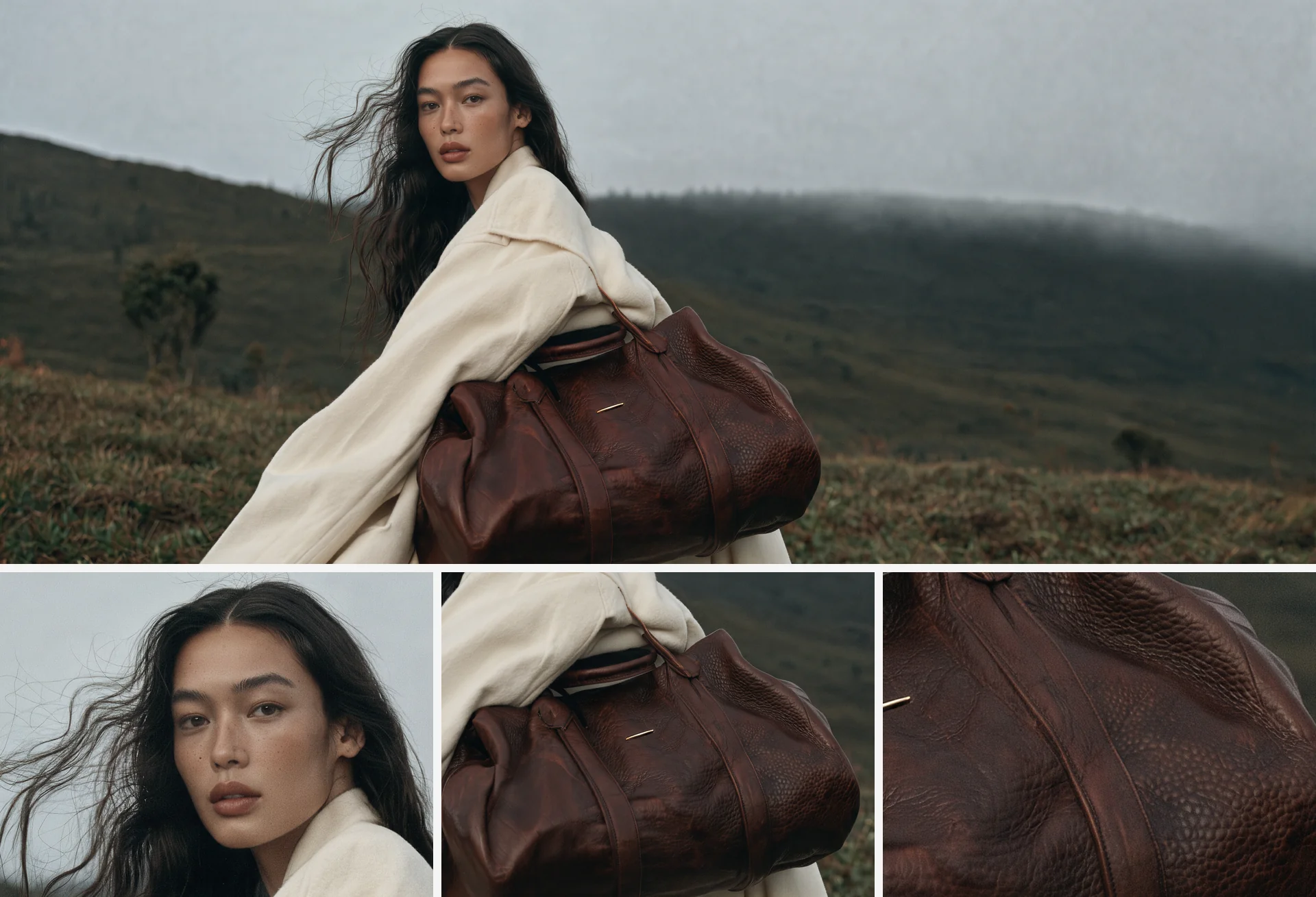
The Kling Image 4.0 API generates images at native 8K, so skin, fabric, product materials and landscapes stay sharp when you zoom in or crop hard for print and billboards. Set resolution to 8K for 8192×8192 at 1:1, or pick 2K (2048×2048) or 4K (5440×3072 at 16:9) when a smaller file is enough. In PoYo tests, a single 8K image came back as a PNG in about 2.5 minutes. Kling's 12544×5376 sample above shows the full frame and three close-ups of the face, bag and leather grain from one image.

  • Choose 2K, 4K or 8K per request
  • Crop tightly while keeping fine detail
  • PNG output ready for post-production
A native 8K fashion photo by Kling Image 4.0 of a woman in a cream coat carrying a leather bag on a misty hillside, with close-up crops of her face, the bag and the leather grain below

02

Matching Image Sets from a Single Prompt

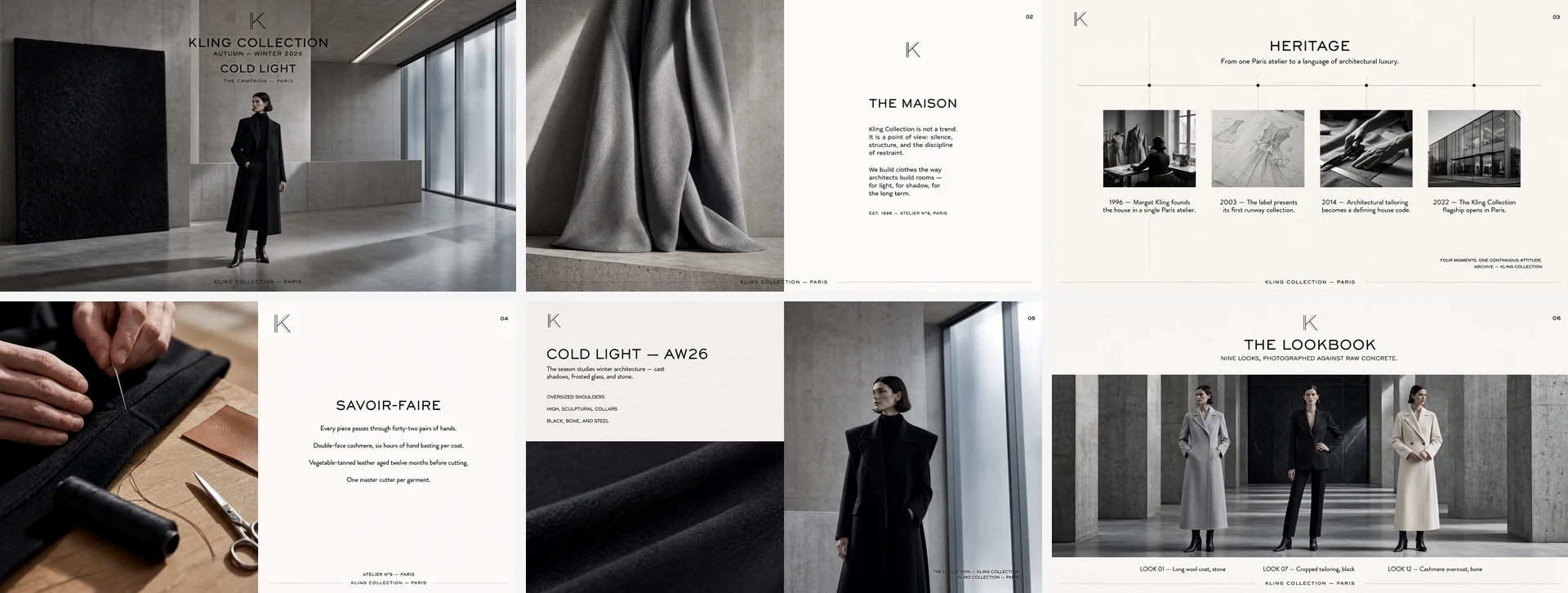
The Kling Image 4.0 API creates image sets of 2 to 10 images that share one subject and style, so storyboards, product angles and slide decks stay consistent. Turn on enable_sequential and set n from 2 to 10 (default 4); the model plans the whole set and returns the images in order. In a PoYo test, the prompt "A three-panel story of a paper boat drifting from a rainy city gutter to a calm sunny lake, same boat in every panel, watercolor style" returned three matching panels, shown in the playground examples. Kling's own sample is the six-page fashion campaign deck above.

  • Generate 2 to 10 images in one set
  • Keep subjects and style consistent
  • Storyboards, product angles and decks
Six matching slides for a fashion brand campaign generated as one image set with Kling Image 4.0: cover, brand story, heritage timeline, craftsmanship, collection and lookbook

03

Long Ecommerce Product Detail Pages

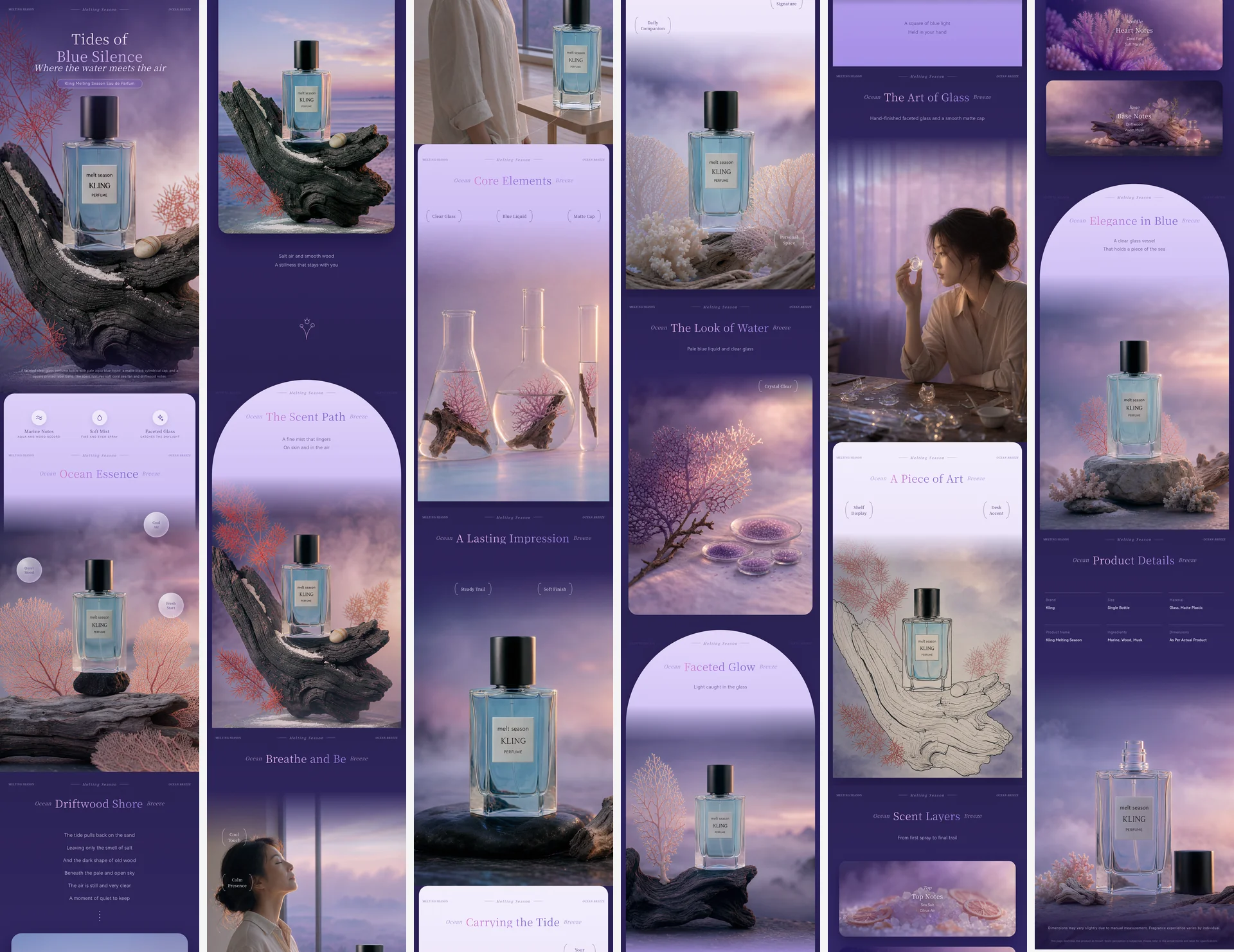
The long image model in the Kling Image 4.0 API turns 1 to 3 product photos into a complete ecommerce product detail page in one generation. Call kling-4.0-long-image with skill set to ecommerce, add the photos in image_urls, and choose length: short (about 2–5 sections), medium (6–10) or long (11–18). Pages are 1024 or 2048 px wide; a long 2K page in PoYo tests was 2048×54,941 px. Kling's perfume page above was generated from the prompt "Create an e-commerce product detail page for a perfume."

  • Start from 1 to 3 product photos
  • Short, medium or long page length
  • 1024 px or 2048 px wide output
A full-length perfume product detail page generated as one long image with Kling Image 4.0, shown in six columns from the hero section to the product details

04

Long Webpage Designs in One Image

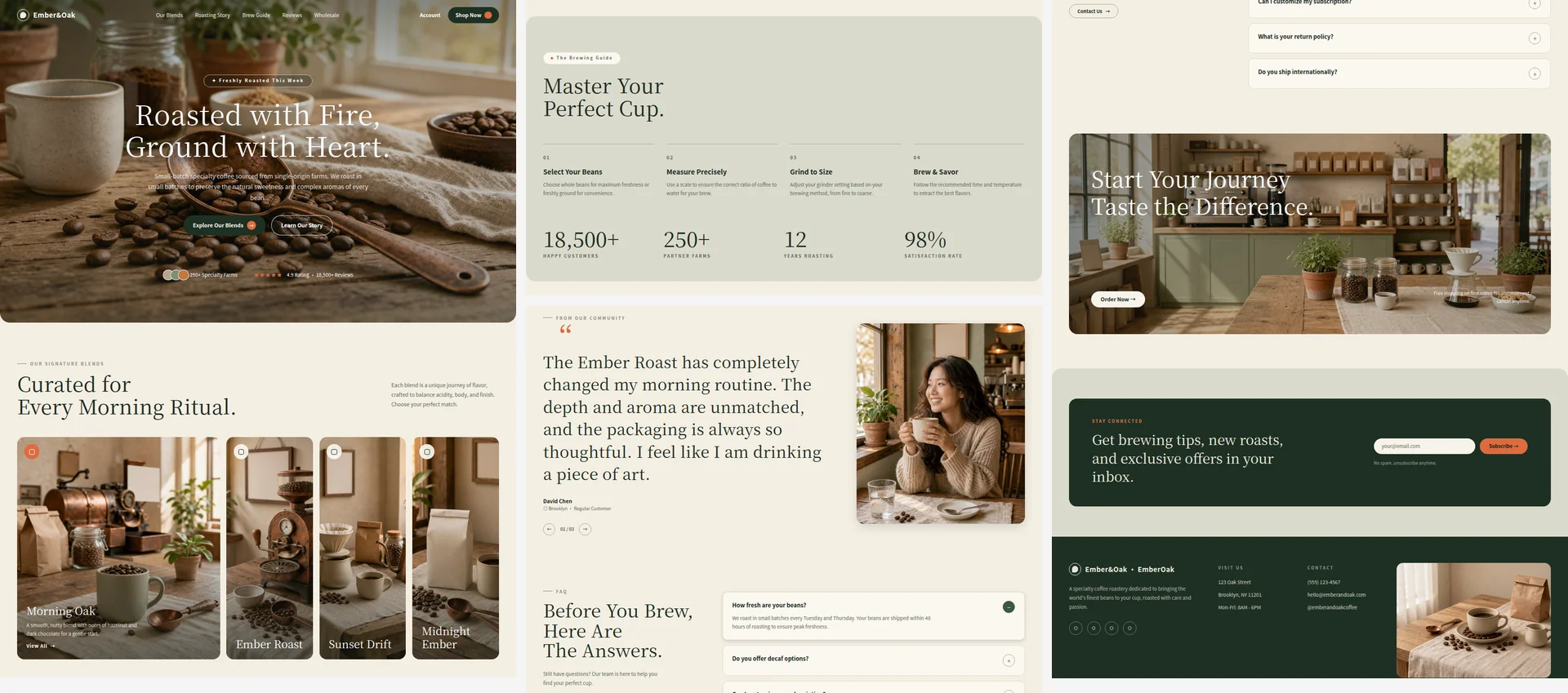
The Kling Image 4.0 API's long image model designs a full scrolling webpage, with navigation, hero, content sections and footer, from one text prompt. Set skill to webpage; add style_image_url to follow the look and layout of a reference design, or subject_image_url to build the page around a subject. This page was generated on PoYo at 1K (1024×5376 px) in about 2 minutes from the prompt "A landing page for a specialty coffee roastery called Ember & Oak: hero with coffee beans, story section, three featured blends with prices, brewing guide, customer reviews and footer. Warm earthy palette."

  • A full scrolling page from one prompt
  • Optional style and subject references
  • Navigation, sections and footer in one layout
Sections of a coffee roastery landing page generated as one long image with kling-4.0-long-image on PoYo: hero, signature blends, brewing guide, customer review, FAQ, call to action and footer

05

Multi-Reference Editing with Consistent Elements

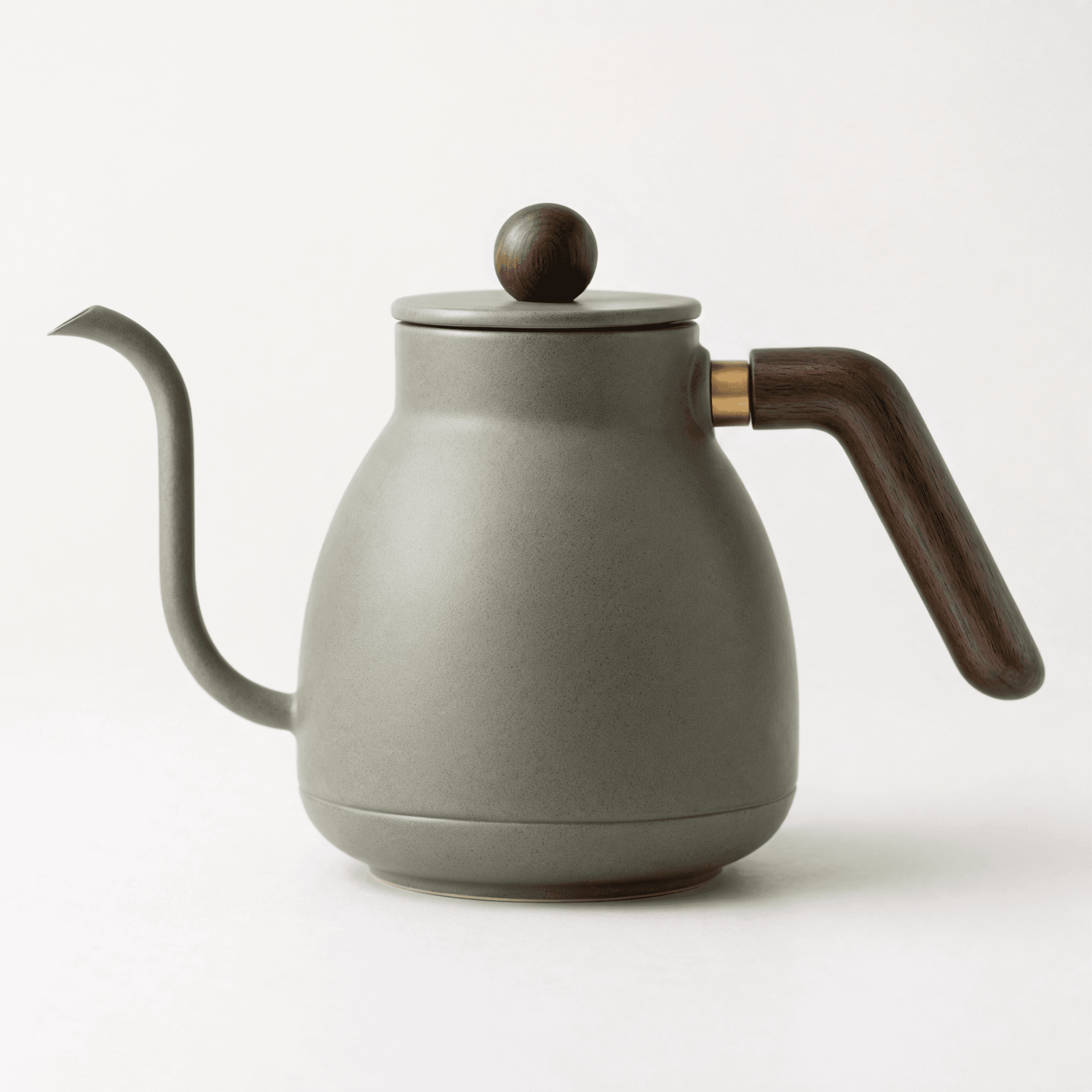
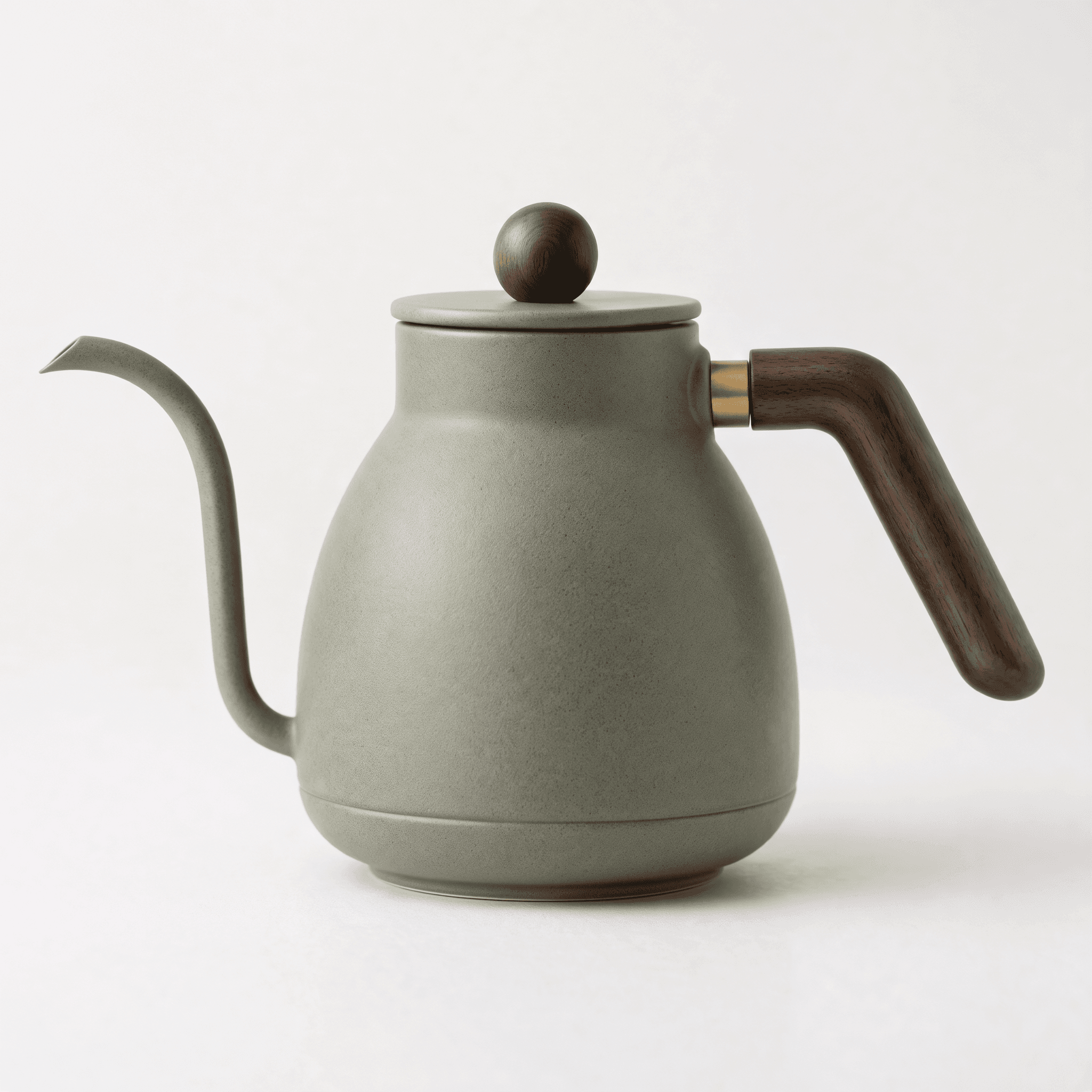
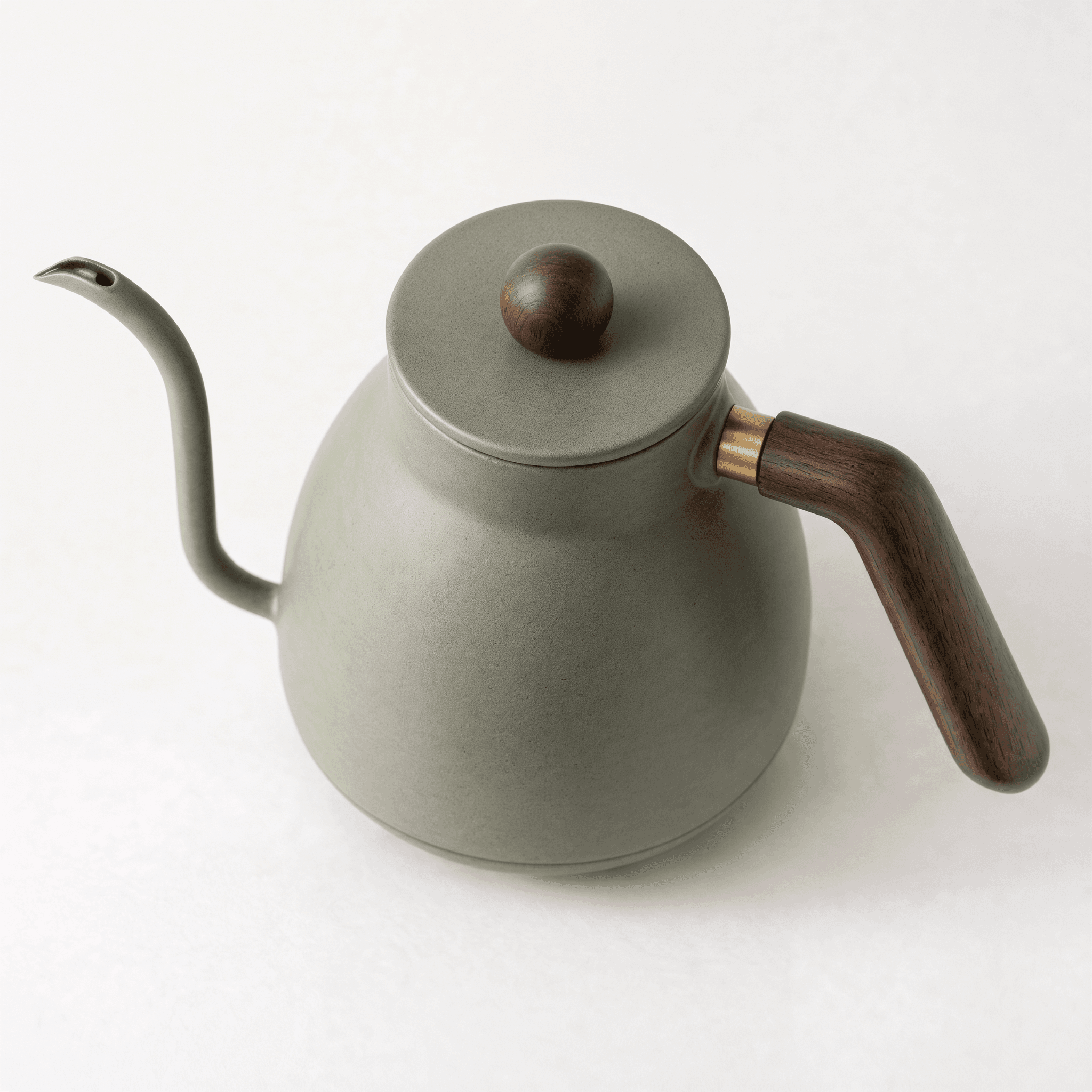
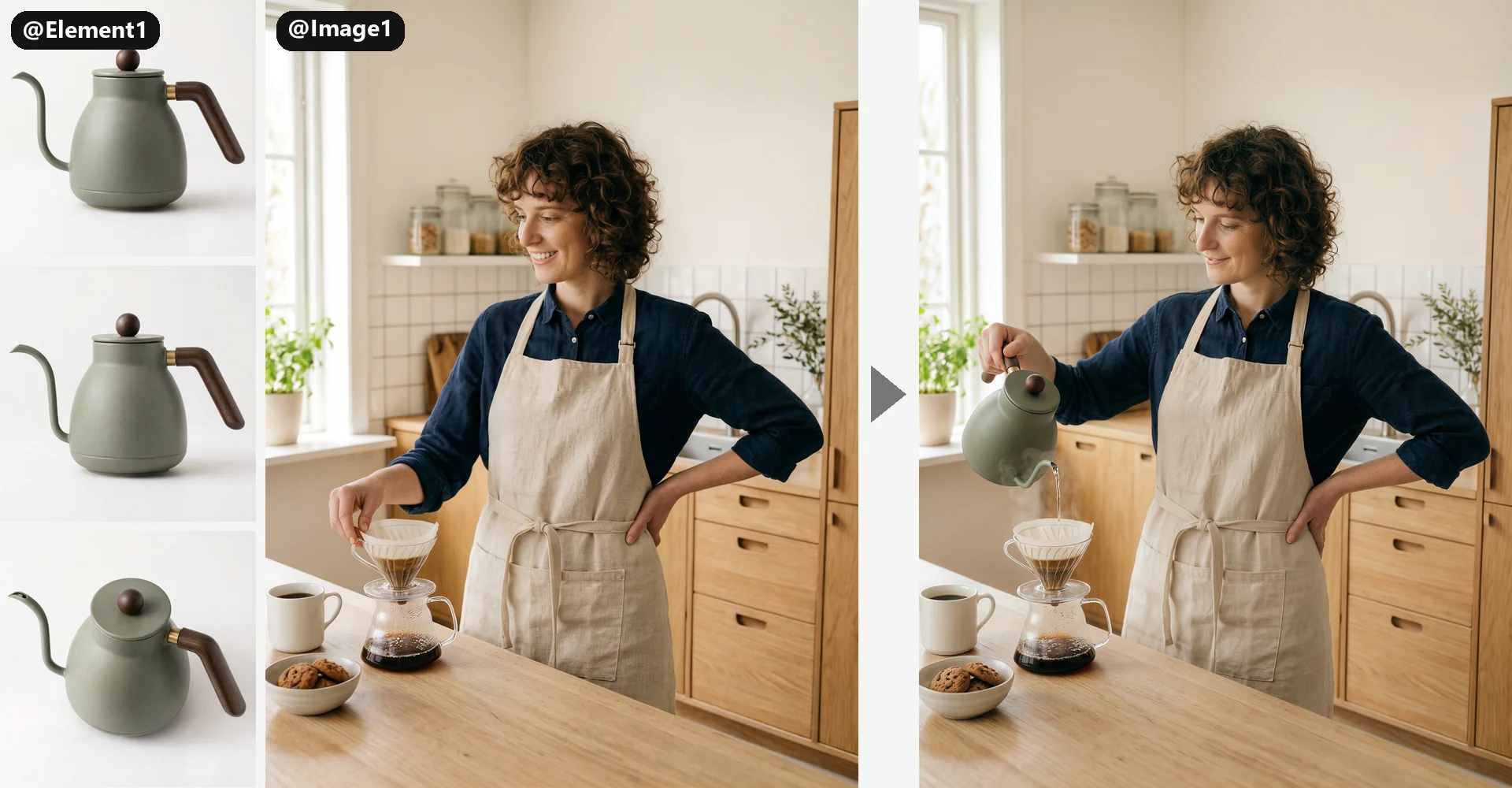
The Kling Image 4.0 API places a specific product or character into a scene while keeping both recognizable, using reference images and multi-angle elements. Pass the scene in image_urls and the product in kling_elements as a frontal view plus 1 to 3 other angles, then refer to them as @Image1 and @Element1. In this PoYo run, the barista portrait (@Image1) and three views of a kettle (@Element1) produced the barista pouring from that exact kettle, with her face, outfit and kitchen unchanged, for 11 credits at 2K.

  • Up to 10 reference images and elements
  • Multi-angle elements keep subjects consistent
  • Refer to inputs as @Image1 and @Element1
Kling Image 4.0 multi-reference edit on PoYo: three views of a sage green kettle labeled @Element1 and a barista portrait labeled @Image1, followed by the result of the barista pouring water from that kettle into a coffee dripper

06

Clear Multilingual Text in Posters and Layouts

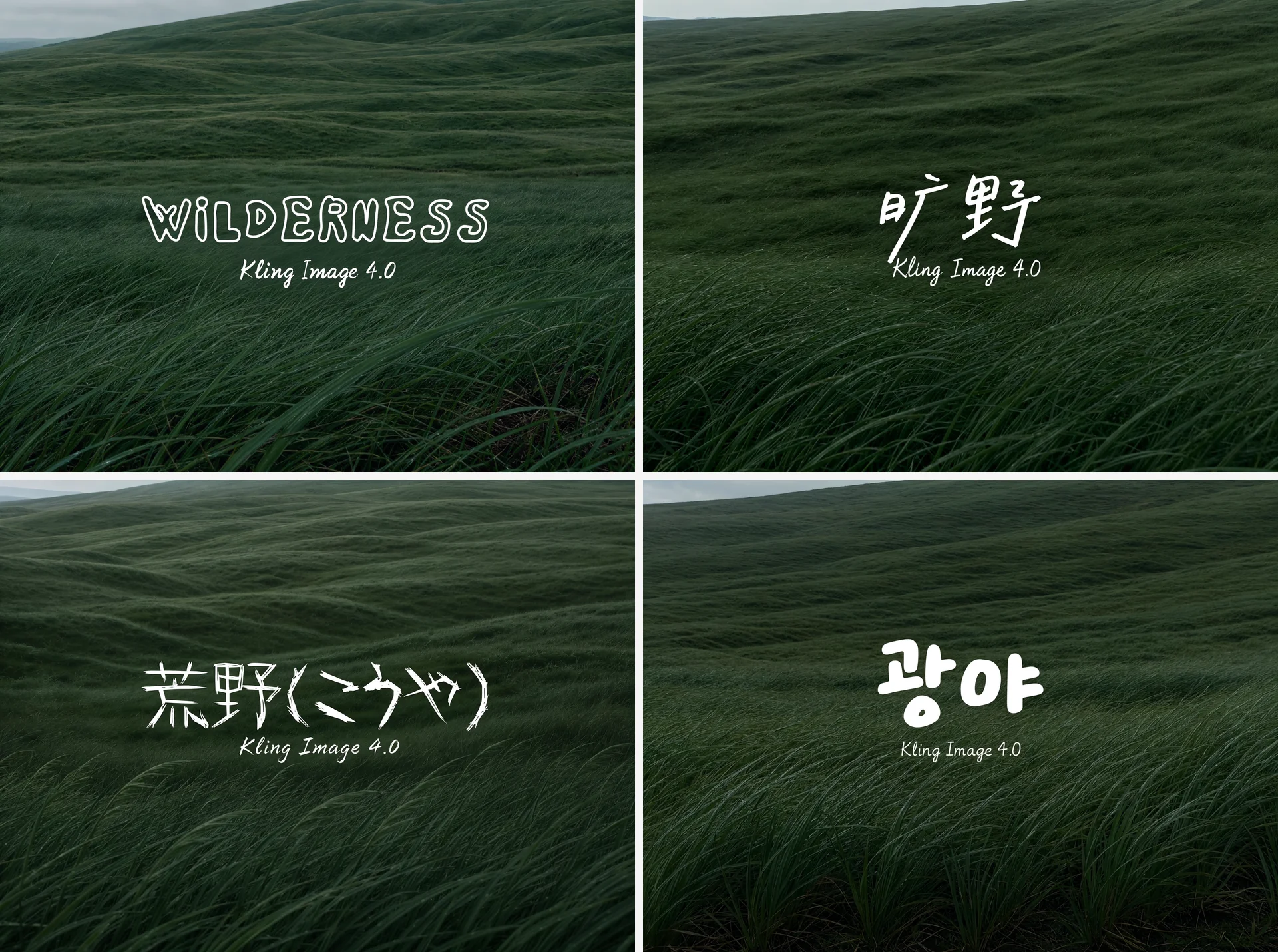
The Kling Image 4.0 API renders up to 2,000 characters of text in a single image, according to Kling, in English, Simplified Chinese, Traditional Chinese, Japanese, Korean, Spanish and Portuguese. That covers headlines, menus, infographics and long product copy. Quote the exact words in your prompt and say where each line goes. Kling's sample above renders the title Wilderness in four languages over the same landscape, each in a typeface that suits the scene.

  • Up to 2,000 characters per image
  • Seven languages, including Chinese and Japanese
  • Headlines, menus and long product copy
The same windswept grassland with the title Wilderness rendered in English, Chinese, Japanese and Korean by Kling Image 4.0

Who Can Benefit from Kling Image 4.0 API?

01

E-Commerce Teams

Turn 1 to 3 product photos into a full product detail page with kling-4.0-long-image, then use Kling Image 4.0 image sets to produce matching product angles and lifestyle shots for every listing.

02

Web and UI Designers

Explore website directions faster by generating complete scrolling page designs with Kling Image 4.0, guided by a style reference or a subject image, before building the final layout.

03

Marketing and Advertising Teams

Produce 8K campaign visuals for print, billboards and large displays, and add headlines and copy inside the image with the multilingual text rendering of the Kling Image 4.0 API.

04

Storyboard and Pre-Production Artists

Plan scenes as an image set of up to 10 frames with Kling Image 4.0, keeping characters, wardrobe and style consistent from the first shot to the last.

05

Fashion and Product Brands

Keep a model, garment or product consistent across new scenes by passing it to Kling Image 4.0 as a multi-angle element, and build lookbooks and campaign decks from one prompt.

06

App Developers and SaaS Platforms

Offer 8K image generation, image sets and long page design in your product through the Kling Image 4.0 API, with one API key, per-image pricing and the same request format for both model IDs.

Kling Image 4.0 API vs Kling O3 Image, Kling O1 Image — Model Comparison

The Kling Image 4.0 API is the newest Kling image model on PoYo and the one to choose for 8K output, image sets and long page designs. Kling O3 Image covers text-to-image and editing up to 4K, and Kling O1 Image Edit focuses on reference-based edits at 1K or 2K. Specs below come from PoYo's API docs for each model.

FeatureKling Image 4.0Kling O3 ImageKling O1 Image Edit
Best for8K stills, image sets and long webpage or ecommerce pagesText-to-image and multi-reference editing up to 4KReference-based edits at 1K or 2K
Model IDs on PoYokling-4.0-image (text-to-image and editing), kling-4.0-long-image (long pages)kling-o3-image (text-to-image), kling-o3-image-edit (editing)kling-o1-image-edit (editing)
Maximum resolution8K (8192×8192 at 1:1); 2K and 4K also available4K; 1K and 2K also available2K; 1K also available
Reference images and elementsUp to 10 reference images and up to 7 elements (2–4 views each), 10 items in totalUp to 10 reference images for editing, plus optional elementsUp to 10 reference images, plus optional elements
Images per request1–9 independent images, or an image set of 2–10 with enable_sequential1–9 images (n)1–9 images (n)
Page and image formatsStandard images in 9 aspect ratios, plus long webpage and ecommerce pages 1024 or 2048 px wideStandard images in 9 aspect ratiosStandard images in 9 aspect ratios
Prompt and textPrompt up to 50,000 characters; up to 2,000 rendered characters in 7 languages (Kling)Prompt up to 2,000 charactersPrompt up to 2,000 characters
Price on PoYo10 / 15 / 25 credits per image at 2K / 4K / 8K, plus 0.5 per reference image or element; long images 38–138 credits3.5 credits per image at 1K or 2K, 7 at 4K3.5 credits per image at 1K or 2K

How to Use Kling Image 4.0 API on PoYo

Step 1: Register & Create API Key
Sign in to PoYo and create an API key in the dashboard to call the Kling Image 4.0 API. The same key works for kling-4.0-image, kling-4.0-long-image and every other model on PoYo.
Create API Key →

Step 2: Top Up Credits
Add credits to your account; each Kling Image 4.0 API request is billed per image. kling-4.0-image costs 10 credits per image at 2K, 15 at 4K and 25 at 8K, plus 0.5 credits per reference image or element. kling-4.0-long-image costs 38 to 138 credits per page by skill, length and resolution. The playground shows the estimate before you run.
Add Credits →

Step 3: Integrate the Kling Image 4.0 API
Send POST https://api.poyo.ai/api/generate/submit with "model": "kling-4.0-image" and an input object with prompt, plus optional image_urls, kling_elements, size, resolution, enable_sequential and n. For long pages, use "model": "kling-4.0-long-image" with skill. Poll the returned task_id or pass a callback_url to receive the result.
View Documentation →

Frequently Asked Questions about Kling Image 4.0 API

What is Kling Image 4.0?

Kling Image 4.0 is the image model in the Kling 4.0 family from Kling AI, Kuaishou's AI creative platform, released on November 17, 2026 after the Kling 4.0 video model. It generates and edits images at 2K, 4K or native 8K, renders text in seven languages, creates image sets of up to 10 images, and designs long webpage and ecommerce pages. PoYo added the Kling Image 4.0 API in November 2026 as kling-4.0-image and kling-4.0-long-image, with one REST API, one API key and a playground on this page.

What is the difference between kling-4.0-image and kling-4.0-long-image?

kling-4.0-image creates standard images: text-to-image, or editing with up to 10 reference images and elements, at 2K, 4K or 8K, as single images or image sets. kling-4.0-long-image creates one tall image for a full page: a webpage design with optional style and subject references, or an ecommerce detail page from 1 to 3 product photos, 1024 or 2048 px wide. Both are part of the Kling Image 4.0 API and use the same API key and request format.

How much does the Kling Image 4.0 API cost on PoYo?

The Kling Image 4.0 API is billed per image with no monthly subscription. kling-4.0-image costs 10 credits ($0.05) at 2K, 15 credits ($0.075) at 4K and 25 credits ($0.125) at 8K per image, plus 0.5 credits per reference image and per element, charged once per request. A 2K edit with one reference image and one element costs 11 credits. kling-4.0-long-image costs 88 or 95 credits for a webpage and 38 to 138 credits for an ecommerce page. Credits are charged only when the task succeeds.

Does the Kling Image 4.0 API generate native 8K images?

Yes. Set resolution to 8K to get images such as 8192×8192 at 1:1; Kling describes this as native 8K generation. 4K returns 5440×3072 at 16:9 and 2K returns 2048×2048 at 1:1. The Kling Image 4.0 API delivers PNG files, and 8K files are large, around 100 MB each, so plan storage and download time for big batches.

Which sizes and aspect ratios does the Kling Image 4.0 API support?

kling-4.0-image supports 9 values for size: auto (the default, chosen from the prompt and references), 16:9, 9:16, 1:1, 4:3, 3:4, 3:2, 2:3 and 21:9. Combine any of them with resolution 2K, 4K or 8K. kling-4.0-long-image instead sets the width, 1024 px at 1K or 2048 px at 2K, and the height grows with the page content.

How many reference images and elements can the Kling Image 4.0 API use?

Pass 1 to 10 images in image_urls and up to 7 elements in kling_elements, with at most 10 items in total. Each element is one character or object shown in 2 to 4 images: the frontal view first, then other angles. Elements are used together with image_urls. Refer to them in the Kling Image 4.0 prompt as @Image1, @Image2 and @Element1, @Element2 in the order you send them.

How do I generate a Kling Image 4.0 image set?

Set enable_sequential to true and n from 2 to 10 (default 4). Kling Image 4.0 then plans the images as one set with consistent subjects and style and returns them in order, which suits storyboards, product angles and slide decks. With enable_sequential off, n from 1 to 9 (default 1) returns independent images for the same prompt. Both modes bill per image.

Can Kling Image 4.0 turn an existing image into 4K or 8K?

Yes. Pass the image in image_urls, set resolution to 4K or 8K, and ask Kling Image 4.0 to keep the composition, subject and colors unchanged. The model returns a newly generated image at the selected resolution based on your reference, so describe anything that must stay exactly the same. Each reference image adds 0.5 credits to the per-image price.

Can the Kling Image 4.0 API render text inside images?

Yes. Kling says Kling Image 4.0 renders up to 2,000 characters in a single image and supports English, Simplified Chinese, Traditional Chinese, Japanese, Korean, Spanish and Portuguese. Put the exact words in quotes, say where each line goes and describe the typeface you want. This works for posters, menus, infographics and product copy on long ecommerce pages.

What can kling-4.0-long-image create?

Two kinds of pages. With skill webpage, describe a website and optionally add style_image_url to follow a reference design or subject_image_url to center the page on a subject. With skill ecommerce, pass 1 to 3 product photos in image_urls and choose length short, medium or long for about 2–5, 6–10 or 11–18 sections. Set resolution to 1K or 2K for a 1024 or 2048 px wide page; long ecommerce pages can be tens of thousands of pixels tall.

How long does a Kling Image 4.0 API request take?

In PoYo tests, a single 2K image took about 1 minute from submission to result, 4K about 1.5 minutes and 8K about 2.5 minutes. An edit with references took 1.5 to 3 minutes, a three-image set about 4 minutes, and a 1K webpage or ecommerce long image about 2 minutes. Requests with nine or ten 8K images took about 14 to 35 minutes, so use callback_url for large 8K batches.

How is Kling Image 4.0 different from Kling O3 Image and Kling O1 Image?

Kling Image 4.0 goes up to native 8K, while Kling O3 Image offers 1K to 4K and Kling O1 Image Edit offers 1K or 2K. Kling Image 4.0 adds image sets of 2 to 10 images, up to 7 multi-angle elements with a 10-item limit, prompts of up to 50,000 characters and a separate long image model for webpage and ecommerce pages. All three are available on PoYo with the same API key.

Can I use Kling Image 4.0 API outputs commercially?

Yes. Images generated through PoYo's Kling Image 4.0 API can be used for commercial purposes, including marketing, advertising, ecommerce product pages, website design, film pre-production and client deliverables. Follow PoYo's terms of service and make sure you have the rights to any reference images you upload.

Is there a Kling Image 4.0 API example request?

Yes. This JSON body creates a 4K image set of three images: {"model": "kling-4.0-image", "input": {"prompt": "Three product photos of a ceramic kettle: front, side and top view", "resolution": "4K", "enable_sequential": true, "n": 3}}. Send it to POST https://api.poyo.ai/api/generate/submit with your API key, then read the images from the task result. In the playground on this page, switch to JSON to see the full request for the current settings.

How do I call the Kling Image 4.0 API with Python?

The Kling image API on PoYo uses one endpoint for both model IDs. Send a POST request to https://api.poyo.ai/api/generate/submit with your API key in the Authorization header and a JSON body such as {"model": "kling-4.0-image", "input": {"prompt": "...", "resolution": "4K"}}. In Python, send it with requests.post and read the task_id from the response, then poll the status endpoint or set callback_url to receive the image URLs. The Kling Image 4.0 API docs list every field for both model IDs.

Why Use PoYo for Kling Image 4.0 API Access

01

Unified API Access

Call the Kling Image 4.0 API, kling-4.0-image and kling-4.0-long-image, with the same request format and API key you use for every other image, video and audio model on PoYo.

02

Transparent Per-Image Pricing

See the Kling Image 4.0 API price for 2K, 4K and 8K, the long image price for each page type, and the reference add-on before you run, and pay only for successful tasks.

03

Playground Testing

Try Kling Image 4.0 API prompts, reference images, elements, image sets and long page settings in the browser, then copy the JSON request into your code.

04

Developer-Friendly Integration

Use documented request fields, task polling and callback URLs, and receive every image of an image set from the Kling Image 4.0 API in order in the task result.