Model icon
elevenlabs-v3-tts
Text to Speech
Model:
ElevenLabs V3 TTS API generates expressive multilingual speech with audio tags, emotional delivery, and dialogue-style voice workflows.
Input
114/5000

1-5000 characters. Use audio tags for expressive delivery and multi-speaker scripts.

Custom

Use a fal example voice name or enable Custom to enter an ElevenLabs voice ID.

Optional ISO 639-1 language code used to enforce a specific language.

Return aligned timestamp data when available.

Output

Example Output

This is sample data. Generate a new result to see real output.

Task ID:elevenlabs-v3-tts-exampleCreated:PoYo official example
Status:finishedProgress:100%

ElevenLabs V3 TTS example output

Examples
Pricing details

Transparent pricing with no hidden fees. Pay as you go.

ElevenLabselevenlabs-v3-tts
Text to speech
PoYo price
$0.080
16 credits
Official price
$0.100
Fal
You save
20%

* Actual fees are based on the final output.

Introduction

Complete guide to using Affordable ElevenLabs V3 TTS API for Expressive AI Voice

Affordable ElevenLabs V3 TTS API for Expressive AI Voice

Build expressive text-to-speech workflows with ElevenLabs V3 TTS on PoYo. Generate natural AI voice audio from scripts, guide performance with audio tags like [excited], [whispers], and [laughs], and control voice, stability, language, text normalization, and timestamps through one async API.

Available ElevenLabs V3 TTS API Models on PoYo

01

elevenlabs-v3-tts

Production-ready expressive TTS at 16 credits per 1000 characters, equal to $0.08 per 1000 characters on PoYo, with controls for voice, stability, language, normalization, and timestamps.
Try Playground

Why ElevenLabs V3 TTS Is Different

ElevenLabs V3 TTS is built for voice output that performs, not just reads. Use it for narration, dialogue, product voiceovers, localization, and character audio.

01
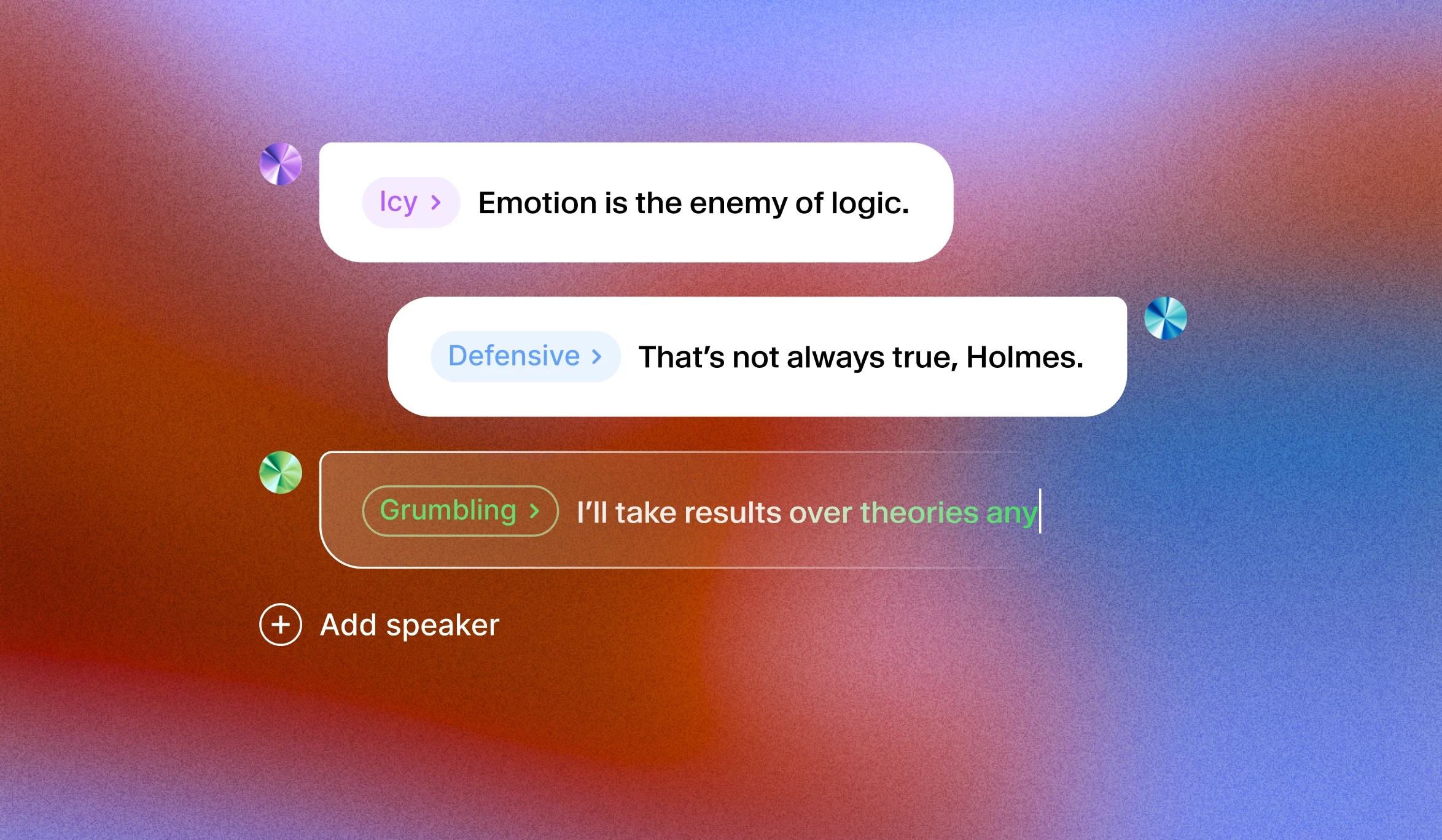
Script-Level Performance Direction

Control emotional tone, delivery, and human reactions directly inside the text text. This makes the same script field useful for both spoken content and performance direction.
  • Use tags such as [excited], [whispers], and [laughs] to guide tone.
  • Create more natural narration, character dialogue, and social voiceovers.
  • Keep a single text field as the source of truth for both script and performance cues.
ElevenLabs v3 audio tags interface

02

API Controls For Real Products

Send the fields exposed in the PoYo API docs: text, voice, stability, timestamps, language_code, and apply_text_normalization. Use preset voice names in the playground or pass custom ElevenLabs voice IDs in production.
  • Keep stability between 0 and 1 for predictable voice behavior.
  • Use language_code for multilingual generation.
  • Enable timestamps when downstream alignment data is needed.
ElevenLabs API audio generation visual

What You Can Build

01

Short Video Voiceovers

Generate expressive narration for reels, product demos, ads, explainers, and launch videos.

02

Learning Content

Turn course scripts, onboarding guides, and tutorials into clear spoken audio.

03

Characters And Dialogue

Prototype character lines, app assistants, roleplay flows, and narrative dialogue using audio tags.

04

Localization

Generate multilingual speech assets with language codes and text normalization control.

ElevenLabs V3 TTS API vs fal.ai ElevenLabs V3 TTS — Model Comparison

PoYo exposes ElevenLabs V3 TTS through a simple async generation workflow with lower reference pricing.
FeaturePoYofal.ai
Public model IDelevenlabs-v3-ttsfal-ai/elevenlabs/tts/eleven-v3
Reference price$0.08 per 1000 characters$0.10 per 1000 characters
PoYo credits16 credits per 1000 charactersN/A
Max text length5000 charactersProvider dependent
WorkflowSubmit task, poll standard status, download audio filesProvider-specific endpoint

PoYo pricing uses 16 credits per 1000 characters. One credit is priced at $0.005.

How to Use ElevenLabs V3 TTS on PoYo

  1. Get your API key: Create a PoYo account and generate an API key from the dashboard. Get API Key ->
  2. Write the script: Enter 1-5000 characters and add audio tags such as [excited], [whispers], or [laughs] when you want more expressive delivery.
  3. Choose voice settings: Select a preset voice name, enter a custom ElevenLabs voice ID in JSON, tune stability, and optionally set language_code, timestamps, and apply_text_normalization.
  4. Submit and retrieve: Submit the task through PoYo's generate API, then poll the standard task status endpoint for audio output. View API Docs ->

ElevenLabs V3 TTS FAQ

What is ElevenLabs V3 TTS?

ElevenLabs V3 TTS is an expressive text-to-speech model that turns written scripts into natural AI voice audio. It is designed to follow inline audio tags, emotional cues, voice settings, and language controls so generated speech can sound more directed and performance-aware.

What is the ElevenLabs V3 TTS API used for?

Use it to generate voiceovers, narration, product demo audio, learning content, character dialogue, app assistant speech, localization audio, and short-form media voice tracks.

What input is required?

The text field is required and must be between 1 and 5000 characters. Voice, stability, timestamps, language_code, and text normalization are optional controls.

Can I use a custom ElevenLabs voice?

Yes. The voice field accepts a voice name or a voice ID. The playground exposes common preset voices, and JSON mode can send a custom ElevenLabs voice ID.

How is billing calculated?

PoYo bills ElevenLabs V3 TTS at 16 credits per 1000 characters, which equals $0.08 per 1000 characters.

Can I use expressive tags?

Yes. The model is designed for expressive speech scripts and supports audio tags such as [excited], [whispers], and [laughs].

How do I get the result?

Submit the generation request, then use the task ID with PoYo's standard task status endpoint. Finished tasks return audio files and may include timestamp data when requested.

Why Use PoYo

01

Affordable Pricing

Use ElevenLabs V3 TTS at $0.08 per 1000 characters with clear per-character billing.

02

Unified Model Access

Use the same PoYo account, billing, status polling, and callback workflow across text, image, video, and audio models.

03

Production Workflow

Submit async jobs, poll stable task status, and retrieve finished audio files from one API surface.

04

Clear Controls

Expose the core controls needed in production: text, voice, stability, language, normalization, and timestamps.