
Key takeaways
- Seedream 5.5 is ByteDance Seed's newest image model, released on November 9, 2026. One model covers text-to-image, single-image editing and multi-reference editing with up to 10 images.
- PoYo exposes two model IDs.
seedream-5.5generates and edits images;seedream-5.5-layerizesplits one image into a base image plus up to 99 transparent layers. - Pricing is per image. 4 credits ($0.02) at 1K or 1.5K, 7 credits ($0.035) at 2K, plus 1.6 credits ($0.008) for each reference image. Layer decomposition is billed per returned image, base image included.
- Transparent PNGs are one parameter away. Set
backgroundtotransparentwithpngoutput and you get an RGBA image, from a prompt or from ordinary RGB reference photos. - Output goes up to 2K (2048×2048 at 1:1, 3136×1344 at 21:9), one image per request.
- Every call is asynchronous. Submit, then poll the status endpoint or pass a
callback_url. In PoYo tests, a Seedream 5.5 image took about 24 seconds on average.
Seedream 5.5 API at a glance
| Seedream 5.5 on PoYo | |
|---|---|
| Developer | ByteDance Seed (listed on BytePlus as Dola Seedream 5.5) |
| Released | November 9, 2026 |
| Model IDs | seedream-5.5, seedream-5.5-layerize |
| Modes | Text-to-image, image editing, multi-reference composition, layer decomposition |
| Reference images | 1–10 (JPEG, PNG or WebP, up to 10 MB each) |
| Resolution | 1K, 1.5K, 2K (default 2K) |
| Aspect ratios | 1:1, 4:3, 3:4, 16:9, 9:16, 3:2, 2:3, 21:9, plus auto for edits |
| Background | auto, transparent, opaque |
| Output format | png (default) or jpeg |
| Layers | Base image + up to 99 layers, with optional text OCR |
| Price | 4 credits ($0.02) at 1K/1.5K, 7 credits ($0.035) at 2K, +1.6 credits per reference image |
What's new in Seedream 5.5
ByteDance describes Seedream 5.5 as its "next-generation image creation model". The launch post and API documentation highlight four upgrades:
- Stable multi-turn editing. Unedited regions are preserved "at the pixel level", with consistent color. ByteDance demonstrated 100 successive edits on one image of the same person.
- Native RGBA output. The model can "directly generate images with an alpha channel, including full and partial transparency", from text or from up to 10 ordinary RGB reference images.
- Finer layer decomposition. One base image plus up to 99 layers, a configurable output count and rich-text OCR for text layers.
- Sharper small text and more realism. In ByteDance's own evaluation, the severe text-corruption rate fell to 0.4% and the minor rate to 1.7%, and realism in image-to-image tasks scored +55.62% GSB against the previous version.
ByteDance also says "a Pro version of the Seedream 5.5 series will follow". For a full comparison with the earlier models, see Seedream 5.5 vs 5.0 Pro vs 5.0 Lite.
Which model ID to use
| You want to | Model ID | Input | Output |
|---|---|---|---|
| Generate an image from a prompt | seedream-5.5 | prompt | 1 image |
| Edit one image or combine up to 10 | seedream-5.5 | prompt + image_urls (1–10) | 1 image |
| Create a transparent sticker, icon or cut-out | seedream-5.5 | prompt (+ optional image_urls), background: "transparent" | 1 RGBA PNG |
| Break a finished image into editable parts | seedream-5.5-layerize | image_urls (exactly 1) + optional prompt | Base image + layers |
Text-to-image and editing share one model ID: adding image_urls switches seedream-5.5 into editing mode.
Request parameters
seedream-5.5
| Parameter | Type | Values | Default |
|---|---|---|---|
prompt | string, required | 5–5,000 characters | — |
image_urls | array | 1–10 public image URLs; selects editing mode | — |
size | string | 1:1, 4:3, 3:4, 16:9, 9:16, 3:2, 2:3, 21:9, auto (edits) | 1:1 for text-to-image, auto for edits |
resolution | string | 1K, 1.5K, 2K | 2K |
background | string | auto, transparent (needs png), opaque | auto |
output_format | string | png, jpeg | png |
enable_safety_checker | boolean | true, false | true |
With size: "auto", an edit follows the shape of the reference images at about the pixel area of the chosen resolution.
Output sizes
size | 1K | 1.5K | 2K |
|---|---|---|---|
| 1:1 | 1024×1024 | 1536×1536 | 2048×2048 |
| 4:3 | 1152×864 | 1792×1344 | 2368×1776 |
| 3:4 | 864×1152 | 1344×1792 | 1776×2368 |
| 16:9 | 1424×800 | 2048×1152 | 2816×1584 |
| 9:16 | 800×1424 | 1152×2048 | 1584×2816 |
| 3:2 | 1248×832 | 1872×1248 | 2496×1664 |
| 2:3 | 832×1248 | 1248×1872 | 1664×2496 |
| 21:9 | 1568×672 | 2352×1008 | 3136×1344 |
seedream-5.5-layerize
| Parameter | Type | Values | Default |
|---|---|---|---|
image_urls | array, required | Exactly 1 JPEG or PNG, up to 10 MB, 512×512 to 6000×6000 px, aspect ratio 1:16 to 16:1 | — |
prompt | string | How to split the image, up to 2,000 characters | Model picks the main elements |
resolution | string | 1K, 1.5K, 2K, auto | auto |
max_images | integer | 2–100, base image included | 30 |
text_recognition | boolean | OCR for regular text layers | false |
output_format | string | png, jpeg (base image only; layers are always PNG) | png |
enable_safety_checker | boolean | true, false | true |
auto keeps the original size when the input is between 1K and 2K, upscales smaller images to 1K and downscales larger ones to 2K.
Seedream 5.5 pricing
PoYo bills Seedream 5.5 per image at the same rates as ByteDance's official API, with no subscription and one API key for every Seedream version. $1 = 200 credits, and credits are charged only when a task succeeds.
| Charge | Credits | USD |
|---|---|---|
seedream-5.5 image at 1K or 1.5K | 4 | $0.02 |
seedream-5.5 image at 2K | 7 | $0.035 |
Each reference image in image_urls | 1.6 | $0.008 |
seedream-5.5-layerize, each returned image at 1K or 1.5K | 4 | $0.02 |
seedream-5.5-layerize, each returned image at 2K or auto | 7 | $0.035 |
seedream-5.5-layerize input image | 1.6 | $0.008 |
Cost examples
| Job | Calculation | Cost |
|---|---|---|
| One 1K transparent sticker | 4 | 4 credits ($0.02) |
| One 2K product shot from a prompt | 7 | 7 credits ($0.035) |
| One 2K edit of a single photo | 7 + 1.6 | 8.6 credits ($0.043) |
| One 2K composition from 10 references | 7 + 10 × 1.6 | 23 credits ($0.115) |
| Five rounds of 2K multi-turn editing, one reference each | 5 × 8.6 | 43 credits ($0.215) |
| 1,000 images at 2K, text-to-image | 1,000 × 7 | 7,000 credits ($35) |
| Layer split at 1K returning a base + 5 layers (PoYo test) | 6 × 4 + 1.6 | 25.6 credits ($0.128) |
Layer split at auto returning a base + 32 layers | 33 × 7 + 1.6 | 232.6 credits ($1.163) |
Two details matter for layer decomposition. The model returns as many layers as the image needs, which can be fewer than max_images, and you pay only for what comes back. At submission, though, your balance must cover max_images images: with the default of 30 at auto, that is 30 × 7 = 210 credits.
Quickstart: submit a task and poll for the result
Create a key in the API key dashboard and keep it in an environment variable:
export POYO_API_KEY="your-api-key"
Submit a job to the unified endpoint:
curl --request POST \
  --url https://api.poyo.ai/api/generate/submit \
  --header "Authorization: Bearer $POYO_API_KEY" \
  --header "Content-Type: application/json" \
  --data '{
    "model": "seedream-5.5",
    "input": {
      "prompt": "A ceramic pour-over coffee set on a walnut counter, soft morning window light, steam rising from the cup, minimalist product photography",
      "size": "16:9",
      "resolution": "2K"
    }
  }'
The response returns a task_id:
{
  "code": 200,
  "data": {
    "task_id": "task-unified-1794470400-abcd1234",
    "status": "not_started",
    "created_time": "2026-11-14T10:30:00"
  }
}
Check the status with the same key:
curl --request GET \
  --url https://api.poyo.ai/api/generate/status/task-unified-1794470400-abcd1234 \
  --header "Authorization: Bearer $POYO_API_KEY"
data.status moves from not_started to running to finished (or failed). When it is finished, the image URL is in data.files[].file_url and the charge is in data.credits_amount. You can also add a top-level callback_url to the submit request and receive the same task object by POST when the task finishes or fails.
For the rest of this guide, this Python helper submits a job and waits for it:
import os
import time

import requests

API = "https://api.poyo.ai/api/generate"
HEADERS = {"Authorization": f"Bearer {os.environ['POYO_API_KEY']}"}


def run(model: str, payload: dict, interval: float = 4, timeout: float = 300) -> dict:
    """Submit a PoYo task and return the finished task data."""
    resp = requests.post(
        f"{API}/submit",
        headers=HEADERS,
        json={"model": model, "input": payload},
        timeout=30,
    )
    resp.raise_for_status()
    body = resp.json()
    if body.get("code") != 200:
        raise RuntimeError(body)
    task_id = body["data"]["task_id"]

    deadline = time.time() + timeout
    while time.time() < deadline:
        task = requests.get(f"{API}/status/{task_id}", headers=HEADERS, timeout=30).json()["data"]
        if task["status"] == "finished":
            return task
        if task["status"] == "failed":
            raise RuntimeError(task.get("error_message"))
        time.sleep(interval)
    raise TimeoutError(task_id)
Always check code in the body as well as the HTTP status: some validation errors return HTTP 200 with code: 400. Other codes to handle are 401 (invalid key), 402 (insufficient credits) and 429 (rate limit).
Example 1: text-to-image with exact text
Seedream 5.5 renders dense and small text well, so spell out every line you want on the image. This is the poster prompt from PoYo's own test run:
task = run("seedream-5.5", {
    "prompt": (
        "A vertical exhibition poster for a ceramics show. A realistic photograph of a "
        "handmade speckled stoneware vase holding dried pampas grass on a linen-draped plinth, "
        "soft side window light and gentle shadows. The poster contains exactly four lines of "
        "text and nothing else: the bold serif headline \"CLAY & LIGHT\" at the top, the subtitle "
        "\"Handmade Ceramics Exhibition\" under it, and \"March 14 - 30, 2027\" and "
        "\"Harbor Gallery, Hall B\" at the bottom. Clean Swiss layout with generous empty space, "
        "warm cream background, terracotta accent color."
    ),
    "size": "3:4",
    "resolution": "2K",
    "output_format": "png",
})
print(task["files"][0]["file_url"])  # 1776×2368 PNG, 7 credits

The 2K poster from PoYo's Seedream 5.5 test run with the prompt above.
Spelling out "exactly four lines of text and nothing else" keeps the copy tight. For text-heavy layouts, budget for one extra run so you can pick the cleanest result.
Example 2: multi-reference edit
Pass up to 10 images and refer to them by position: the first URL is image 1, the second is image 2. State what each image contributes and what must stay unchanged.
{
  "model": "seedream-5.5",
  "input": {
    "prompt": "Place the blue-and-white porcelain vase from image 1 upright at the center of the empty glass display case in image 2. Keep the vase's silhouette, cobalt patterns and glaze, and keep the museum architecture and wooden cabinet unchanged. Match the warm gallery lighting, perspective, scale and a soft contact shadow.",
    "image_urls": [
      "https://storage.poyo.ai/models/seedream-5-0-flash/examples/museum-input-1.webp",
      "https://storage.poyo.ai/models/seedream-5-0-flash/examples/museum-input-2.webp"
    ],
    "size": "4:3",
    "resolution": "2K"
  }
}
Swap in your own public HTTPS images for production. Without size, an edit defaults to auto and follows the reference images. This request costs 7 + 2 × 1.6 = 10.2 credits ($0.051).
Example 3: transparent PNG
Set background to transparent and keep output_format as png. Describing an isolated subject in the prompt helps:
{
  "model": "seedream-5.5",
  "input": {
    "prompt": "A clear glass teapot filled with amber tea and floating chamomile flowers, with a soft natural reflection on the glass, product cutout isolated on a transparent background.",
    "size": "1:1",
    "resolution": "1K",
    "background": "transparent",
    "output_format": "png"
  }
}
PoYo's test run returned a 1024×1024 RGBA PNG in about 22 seconds for 4 credits. Glass, soft shadows and semi-transparent edges keep their partial transparency, so the cut-out sits naturally on any background.

Text-to-RGBA example from ByteDance's Seedream 5.5 documentation, placed on a checkerboard to show the alpha channel.
You can also make transparent assets from photos. In ByteDance's example, two collage posters go in as references and come back as one transparent sheet of stickers, with a prompt that says to extract the sticker elements from image 1 and image 2, remove all other background content and arrange the stickers "separately without overlap, with sharp and intact edges".
Example 4: multi-turn editing
To keep refining one picture, feed each result back as the next reference and say what to change and what to keep:
image = "https://storage.poyo.ai/models/seedream-5-5/examples/transparent-teapot-2c9bec305560.png"

steps = [
    "Place the glass teapot from image 1 on a rustic wooden table by a window in soft morning "
    "sunlight. Keep the teapot's shape, glass lid, handle, amber tea and floating chamomile "
    "flowers unchanged.",
    "Add a white ceramic cup of tea next to the teapot. Keep everything else unchanged.",
    "Change the time of day to warm late-afternoon light. Keep the teapot, cup, table and "
    "window unchanged.",
]

for prompt in steps:
    task = run("seedream-5.5", {
        "prompt": prompt,
        "image_urls": [image],
        "size": "1:1",
        "resolution": "2K",
        "background": "opaque",
    })
    image = task["files"][0]["file_url"]
    print(image)
ByteDance recommends RGB inputs and background: "opaque" while you edit, for the most consistent results. Switch to transparent only for the final cut-out. Each round here costs 8.6 credits, so the three steps cost 25.8 credits ($0.129).
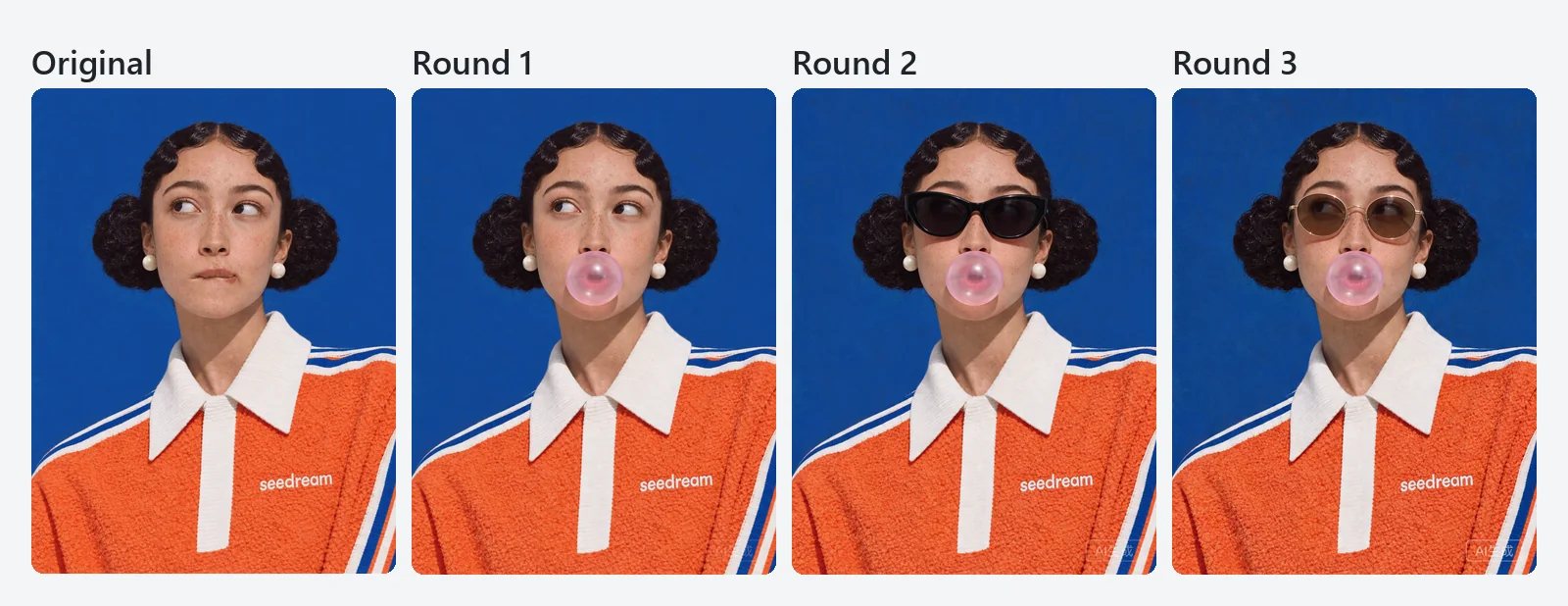
Three editing rounds on one portrait, from ByteDance's Seedream 5.5 documentation.
Example 5: layer decomposition
seedream-5.5-layerize takes exactly one image. Without a prompt, the model finds the main elements and puts each on its own layer. This request splits the ceramics poster from Example 1:
{
  "model": "seedream-5.5-layerize",
  "input": {
    "image_urls": ["https://storage.poyo.ai/models/seedream-5-5/examples/t2i-clay-and-light-7c708282a2fe.png"],
    "resolution": "1K",
    "max_images": 6
  }
}
To choose what to separate, add a prompt such as "Put each animal on its own layer and keep the rest of the scene in the base image". In ByteDance's example with that kind of prompt, max_images: 40 returned 33 images: the base image plus 32 animal layers.
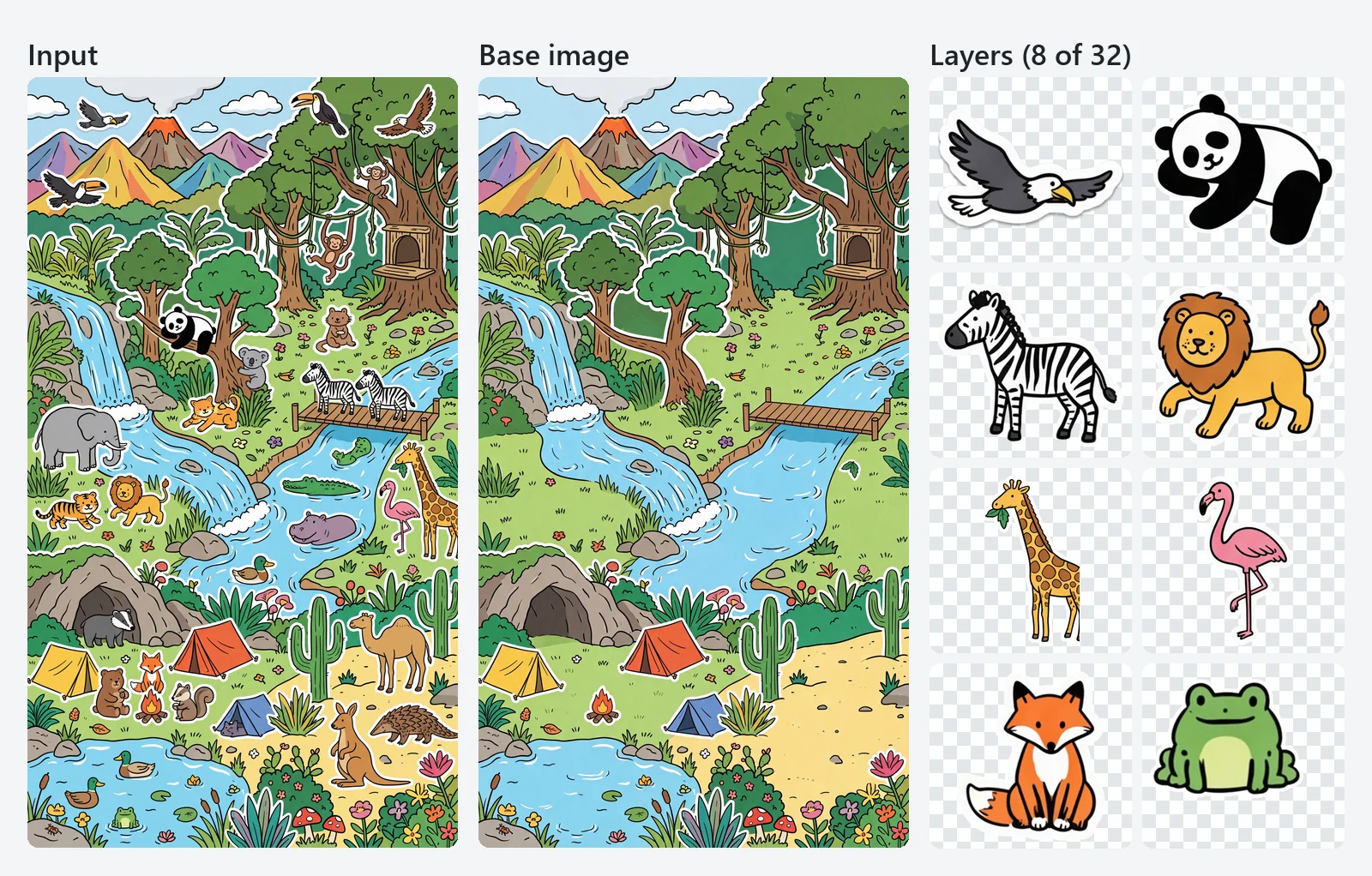
Input, base image and 8 of the 32 layers from ByteDance's Seedream 5.5 layer decomposition example.
When the task finishes, data.files lists one file per image, base image first. Each file has a layer object. This excerpt is from PoYo's test of the poster above, which returned a base image plus 5 layers in about 30 seconds:
{
  "files": [
    {
      "file_url": "https://storage.poyo.ai/images/task-unified-1794470400-abcd1234/task-unified-1794470400-abcd1234_1.png",
      "file_type": "image",
      "layer": { "z_index": 0 }
    },
    {
      "file_url": "https://storage.poyo.ai/images/task-unified-1794470400-abcd1234/task-unified-1794470400-abcd1234_2.png",
      "file_type": "image",
      "layer": {
        "z_index": 1,
        "name": "Dark brown bold serif main title",
        "description": "Dark brown bold serif main title text reading \"CLAY & LIGHT\"",
        "bounding_box": {
          "absolute": [0, 0, 887, 295],
          "normalized": [0, 0, 1000, 250]
        }
      }
    }
  ]
}
z_indexis 0 for the base image and counts up from 1; higher layers sit on top.bounding_box.absoluteis[left, top, right, bottom]in base-image pixels;normalizedis the same box on a 0–1000 scale.nameanddescriptionare written by the model.
The other four layers in that test were the subtitle, the linen-covered table, the vase with pampas grass and the date-and-venue text. To rebuild the image, scale each layer to its box and stack the layers in z_index order:
from io import BytesIO

import requests
from PIL import Image


def load(url: str) -> Image.Image:
    return Image.open(BytesIO(requests.get(url, timeout=60).content)).convert("RGBA")


def rebuild(files: list[dict]) -> Image.Image:
    files = sorted(files, key=lambda f: f["layer"]["z_index"])
    canvas = load(files[0]["file_url"])  # base image, z_index 0
    for f in files[1:]:
        left, top, right, bottom = f["layer"]["bounding_box"]["absolute"]
        layer = load(f["file_url"]).resize((right - left, bottom - top), Image.LANCZOS)
        canvas.alpha_composite(layer, (left, top))
    return canvas
Layer files are often larger than their box (the title layer above is 1775×591 for an 887×295 box), so always resize before placing. To place layers on a canvas of another size, convert from normalized instead.
Text OCR on text layers
Add "text_recognition": true and each regular text layer also returns layer.text_recognition: the full text, every line with its bounding box, and runs with approximate styles (similar_font_family, foreground_color, bold, italic, underline, strikethrough, shadow, translucent). Design tools can use this to change the copy, translate a layout or rebuild a template. Artistic and handwritten lettering stays part of the image layers.
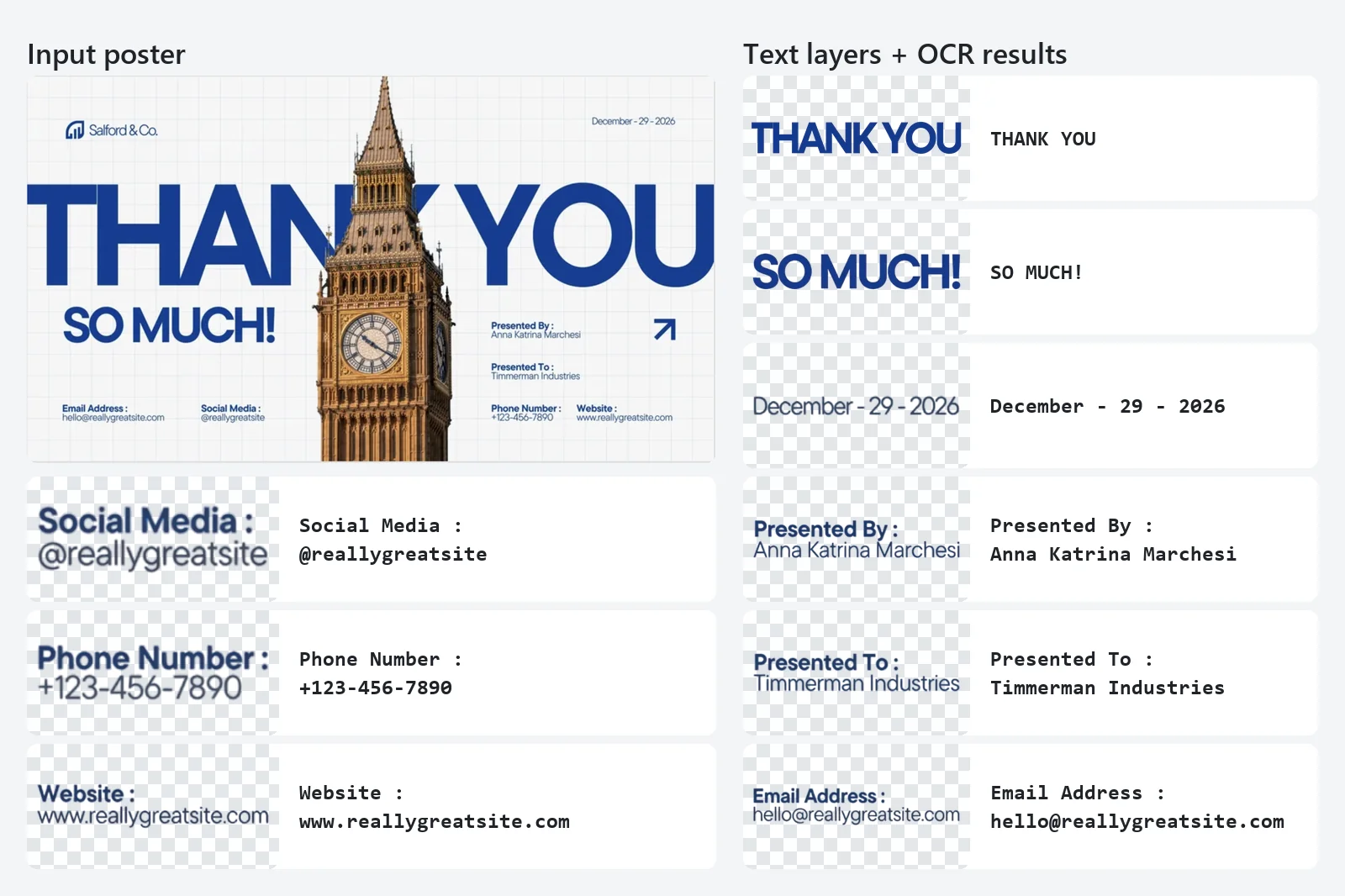
Text layers and their OCR results from ByteDance's Seedream 5.5 documentation.
Practical tips
- Pick the resolution by placement. 1K and 1.5K cost the same 4 credits, so use 1.5K rather than 1K for anything you might ship. Move to 2K for print, hero images and fine text.
- Watch the reference surcharge. Each reference image adds 1.6 credits. Send only the images the edit needs; a single well-chosen reference often beats five loose ones.
- Write edits as change + keep. "Replace X with Y. Keep A, B and C unchanged" gives the model a clear boundary and makes multi-turn editing more stable.
- Name references by position. Say "image 1", "image 2" in the order of
image_urls. - Keep
pngfor transparency.transparentpairs withoutput_format: "png", the format that carries the alpha channel. - Tune
max_imagesto the job. A simple product shot needs a handful of layers; a busy illustration benefits from 30–60. Lower values also lower the balance you need at submission. - Save outputs. Download each
file_urlto your own storage as soon as the task finishes. - Use callbacks at scale. A
callback_urlavoids polling hundreds of tasks; make the handler idempotent, since a completion event can arrive more than once.
Seedream 5.5 vs other Seedream APIs on PoYo
| Model | Best for | Max resolution on PoYo | PoYo price per image |
|---|---|---|---|
| Seedream 5.5 | Repeated edits, transparent PNGs, layered files | 2K | 4 credits (1K/1.5K) or 7 credits (2K), +1.6 per reference |
| Seedream 5.0 Pro | Dense layouts, infographics, multilingual text | 2K | 15 credits |
| Seedream 5.0 Lite | 3K output, custom sizes, sets of up to 15 images | 3K | 5 credits |
| Seedream 5.0 Flash | Low-cost drafts and multi-reference edits | 2K | 4 credits |
For a side-by-side look at capabilities, prices and migration steps, read Seedream 5.5 vs 5.0 Pro vs 5.0 Lite. Earlier guides cover the Seedream 5.0 Pro API, Seedream 5.0 Pro features and Seedream 5.0 Flash.
FAQ
What is Seedream 5.5?
Seedream 5.5 is ByteDance Seed's image creation model, released on November 9, 2026. It is the same model that BytePlus lists as Dola Seedream 5.5. It handles text-to-image, editing with up to 10 reference images, native transparent PNGs and layer decomposition into a base image plus up to 99 layers.
How much does the Seedream 5.5 API cost?
On PoYo, seedream-5.5 costs 4 credits ($0.02) per image at 1K or 1.5K and 7 credits ($0.035) at 2K, plus 1.6 credits ($0.008) per reference image. seedream-5.5-layerize charges the same per-image rate for every returned image, base image included, plus 1.6 credits for the input image; auto resolution bills at the 2K rate.
Is there a free Seedream 5.5 API?
Seedream 5.5 on PoYo is pay-as-you-go: you pay per successful image, with no subscription or minimum, starting at $0.02. One API key covers every Seedream version, and you can try prompts in the playground on the Seedream 5.5 model page before writing code.
Is there a Seedream 5.5 Pro?
ByteDance has announced that "a Pro version of the Seedream 5.5 series will follow". The current release is Seedream 5.5, available on PoYo as seedream-5.5 and seedream-5.5-layerize.
Does Seedream 5.5 support 4K?
Seedream 5.5 outputs at 1K, 1.5K or 2K. The largest sizes are 2048×2048 at 1:1, 2816×1584 at 16:9 and 3136×1344 at 21:9. For 3K output, use Seedream 5.0 Lite.
How many reference images can I use?
Up to 10 per request, as public JPEG, PNG or WebP URLs of up to 10 MB each. Each reference image adds 1.6 credits. Layer decomposition takes exactly one input image.
How do I get a transparent background?
Set background to transparent and output_format to png. This works for text-to-image and for edits, and the reference images can be ordinary RGB photos.
How many layers can Seedream 5.5 create?
Up to 99 layers plus the base image. Set max_images from 2 to 100 (default 30); the model returns as many layers as the image needs, up to that limit, and you are billed only for images returned.
How long does a Seedream 5.5 request take?
In PoYo tests in November 2026, a seedream-5.5 image took about 24 seconds on average and about 29 seconds at the 90th percentile. Layer decomposition requests returning 3 to 13 images took about 18 to 47 seconds.
Can Seedream 5.5 generate several images in one request?
Each seedream-5.5 request returns one image. For variations, send parallel requests and track each task_id. Layer decomposition is the exception: one request returns the base image and all its layers.