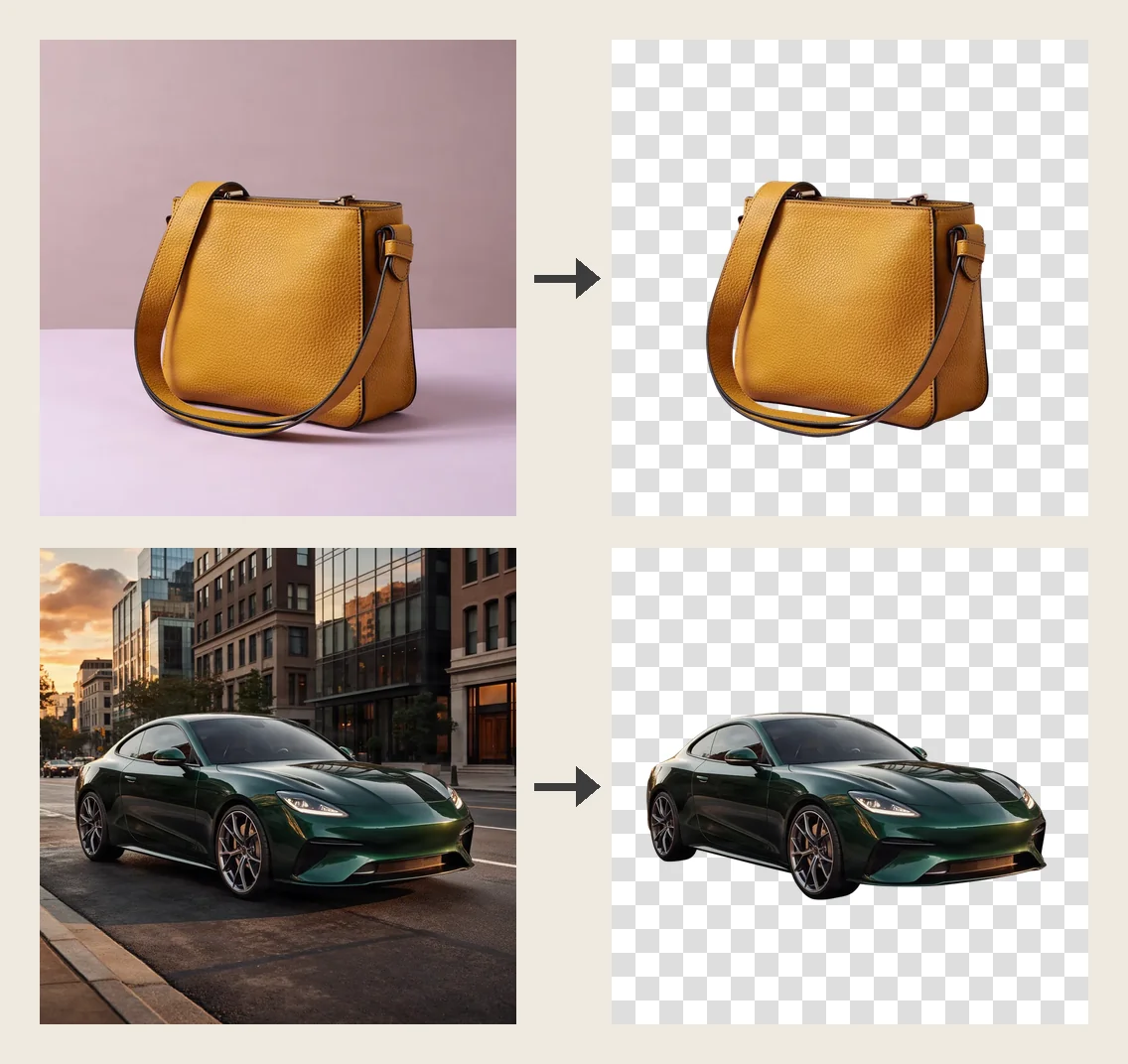
Bria RMBG 3.0 API for background removal: send one image and get a transparent PNG at the original size, with clean edges on hair, fur and mesh. An optional prompt chooses what to keep. 3.6 credits per image.
Drop files here, paste files, or add a URL. Required. Exactly one image: JPEG, PNG, WebP, GIF, AVIF, HEIC or HEIF. Upload a file or paste a public HTTP(S) URL.
——
25/2000
Output
Example Output
This is sample data. Generate a new result to see real output.
Bria's third-generation background removal model for clean, same-size transparent PNG cutouts
Bria RMBG 3.0 API - Background Removal with Clean Edges
The Bria RMBG 3.0 API is a background removal API that runs Bria RMBG 3.0, the third-generation background removal model from Bria AI, as one REST call on PoYo. Send one image and the API returns a transparent PNG at the same width and height, with clean edges on hair, fur, mesh and product labels. Add an optional prompt in plain words, such as "only the crochet cardigan", to choose what the cutout keeps. Each request costs 3.6 credits ($0.018), with or without a prompt.
One image in, one transparent PNG out. Bria RMBG 3.0 is built on Bria's 8B Fibo 2.0 image model and renders a soft alpha matte in four steps, so edges stay smooth instead of being cut to a hard outline. Through the Bria RMBG 3.0 API it accepts JPEG, PNG, WebP, GIF, AVIF, HEIC and HEIF images, takes an optional prompt of up to 2,000 characters and costs 3.6 credits ($0.018) per image.
Key Features of Bria RMBG 3.0 API
What the Bria RMBG 3.0 API does well, from hair and mesh edges to same-size product cutouts and prompt-guided selection.
01
Clean Edges on Hair and Fur
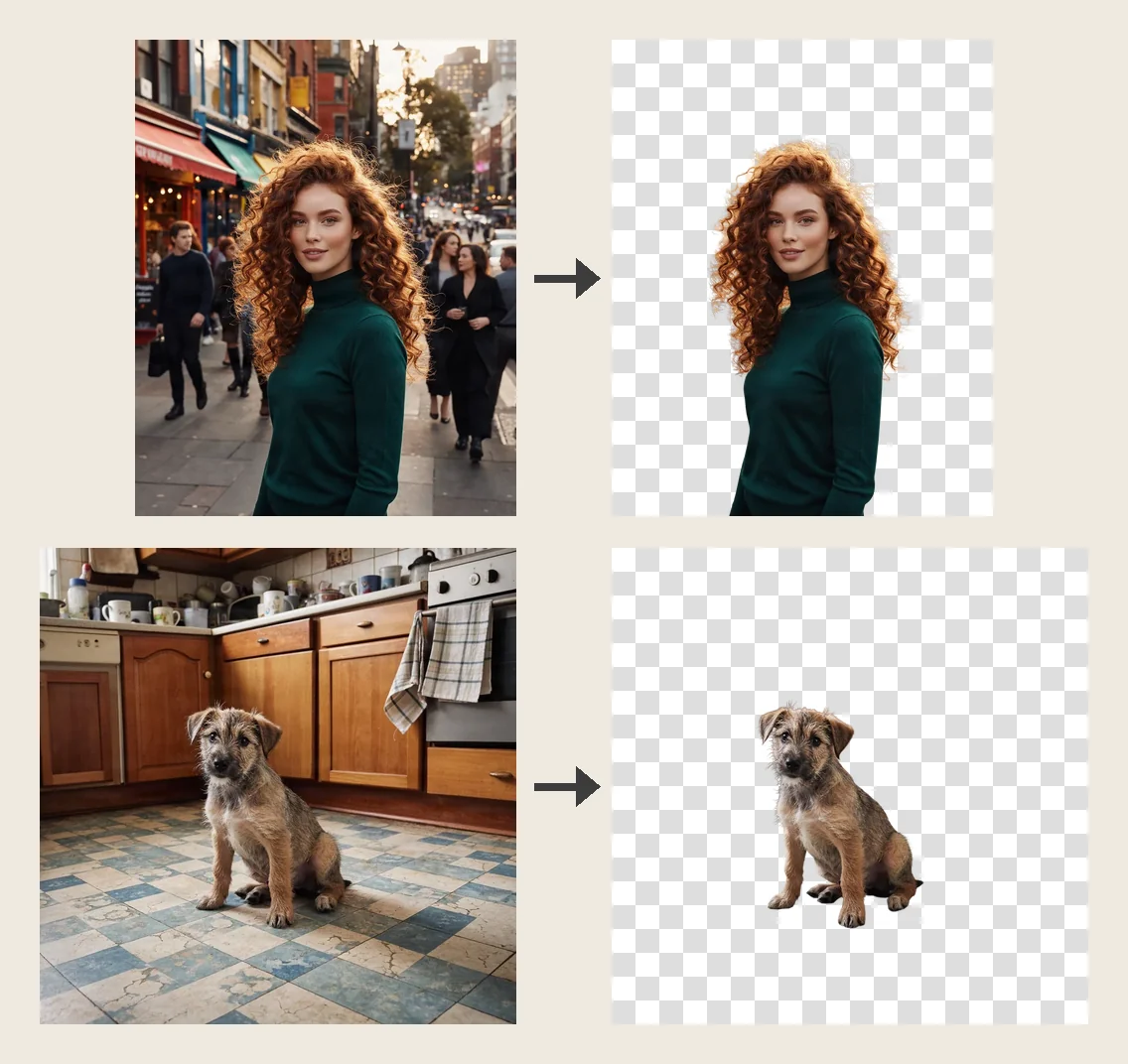
Cutouts usually fail at the edges: curly hair, a puppy's coat or loose strands against a busy street come out jagged or with a halo. Bria RMBG 3.0 treats background removal as an image edit and renders a soft alpha matte, so fine strands stay in the cutout instead of being clipped to a hard line. In Bria's published benchmark of 234 hard images, hair and fur is one of the categories where Bria RMBG 3.0 ranked first.
Soft alpha edges, not a hard mask
Curls and fur keep their fine strands
Busy streets and kitchens stay out
02
Open Gaps in Spokes, Mesh and Fences
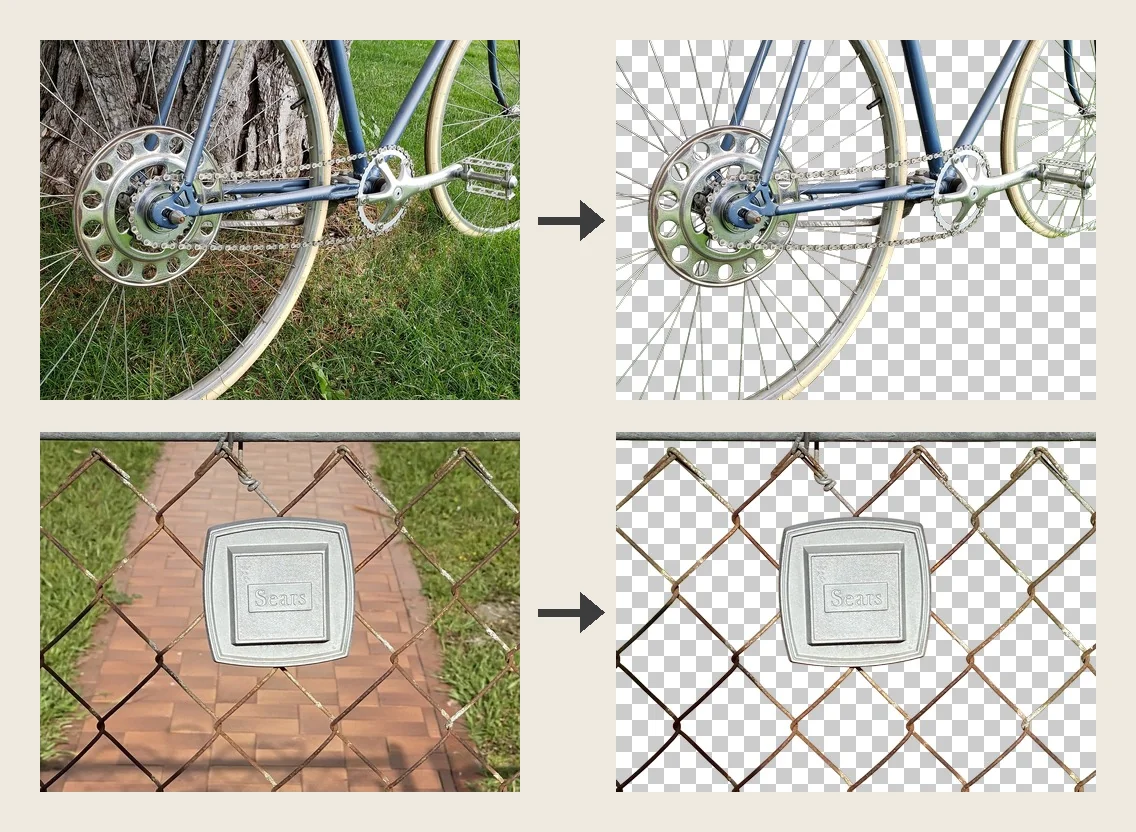
Many background removal tools fill in the holes of a bicycle wheel or a chain-link fence and leave grey patches behind. The Bria RMBG 3.0 API clears the gaps between spokes, mesh wires and chair rungs, so the new background shows through where it should. You get a cutout that drops onto any color or scene without retouching each hole by hand.
Gaps between spokes turn transparent
Fence and mesh openings are cleared
No grey fill left inside holes
03
Product and Car Cutouts at the Original Size
Product listings need a clean subject at the exact size of the original photo. The Bria RMBG 3.0 API returns a PNG with a transparent background at the same width and height as the input, so it lines up with your existing templates. Bria reports that packaging and white products stay solid and that printed labels and logos stay intact; on its set of 48 real online-store photos, Bria RMBG 3.0 ranked first with an average rank of 1.15.
Same width and height as the input
Labels and logos stay intact
Ready for listings and catalogs
04
Shadows and Busy Backgrounds Stay Out
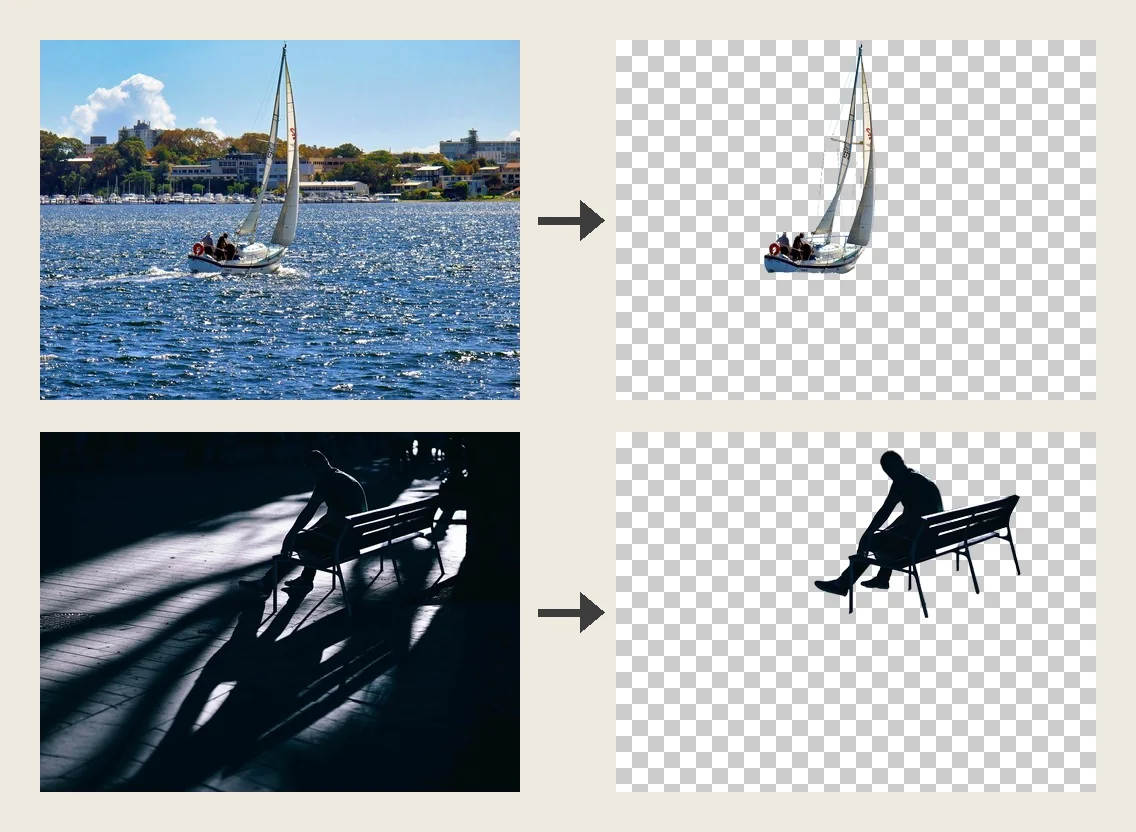
Cast shadows, reflections on water and crowded streets are easy to drag into a cutout by mistake. The Bria RMBG 3.0 API separates the subject from its shadow and from the scene around it, as with the sailboat on bright water and the person on a bench with long shadows, so the transparent PNG holds only the subject you want to place on a new background.
Cast shadows are left behind
Water and street scenes removed
Only the subject stays in the PNG
05
Choose What to Keep with an Optional Prompt
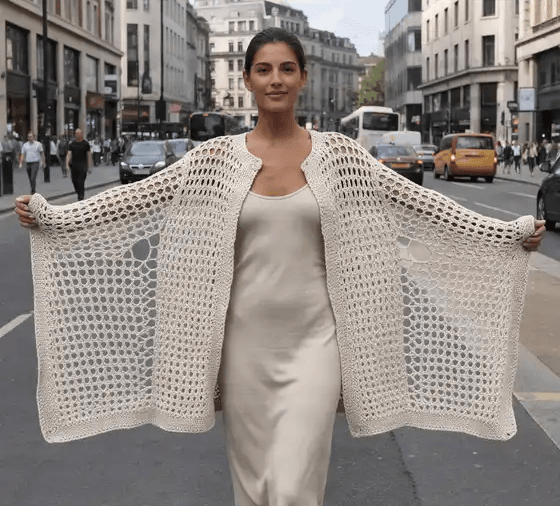
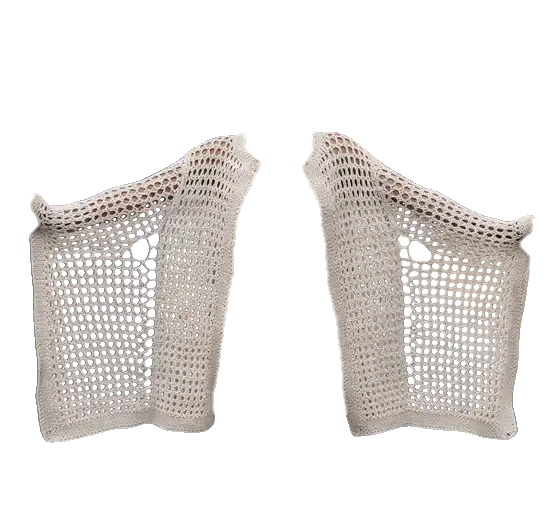
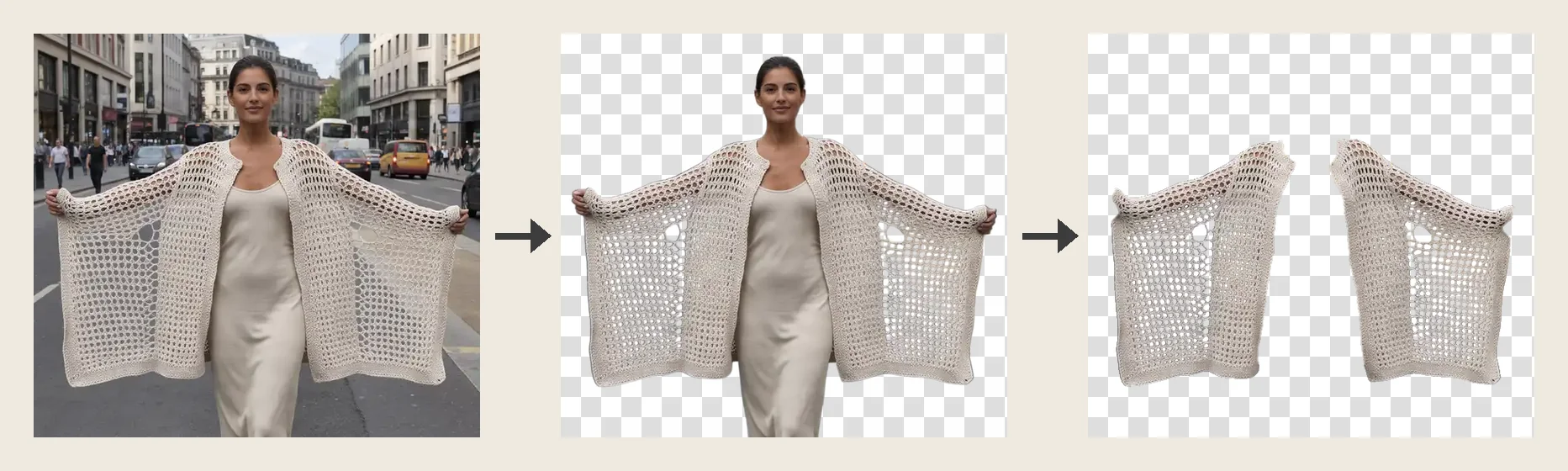
The most obvious subject is not always the one you need. Add a prompt to the Bria RMBG 3.0 API in plain words: keep a second object ("the person with the mat and the plant"), leave one out ("the woman at her desk without the lamp") or keep a single item ("only the chair"). In this PoYo test, the default cutout kept the woman and her cardigan, and the prompt "only the crochet cardigan" kept just the cardigan, at the same 3.6 credits.
Add, drop or isolate objects in plain words
Kept areas are the original pixels
Same price with or without a prompt
Who Can Benefit from Bria RMBG 3.0 API?
01
E-Commerce Product Listings
Marketplaces and store builders can call the Bria RMBG 3.0 API on every uploaded product photo, return a same-size transparent PNG and place it on a white or branded background, keeping labels and logos readable.
02
Fashion and Apparel Catalogs
Fashion teams can turn street and studio shots into catalog images. With a prompt such as "only the crochet cardigan", the Bria RMBG 3.0 API keeps the garment and removes the model, so one photo shoot covers both lookbook and product pages.
03
Profile Photos and Avatars
Social, dating and HR apps can cut people out of everyday photos for profile pictures and ID-style avatars. The Bria RMBG 3.0 API keeps curly and wind-blown hair, which is where simpler background removers usually fail.
04
Design and Marketing Tools
Template editors and ad builders can add one-click background removal to uploaded images, then drop the transparent PNG into banners, social posts and slides without asking users to trace edges by hand.
05
Photo Editing and Creator Apps
Photo editors and mobile creator apps can use the Bria RMBG 3.0 API as the first step of sticker making, background swaps and composites, with the optional prompt letting users pick which object to keep.
06
Print-on-Demand and Merchandise
Print-on-demand services can remove the background from logos, pets and product photos before printing them on shirts, mugs and stickers, using the transparent PNG at the original resolution of the upload.
How to Use Bria RMBG 3.0 API on PoYo
Step 1: Register & Create API Key Sign in to PoYo and create an API key in the dashboard. The same key works for the Bria RMBG 3.0 API and every other image, video and audio model on PoYo. Create API Key →
Step 2: Top Up Credits Add credits to your account. Each background removal request returns one transparent PNG for 3.6 credits ($0.018), whether or not you add a prompt. Add Credits →
Step 3: Call the Bria RMBG 3.0 API Send POST https://api.poyo.ai/api/generate/submit with your API key and a JSON body such as {"model": "bria-rmbg-3.0", "input": {"image_urls": ["https://storage.poyo.ai/models/bria-rmbg-3-0/examples/rmbg3-input-crochet-da4fe2ab38df.png"], "prompt": "only the crochet cardigan"}}. Leave out prompt to keep the most prominent subject. Poll the returned task_id or pass a callback_url to receive the PNG. The same request works from Python, Node.js or cURL. View Documentation →
Frequently Asked Questions about Bria RMBG 3.0 API
01
What is Bria RMBG 3.0?
Bria RMBG 3.0 is the third-generation background removal model from Bria AI, published in November 2026. Instead of a segmentation network, it is built on Bria's 8B Fibo 2.0 image model and renders a soft alpha matte in four steps. PoYo offers it as the Bria RMBG 3.0 API with the model ID bria-rmbg-3.0: send one image and get back a transparent PNG at the original size.
02
How is Bria RMBG 3.0 different from RMBG 2.0?
RMBG 2.0 is a 0.2B segmentation model based on the BiRefNet architecture and returns a cutout in under a second. Bria RMBG 3.0 is an 8B generative model that treats background removal as an image edit; according to Bria, it is slower, at a few seconds per image, but handles hard images such as hair, fur, mesh, shadows and product labels better. On PoYo, the Bria RMBG 3.0 API also accepts an optional prompt to choose what to keep.
03
How do I remove an image background with the Bria RMBG 3.0 API?
Send a POST request to https://api.poyo.ai/api/generate/submit with model set to bria-rmbg-3.0 and input.image_urls set to one public image URL. The API returns a task_id right away; poll the task status or pass a callback_url, and the finished task contains one PNG file with a transparent background.
04
What does the Bria RMBG 3.0 API return?
One PNG with an alpha channel per request. The background is transparent, the kept areas are the original pixels of your photo, and the image has the same width and height as the input, so the cutout lines up with the original in any layout.
05
Can I choose which object Bria RMBG 3.0 keeps?
Yes. Add a prompt of up to 2,000 characters in plain words: keep more ("the person with the mat and the plant"), leave something out ("the woman at her desk without the lamp") or keep one item ("only the chair"). Without a prompt, the Bria RMBG 3.0 API keeps the most prominent subject. The price is the same either way.
06
How well does Bria RMBG 3.0 handle hair, fur and fine detail?
Hair and fur are among its strengths. In Bria's published benchmark of 234 hard images across 12 categories, Bria RMBG 3.0 ranked first overall among six background removal systems, with an average rank of 1.51 and the best or tied-best result on 185 of the 234 images, and first in seven categories, including hair and fur, holes and mesh, shadows and reflections, motion blur and multiple subjects. These are Bria's own test results.
07
Which image formats can I send?
JPEG, PNG, WebP, GIF, AVIF, HEIC and HEIF. Pass exactly one publicly accessible HTTP or HTTPS URL in image_urls; in the Playground you can also upload a file. The output is always a PNG with transparency.
08
How long does a background removal request take?
Bria says each image takes a few seconds; in its own tests, a roughly 1-megapixel image took about 6 seconds on one L40S GPU. In PoYo tests with 560-pixel images, a cutout took about 8 seconds and a prompt-guided cutout about 27 seconds. Requests run as asynchronous tasks, so your application can keep working while the cutout is processed.
09
How much does the Bria RMBG 3.0 API cost on PoYo?
3.6 credits ($0.018) per image, with or without a prompt. Each request returns one transparent PNG, there is no subscription, and the Playground shows the cost before you run a request.
10
Can I remove backgrounds from many images at once?
Each Bria RMBG 3.0 API request processes one image. For batch background removal, submit one request per image in parallel; every request gets its own task_id, so you can track each image and receive the results by polling or callback as they finish.
11
Can I remove the background from a video?
The Bria RMBG 3.0 API works on images. For videos, use PoYo's AI Video Background Removal API, which removes the background from a whole clip and returns a video with a transparent or solid-color background.
Why Use PoYo for Bria RMBG 3.0 API Access
01
One API Key for Every Model
Call the Bria RMBG 3.0 API with the same request format and API key you use for image generation, video and audio models on PoYo, and chain a cutout into your next generation step.
02
Fixed Price per Image
Every Bria RMBG 3.0 API request returns one transparent PNG for 3.6 credits, shown before you submit. No subscription, and you pay only for the images you process.
03
Playground Testing
Upload a photo or paste a URL, try prompts that choose what to keep, preview the cutout on a checkerboard and download the PNG, then copy the JSON request into your code.
04
Developer-Friendly Integration
Use the documented Bria RMBG 3.0 API request fields, task polling and callback URLs, so background removal never blocks your application.