Nano Banana 2.1: What's New, Pricing & API Guide
Explore Nano Banana 2.1 updates, multilingual text, character consistency, and 4K examples. Learn prompt tips and Poyo API steps, starting at $0.02 per image.
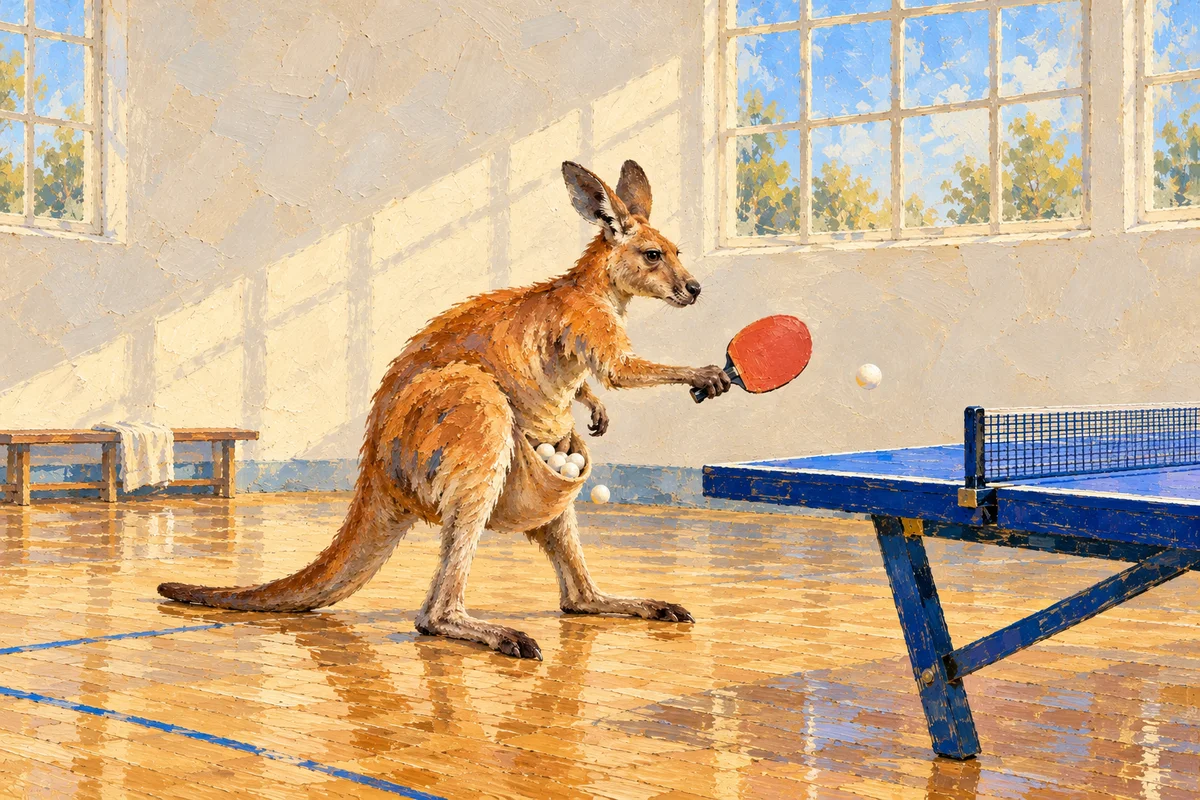
Nano Banana 2.1 is Google’s update to Nano Banana 2 for image generation and editing, with improvements to visual quality, prompt adherence, text rendering, and character consistency across editing turns. On Poyo, you can generate 1K, 2K, and 4K images and edit with up to 10 reference images, starting at 4 credits ($0.02) per image.
For multilingual signs, character storyboards, or high-resolution scenes, start with the three examples below: inspect the inputs and outputs, learn how prompts define composition and features to preserve, and choose a resolution for your delivery size. Text-to-image generation and reference editing share the model ID nano-banana-2.1 in the playground and API. This guide also includes a price table and the complete submission and status-query steps.
Nano Banana 2.1 Pricing, Resolution, and Reference Images at a Glance
| Item | Configuration on Poyo |
|---|---|
| Provider | |
| Google model ID | gemini-nano-banana-2.1 |
| Poyo model ID | nano-banana-2.1 |
| Workflows | Text to image, reference-based editing, multi-reference composition |
| Output resolution | 1K, 2K, 4K; API default 1K |
| Reference images | Up to 10 in both the playground and API |
| Explicit aspect ratios | 1:1, 2:3, 3:2, 3:4, 4:3, 4:5, 5:4, 9:16, 16:9, 21:9 |
| Editing aspect ratio | Supports auto to choose a ratio from the references |
| Starting price | 4 credits / $0.02 per image |
Try the examples on the Nano Banana 2.1 model page, or explore the parameters in the API documentation.
What Changed from Nano Banana 2?
Text Rendering and Visual Layout
Google highlights text rendering and infographic layout as key improvements. These matter for signs, posters, exhibit labels, and educational images: describe the visual scene and provide the exact copy, reading order, weight, alignment, and spacing. The station example below shows how Chinese, English, and Japanese text can share a set of signs.
Character and Object Consistency
The update covers character consistency across editing turns and multi-reference composition. For character storyboards or product scenes, references can supply a face, outfit, product silhouette, and scene structure. The prompt defines the features to preserve and the pose, background, or lighting to change. The four-panel example below lets you examine one character across several scenes within a single image.
Visual Quality and High-Resolution Output
Nano Banana 2.1 offers three resolution tiers. Google also highlights improvements to realism and wide images. On Poyo, choose between 1K, 2K, 4K, and several aspect ratios according to your delivery size and composition.
Nano Banana 2.1 vs. Nano Banana 2 vs. Nano Banana Pro
These three models belong to Google’s Nano Banana family. Compare their creative roles, output sizes, and Poyo prices when planning the same brief.
| Comparison | Nano Banana 2.1 | Nano Banana 2 | Nano Banana Pro |
|---|---|---|---|
| Positioning | Updated model for efficient everyday generation and editing | Previous-generation model for established generation and editing workflows | Premium model for complex visual briefs and precise creative control |
| Creative strengths | Multilingual text, character consistency across edits, realistic and wide scenes | Multilingual visuals, reference-based composition, high-resolution scenes | Detailed compositions, localized brand assets, consistent visual identity |
| Output resolution on Poyo | 1K, 2K, 4K | 1K, 2K, 4K | 1K, 2K, 4K |
| Poyo price per image, standard routes | 1K: $0.02; 2K: $0.03; 4K: $0.05 | 1K: $0.025; 2K: $0.04; 4K: $0.06 | 1K/2K: $0.04; 4K: $0.07 |
| Suggested briefs | Signs, character storyboards, product scenes, wide image concepts | Existing briefs with saved prompts and references | Brand campaigns, complex scenes, finely specified layouts |
For a new brief involving text, reference editing, or several rounds of character refinement, start with Nano Banana 2.1. For an established Nano Banana 2 workflow, use your saved prompt and references as a baseline for comparison. For a detailed brand brief or complex composition, test Nano Banana Pro with the same inputs and assess layout, subject fidelity, and delivery size alongside cost.
Nano Banana 2.1 Examples: Multilingual Text, Character Consistency, and a 4K Scene
These inputs and outputs come from the generation examples on Poyo’s model page. Each example identifies the references, requested aspect ratio and resolution, and details to inspect in the output, so you can adapt the prompt to your own brief.
1. Railway Signs in Three Languages
|
Input 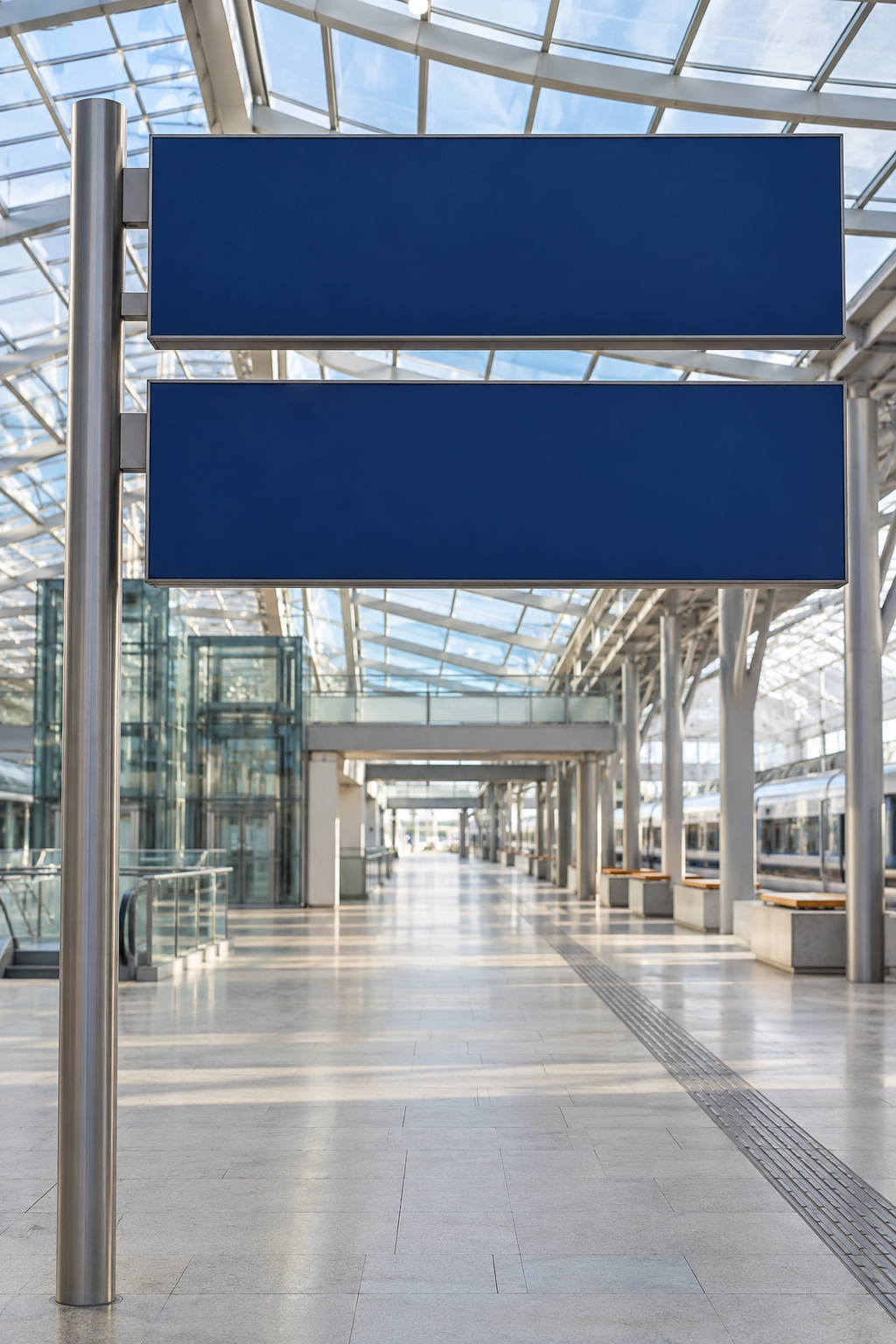
Prompt excerpt
|
Output 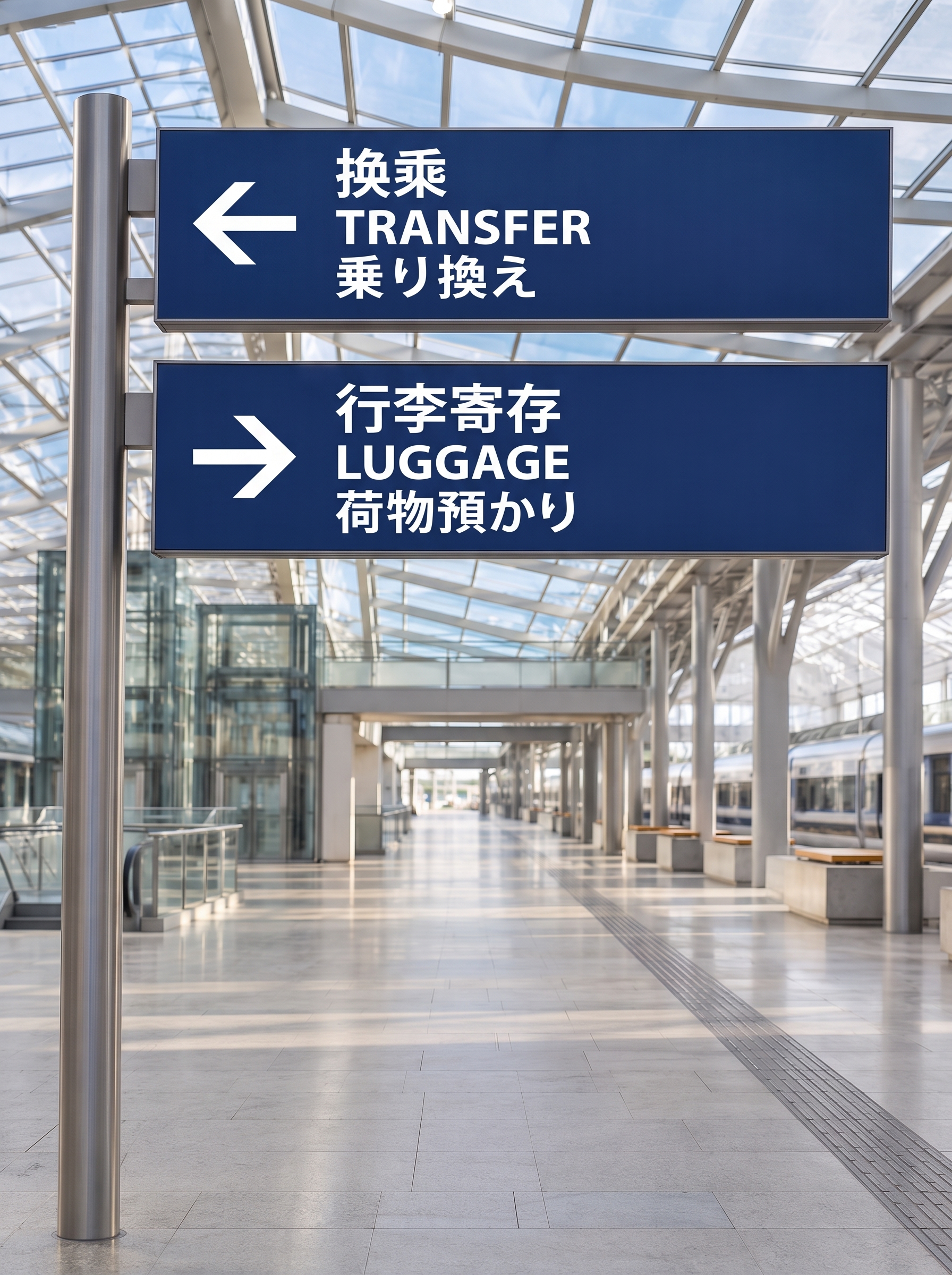
|
Input and settings: Use one station reference image at 3:4 and 2K, arranging two dark blue panels as directional signs.
What to inspect: The output displays “换乘 / TRANSFER / 乗り換え” and “行李寄存 / LUGGAGE / 荷物預かり”. Zoom in to check all three languages line by line, the arrow direction on each panel, and the contrast between the white lettering and blue background.
Prompt approach: Assign copy, arrow direction, and text hierarchy to each panel while preserving the architecture, perspective, and lighting. Apply the same structure to localized signs or exhibit labels, then proofread each line and its punctuation.
2. One Researcher Across Four Panels
|
Input 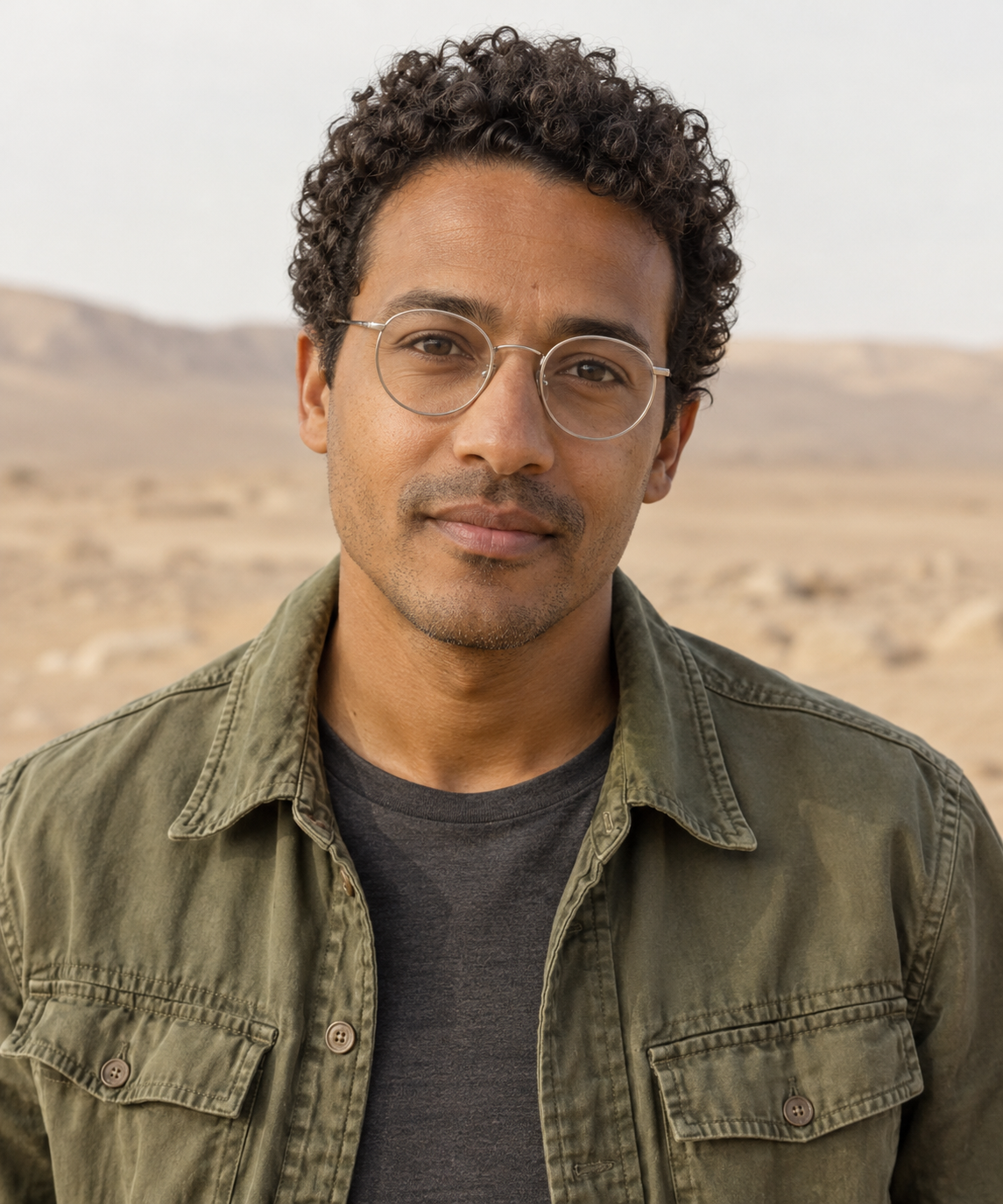
Prompt excerpt
|
Output 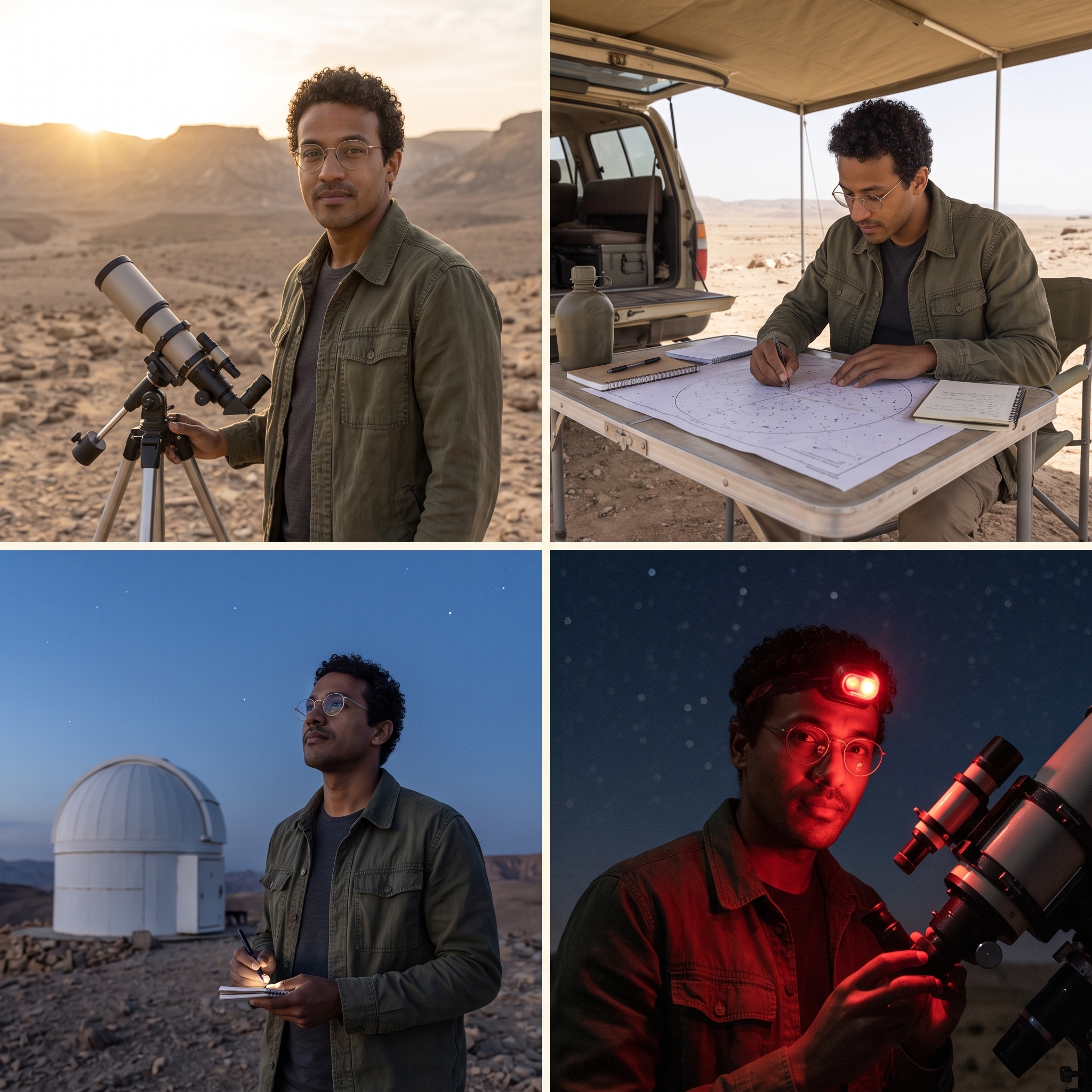
|
Input and settings: Use a single character reference. One request produces one square 2K image containing four panels.
What to inspect: The scenes cover a sunrise observation, a star chart, an observatory, and a night telescope setup, carrying forward short curly hair, round glasses, and an olive-green jacket. Compare each panel with the reference to check the face, hair, and clothing, then examine changes in activity and lighting.
Prompt approach: Define shared character traits first, then describe the activity, framing, and light in each panel. This structure works for character storyboards, character design, and series concepts. For further editing rounds, supply the selected image in each new request and check the features you want to preserve.
3. A Sketch Turned into a 4K Volcanic Coast
|
Input 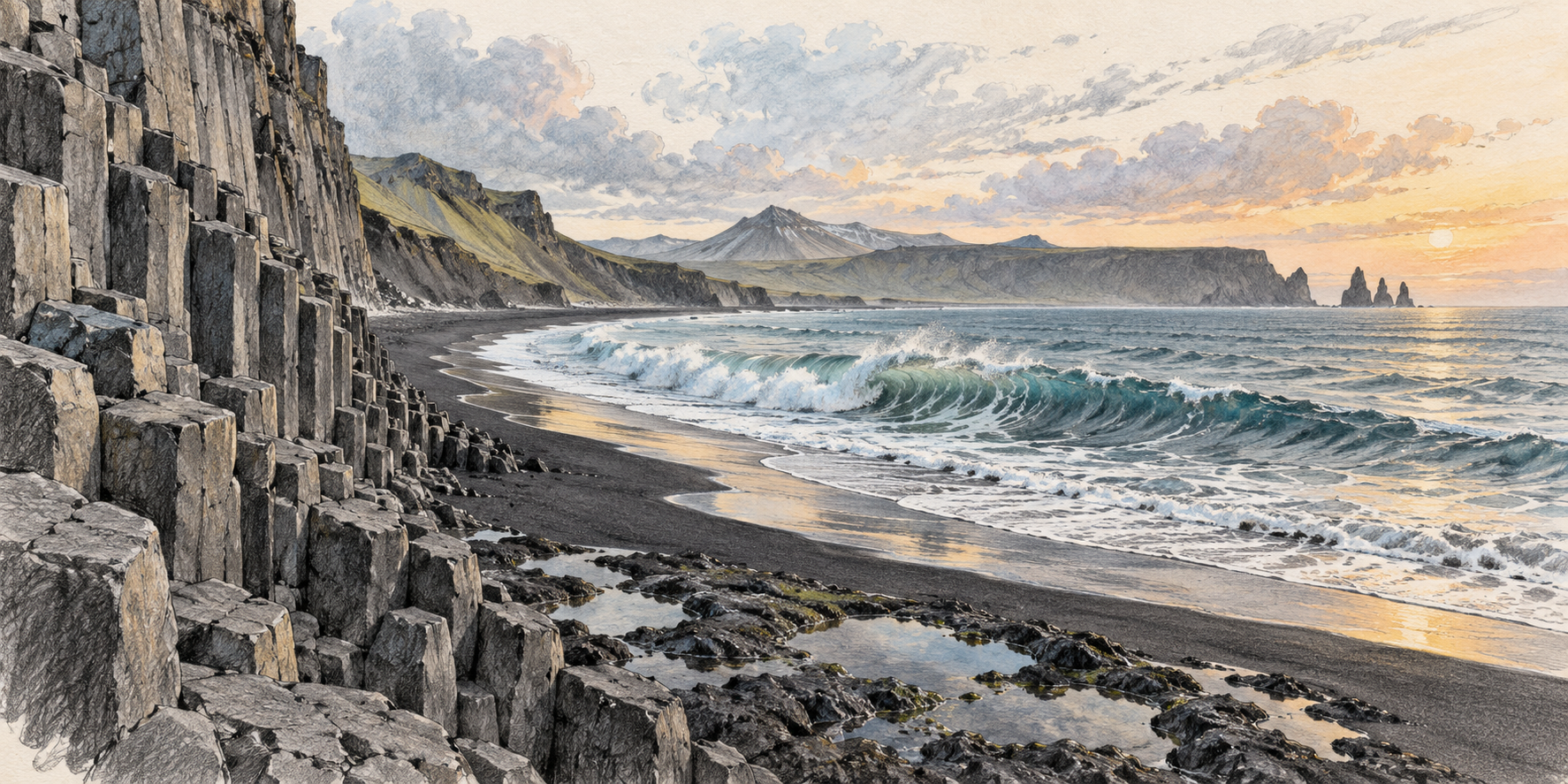
Prompt excerpt
|
Output 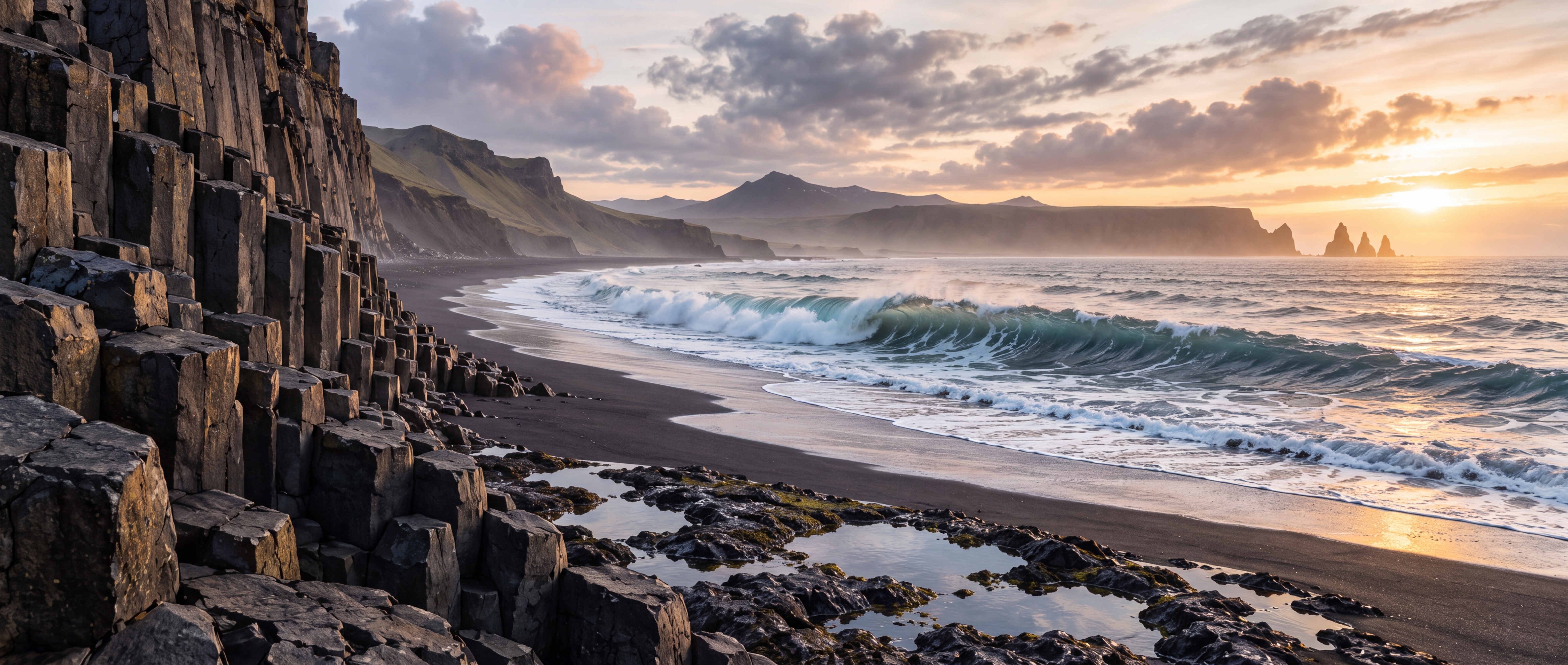
|
Input and settings: Use the coastal sketch to guide composition at 21:9 and 4K.
What to inspect: Compare the input and output for the positions of the basalt columns on the left, the curved black-sand bay, and the distant landforms. Then zoom in on rock texture, sea foam, and layers of morning light. The panorama combines the reference structure with the materials and lighting described in the prompt.
Prompt approach: Assign composition to the reference and a photographic style to the output, then describe materials, lighting, and depth. This approach suits wide scene concepts, website banners, and high-resolution environment assets.
Nano Banana 2.1 Pricing and Resolution Choices
Poyo applies the same resolution-based pricing to text-to-image generation and editing. These prices were updated on October 8, 2026:
| Resolution | Credits per image | Price per image | Budget for 100 images | Suggested use |
|---|---|---|---|---|
| 1K | 4 credits | $0.02 | $2 | Composition exploration, previews, smaller images |
| 2K | 6 credits | $0.03 | $3 | Multilingual visuals, product images, general delivery |
| 4K | 10 credits | $0.05 | $5 | High-resolution scenes, detail views, larger assets |
Calculate budgets by the number of generated images. When planning 100 final assets, include candidate images and editing rounds for each concept. Explore the direction at a smaller resolution, then generate at 2K or 4K according to delivery requirements to keep each round’s cost clear. See the model page for current pricing.
For example, generate three 1K candidates for each of 10 concepts, then one 4K final image per concept. The 40 outputs cost 120 credits ($0.60) for the candidates and 100 credits ($0.50) for the 4K images: 220 credits ($1.10) in total. Include further editing rounds as additional outputs to budget for the actual creative workflow.
How to Use Nano Banana 2.1 in the Poyo Playground
- Open the Nano Banana 2.1 model page.
- Describe the subject, composition, style, lighting, and exact text.
- For editing, upload references and explain the role of each image.
- Select an aspect ratio and 1K, 2K, or 4K output; editing also offers
auto. - Generate, inspect the text, subject features, and details, then refine the concept and download the image.
For example, “image 1 supplies the person, image 2 the outfit, and image 3 the scene” explains how the references relate. For a later edit, supply the image to revise in a new request and describe the changes and features to preserve.
Nano Banana 2.1 API Integration
The following examples demonstrate the request structure, with prompts written around poster and station-sign tasks.
Submit a Text-to-Image Request
Create a Poyo API key, then use the unified submission endpoint:
curl --request POST \
  --url https://api.poyo.ai/api/generate/submit \
  --header 'Authorization: Bearer YOUR_API_KEY' \
  --header 'Content-Type: application/json' \
  --data '{
    "model": "nano-banana-2.1",
    "input": {
      "prompt": "Create a museum poster titled OCEAN & EARTH. Place the title at the top, a detailed ocean illustration in the center, and the subtitle Explore Our Blue Planet at the bottom. Use crisp readable typography, generous spacing, deep blue and warm ivory colors.",
      "size": "3:4",
      "resolution": "2K"
    }
  }'
After a successful submission, read the task ID from data.task_id in the response.
Edit with a Reference Image
Keep the same model ID and add image_urls inside input. This request body edits the station image:
{
  "model": "nano-banana-2.1",
  "input": {
    "prompt": "Preserve the station architecture, perspective and lighting. Set the top sign to three stacked lines: 换乘, TRANSFER, 乗り換え, with a left arrow. Set the lower sign to 行李寄存, LUGGAGE, 荷物預かり, with a right arrow. Use bold white lettering on dark blue panels with generous line spacing.",
    "image_urls": [
      "https://storage.poyo.ai/nano-banana-2-1/inputs/railway-v1-6d464d939584.png"
    ],
    "size": "3:4",
    "resolution": "2K"
  }
}
size controls aspect ratio and resolution controls output resolution. Text-to-image defaults to size: "1:1"; requests with references default to size: "auto". Both workflows default to 1K resolution.
Retrieve the Result
Replace the task ID in this URL with the value from the submission response:
curl --request GET \
  --url https://api.poyo.ai/api/generate/status/YOUR_TASK_ID \
  --header 'Authorization: Bearer YOUR_API_KEY'
Poll every 2–5 seconds. When data.status becomes finished, read each image’s file_url from data.files and save it. You can also add a top-level callback_url to the submission request to receive a notification when the task completes. See the task status documentation for the full flow.
Nano Banana 2.1 Prompt Tips: Exact Text and Features to Preserve
Use the structure “subject + composition + style and materials + lighting + exact text + preservation requirements”:
For a sign prompt, start with “two dark blue directional signs inside a station,” add each panel’s copy line by line and its arrow direction, then specify the architecture, perspective, and lighting to preserve. Each added requirement corresponds to a detail you can inspect in the output. Use the same approach for character and product edits, describing the features to preserve and the changes to make separately.
- Text tasks: Supply copy line by line, then specify font style, weight, alignment, and spacing.
- Character tasks: Define shared face, hair, and clothing features before describing each scene.
- Reference composition: Assign sources for the subject, objects, environment, and style in reference order.
- Image editing: Describe this round’s changes and the geometry, viewpoint, and lighting relationships to preserve.
- Delivery review: Zoom in on text, hands, edges, textures, and product markings before selecting the final asset.
Frequently Asked Questions
What is Nano Banana 2.1?
Nano Banana 2.1 is Google’s updated Nano Banana model for image generation and editing. It improves visual quality, text rendering, prompt adherence, and character consistency across editing turns. On Poyo, it supports 1K, 2K, and 4K output and editing with up to 10 reference images.
What are the main upgrades over Nano Banana 2?
Google highlights improvements to text rendering, infographic layout, realism, wide images, and character consistency across edits. Use an existing brief with the same prompt, references, aspect ratio, and resolution to compare the details that matter to your task, such as lettering, facial features, or product materials.
How should I choose between Nano Banana 2.1 and Nano Banana Pro?
Start with Nano Banana 2.1 for everyday generation, multilingual signs, reference-based editing, and character iteration. Nano Banana Pro is positioned for complex visual briefs, localized brand assets, and precise creative control. Compare both on the same brief and choose by composition, subject fidelity, output size, and budget.
How much do generation and editing cost on Poyo?
Both workflows use the same resolution-based price: 1K costs 4 credits ($0.02), 2K costs 6 credits ($0.03), and 4K costs 10 credits ($0.05) per image. Include candidate images and further editing rounds in your budget. For example, 100 images cost $2 at 1K, $3 at 2K, or $5 at 4K.
How should I choose 1K, 2K, 4K, and an aspect ratio?
Use 1K to explore composition, 2K for general delivery and text-rich visuals, and 4K for larger assets and fine-detail review. Choose the aspect ratio for the intended placement, such as a portrait poster or a 21:9 banner. For editing, auto can choose a ratio from the references; the API defaults to 1K resolution.
How many reference images can I use, and what should each provide?
The Poyo playground and API support up to 10 reference images. Assign each image a clear role in upload order: for example, image 1 supplies the person, image 2 the product or outfit, and image 3 the scene. Explain the appearance, proportions, materials, or composition to preserve in the final image.
How can I keep a person or product consistent across edits?
Supply the selected image in each new editing request and repeat the defining features to preserve, such as the face, hairstyle, clothing, product silhouette, logo position, and materials. Focus each round on one change, such as lighting or background. Compare the result with the reference before using it as the input for the next round.
How can I generate clear Chinese, English, and multilingual text?
Write the exact text in quotation marks and specify its language, position, reading order, font style, and spacing. For several languages, assign each line or panel its own copy, as in the station example above. Choose a resolution for the intended viewing size, then zoom in and proofread each line before delivery.
What watermark or provenance marker do generated images carry?
Google states that images generated by its image models include a SynthID watermark. SynthID is an invisible marker embedded in the image to help identify AI-generated content. This describes the model’s provenance marking; inspect the downloaded result for its visible appearance.
How can I try Nano Banana 2.1 on Poyo and download the result?
Open the Nano Banana 2.1 model page, enter a prompt, and upload references for editing. Choose an aspect ratio and resolution, then generate. Review the completed image, refine the prompt or references for another round, and download the selected result.
To start creating, open the Nano Banana 2.1 model page and adapt an example to your own subject, copy, and composition.