Hunyuan 3D 3.6 API for high-poly 3D generation: turn a text prompt, one image or up to 8 views into a GLB model with up to 2,000,000 faces, 2K, 4K or 8K textures and optional PBR maps. From 120 credits per model.
Tencent's high-poly 3D generation model for detailed geometry and PBR textures
Hunyuan 3D 3.6 API - High-Poly 3D Models with 8K Textures and PBR
The Hunyuan 3D 3.6 API is a 3D generation API that runs Hunyuan 3D 3.6 (Hy3D 3.6), the 3D model Tencent Hunyuan released on November 27, 2026, as one REST call on PoYo. Send a text prompt, one front-view image, or a front view plus up to 7 more views of the same object, and the Hunyuan 3D 3.6 API returns a GLB model with up to 2,000,000 faces, 2K, 4K or 8K textures and optional PBR maps, plus an OBJ ZIP for textured models and a preview image. Pricing starts at 120 credits ($0.60) for a geometry-only model.
Hunyuan 3D 3.6 Text to 3D (hunyuan-3d/v3.6/text-to-3d)
Describe an object in up to 1,024 characters and the Hunyuan 3D 3.6 API builds a textured or geometry-only 3D model. Pick one of five style presets (qinghuaci, china_style, sculpture, cartoon, cyberpunk) to set the look of the texture. 400 credits ($2.00) for a textured model, 160 credits ($0.80) for geometry only.
02
Hunyuan 3D 3.6 Image to 3D (hunyuan-3d/v3.6/image-to-3d)
Send one front-view image, and add back, left, right, top, bottom, left-front or right-front views when you have them. The Hunyuan 3D 3.6 API rebuilds the object from every view you send. 280 credits ($1.40) textured or 120 credits ($0.60) geometry only from one image; 400 or 160 credits with extra views.
Key Features of Hunyuan 3D 3.6 API
What the Hunyuan 3D 3.6 API is built for: dense, clean geometry, high-resolution PBR textures and three ways to describe the object.
01
High-Poly Geometry up to 2,000,000 Faces
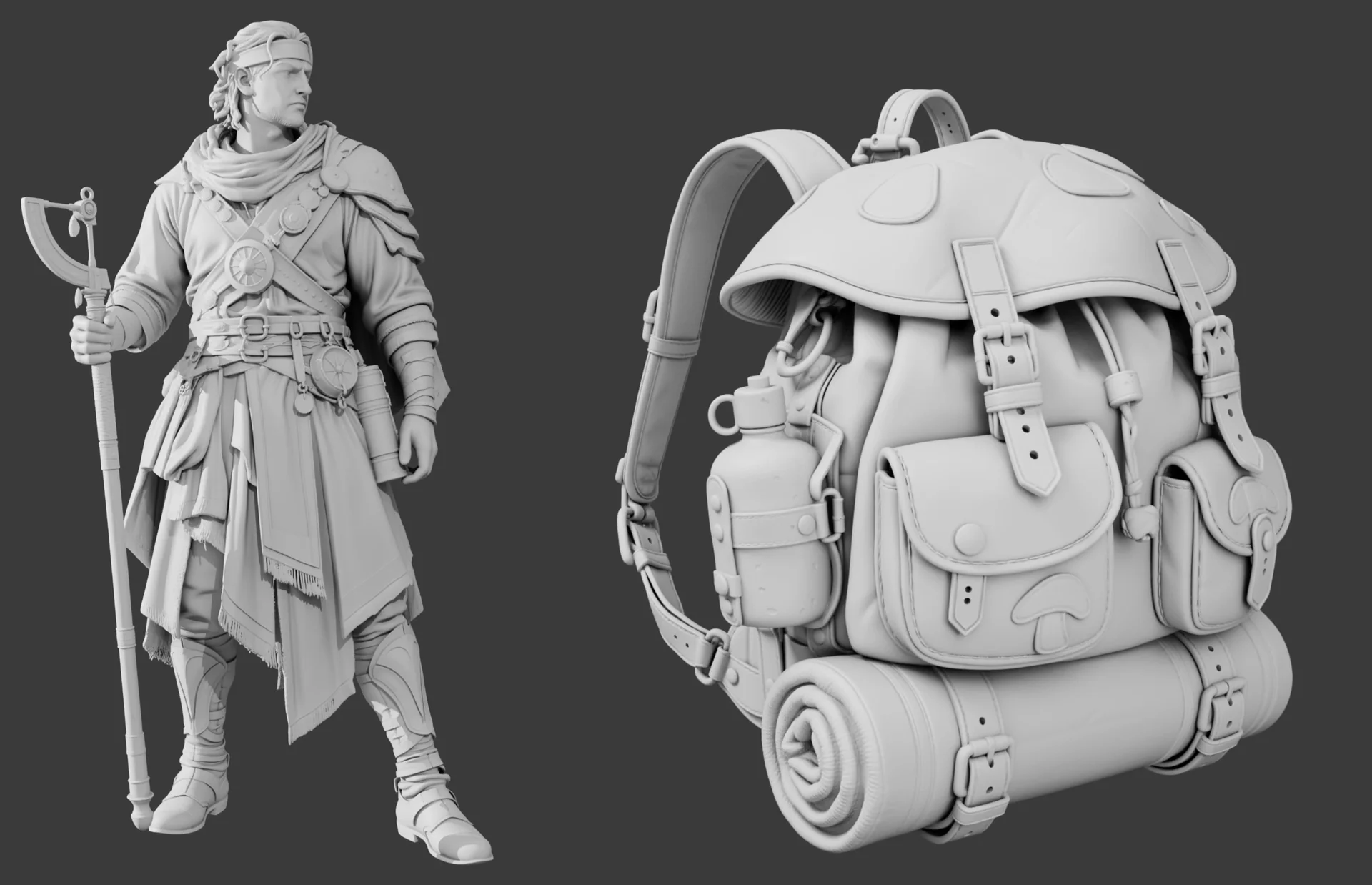
Character busts, armor and props lose their value when surfaces come out lumpy or parts blur together. Hunyuan 3D 3.6 raises the face limit from 1.5 million in Hunyuan 3D 3.1 to 2 million, and Tencent tuned it for flat, clean surfaces, clear part boundaries and finer faces, hair and cloth folds. With the Hunyuan 3D 3.6 API you set face_count from 1,000 to 2,000,000 and turn on face_strict_mode when you need an exact count.
Up to 2,000,000 faces per model
Clear part edges on armor and gear
Exact face counts with face_strict_mode
02
8K Textures and PBR Materials
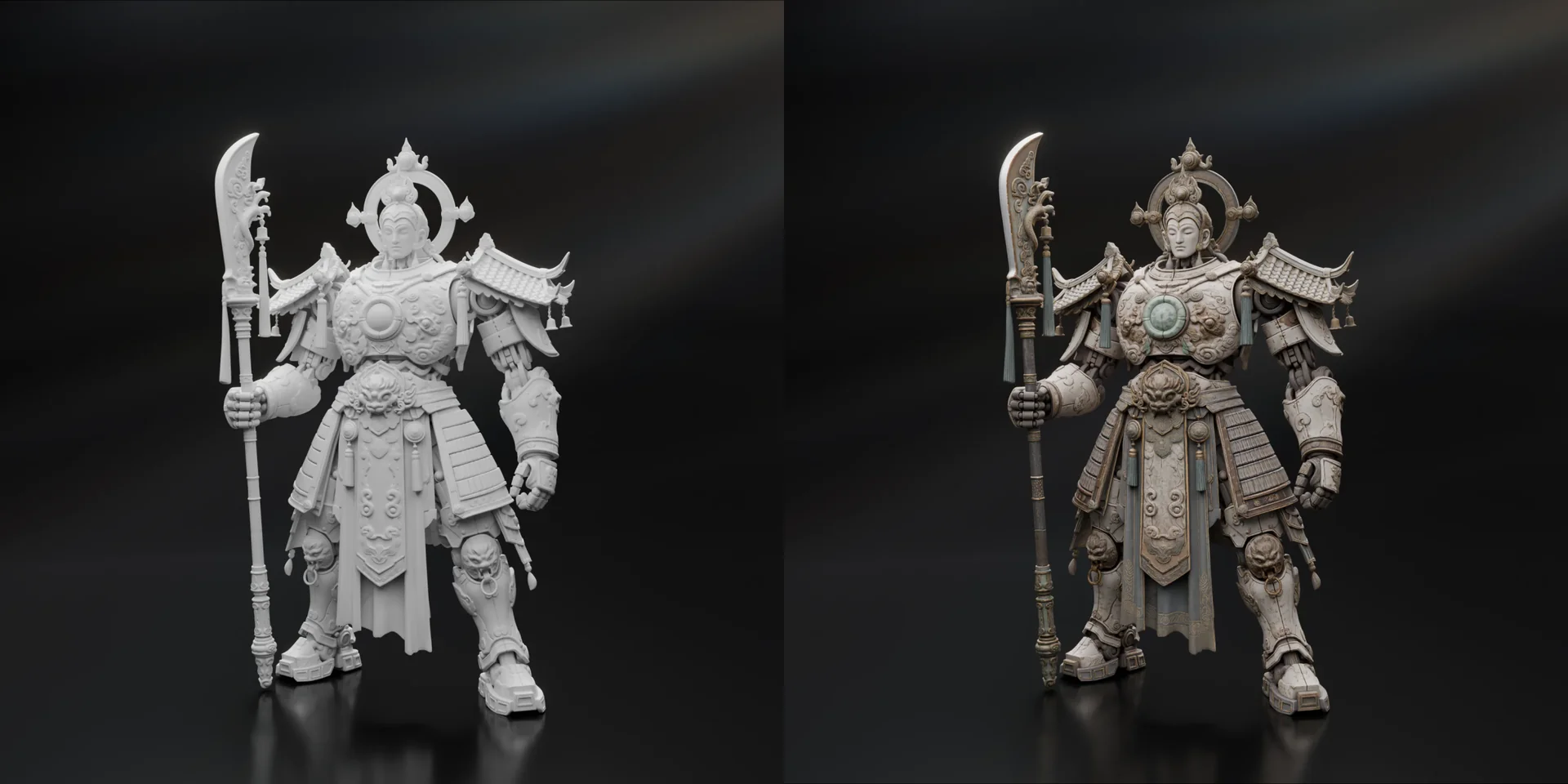
A model is only as convincing as its surface. Hunyuan 3D 3.6 generates the texture together with the geometry, and the Hunyuan 3D 3.6 API lets you choose 2K, 4K or 8K texture maps in PNG, JPEG or WebP. Set enable_pbr to add metallic, roughness and normal maps for metal, wood, leather and cloth, and seamless_texture to keep texture seams to a minimum. The official example shows the same warrior as clean geometry and with its finished materials.
2K, 4K or 8K texture maps
Metallic, roughness and normal maps
Seamless texture option
03
Text to 3D with Five Style Presets
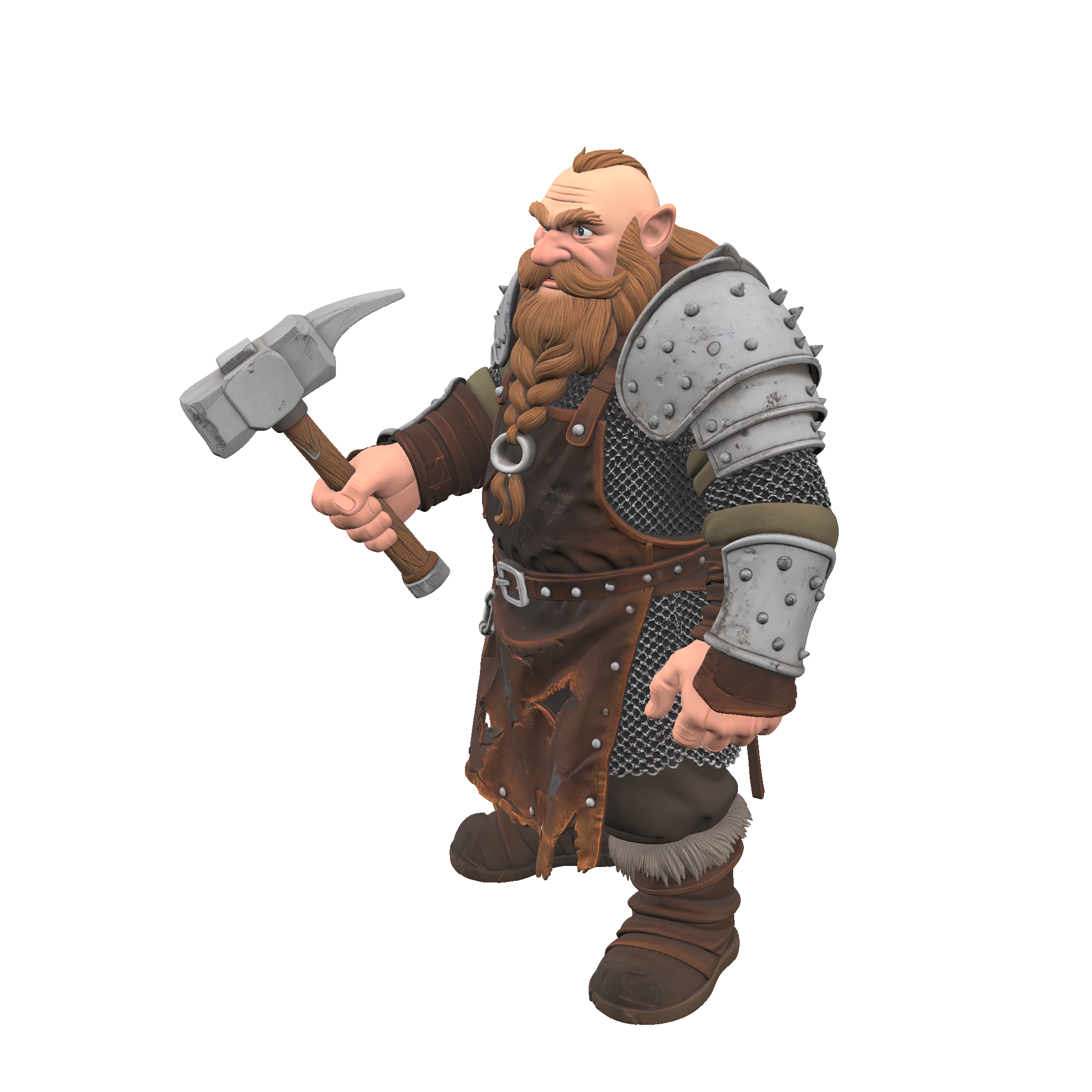
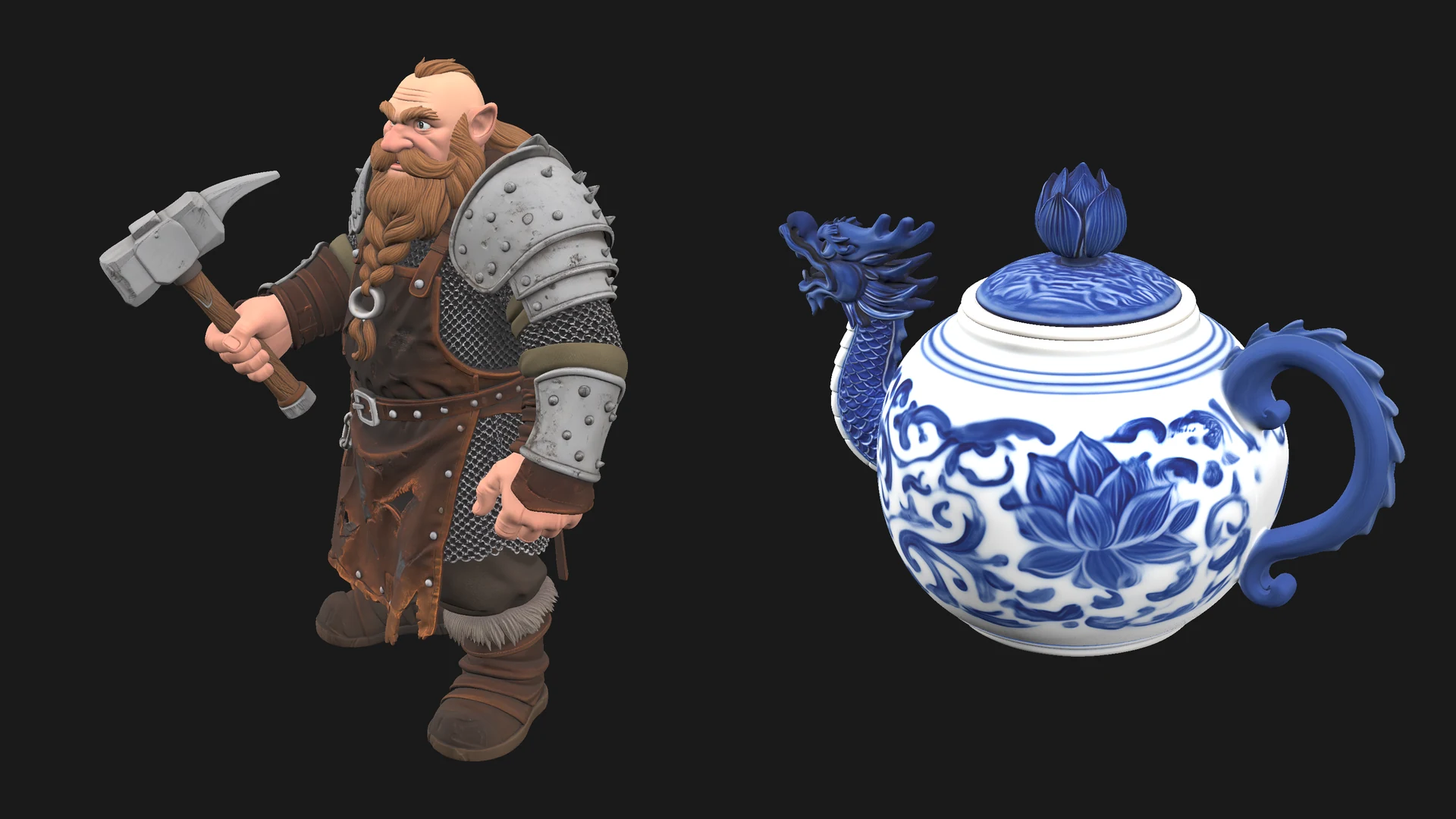
When you have only an idea, write it down. The Hunyuan 3D 3.6 API turns a prompt of up to 1,024 characters into a 3D model, and the optional style field applies a preset look: qinghuaci (blue-and-white porcelain), china_style, sculpture, cartoon or cyberpunk. In PoYo's tests, a prompt for "a battle-worn dwarf blacksmith in a layered leather apron over chainmail" returned a textured character with riveted pauldrons, a braided beard and a forging hammer, and a teapot prompt with the qinghuaci style returned blue-and-white porcelain with a dragon-shaped spout.
Prompts of up to 1,024 characters
Five texture style presets
Textured or geometry-only output
04
Image to 3D from One Front View
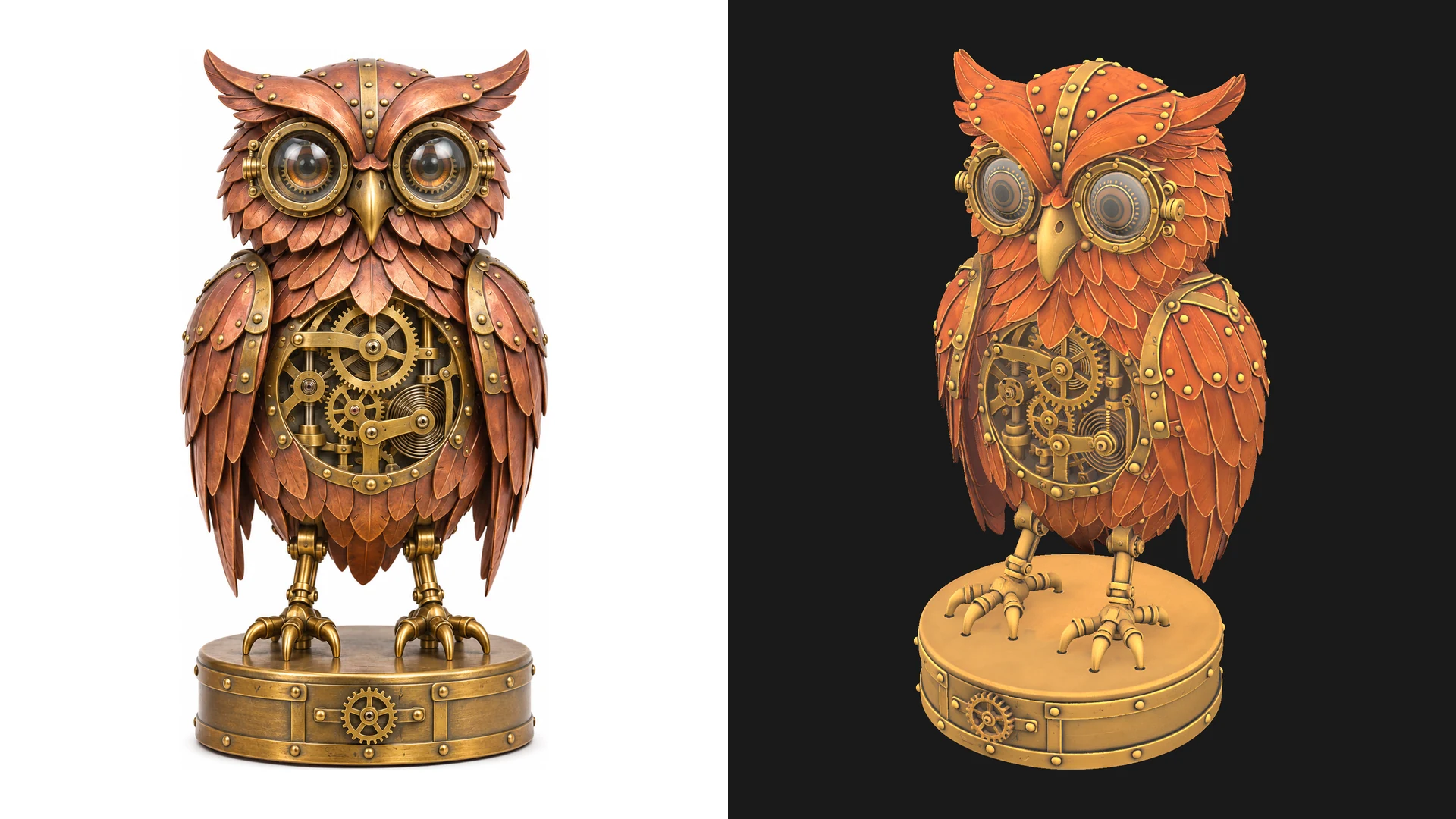
Concept art and product photos already hold most of the design. Send one JPG, PNG or WebP image to the Hunyuan 3D 3.6 API and it rebuilds the object in 3D, keeping the silhouette, colors and materials of the reference. In this PoYo test, a single front view of a steampunk owl figurine became a textured model with its riveted copper feathers, exposed gears and brass base. Turn on bake_lighting to keep the lighting of the photo in the texture, or leave it off for an unlit albedo texture that you can relight.
One JPG, PNG or WebP image
Keeps shape, colors and materials
Optional baked lighting from the photo
05
Multi-View Input for Accurate Backs and Sides
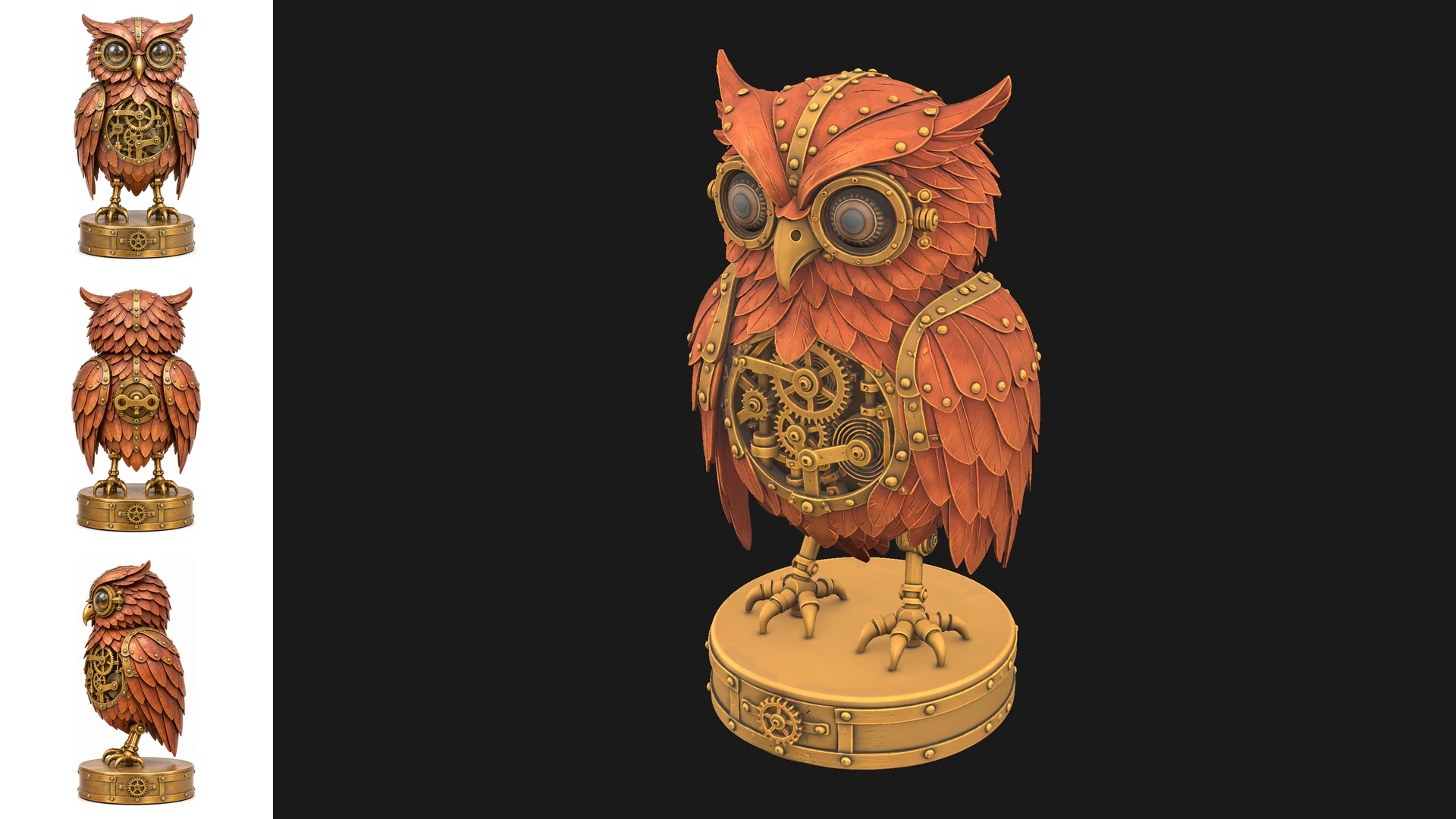
A single photo leaves the back of an object to guesswork. Add up to 7 extra views (back, left, right, top, bottom, left-front and right-front) and the Hunyuan 3D 3.6 API builds the model from all of them, so the back panel and sides match your design. In this PoYo test, front, back and left views of the same owl produced a model whose back, wings and base follow the reference, and ao_strength controlled the ambient occlusion in the texture.
Up to 8 images of one object
Back and sides follow your references
Ambient occlusion with ao_strength
Who Can Benefit from Hunyuan 3D 3.6 API?
01
Game Studios and Character Artists
Game teams can use the Hunyuan 3D 3.6 API to turn concept art of characters, creatures, armor and props into high-poly base meshes with clear part boundaries, then retopologize, bake and refine them in their own pipeline.
02
Figurines and 3D Printing
Figurine makers and 3D printing services can generate detailed busts and statues from a sketch or photo. Hunyuan 3D 3.6 builds watertight meshes with up to 2,000,000 faces, and the GLB and OBJ files load into slicing and sculpting tools.
03
E-Commerce 3D Product Views
Online stores can turn product photos, or several angles of one product, into textured 3D models for interactive viewers and AR previews, with PBR maps that separate metal, leather and fabric.
04
Film, Animation and Previsualization
Film and animation teams can block out sets, props and costumes for previs with the Hunyuan 3D 3.6 API, using text prompts for early ideas and multi-view references when a design is locked.
05
3D Creation Apps and Platforms
Developers of 3D editors, creator apps and asset marketplaces can add text-to-3D and image-to-3D generation through one Hunyuan 3D 3.6 API call, and let users choose face count, texture size and style.
06
Education and Cultural Heritage
Teachers, museums and cultural brands can turn illustrations and artifact photos into 3D models for lessons, exhibitions and souvenirs, with style presets such as qinghuaci and sculpture for themed collections.
Hunyuan 3D 3.6 API vs Hunyuan 3D v3.1 Pro, Hunyuan 3D v3.1 Rapid — Model Comparison
All three Hunyuan 3D models are available on PoYo. Hunyuan 3D 3.6 is the one to choose for high-poly detail and high-resolution textures; Hunyuan 3D v3.1 Pro and Rapid cost less per model.
Feature
Hunyuan 3D 3.6
Hunyuan 3D v3.1 Pro
Hunyuan 3D v3.1 Rapid
Inputs
Text (up to 1,024 characters); one image plus up to 7 views
Text (up to 1,024 characters); one image plus up to 7 views
Text (up to 200 characters); one image
Face Count
1,000–2,000,000 (default 2,000,000)
40,000–1,500,000 (default 500,000)
Set by the model
Texture Resolution
2K, 4K or 8K
Set by the model
Set by the model
PBR Maps
Included in the price
+24 credits
+24 credits
Texture Controls
Style presets, texture format, seamless texture, baked lighting, ambient occlusion
PBR, geometry-only mode
PBR, geometry-only mode
Price per Textured Model
400 credits (text), 280 credits (one image)
60 credits base plus add-ons
36 credits base plus add-ons
Parameters and prices as implemented on PoYo. Face count and texture resolution limits for Hunyuan 3D 3.6 come from Tencent's release notes.
How to Use Hunyuan 3D 3.6 API on PoYo
Step 1: Register & Create API Key Sign in to PoYo and create an API key in the dashboard. The same key works for the Hunyuan 3D 3.6 API and every other image, video, audio and 3D model on PoYo. Create API Key →
Step 2: Top Up Credits Add credits to your account. A textured Hunyuan 3D 3.6 model costs 400 credits ($2.00) from text and 280 credits ($1.40) from one image; geometry-only models start at 120 credits ($0.60). Add Credits →
Step 3: Call the Hunyuan 3D 3.6 API Send POST https://api.poyo.ai/api/generate/submit with your API key and a JSON body such as {"model": "hunyuan-3d/v3.6/text-to-3d", "input": {"prompt": "A carved wooden chess knight with a flowing mane and a ringed round base", "generate_type": "Geometry", "face_count": 300000}}. For images, use hunyuan-3d/v3.6/image-to-3d with image_urls and optional view fields such as back_image_url. Poll the returned task_id or pass a callback_url to receive the GLB, the OBJ ZIP and the preview image. View Documentation →
Frequently Asked Questions about Hunyuan 3D 3.6 API
01
What is Hunyuan 3D 3.6?
Hunyuan 3D 3.6, published by Tencent as Hy3D 3.6 (also written Hunyuan3D 3.6), is the 3D generation model Tencent Hunyuan released on November 27, 2026. It focuses on high-poly geometry and PBR textures for characters, creatures, clothing and complex props. PoYo offers it as the Hunyuan 3D 3.6 API with two model IDs: hunyuan-3d/v3.6/text-to-3d and hunyuan-3d/v3.6/image-to-3d.
02
What's new in Hunyuan 3D 3.6 compared with Hunyuan 3D 3.1?
According to Tencent, Hunyuan 3D 3.6 raises the maximum face count from 1.5 million to 2 million and the texture resolution from 4K to 8K, and improves surface quality, part boundaries and fine detail on faces and clothing. On PoYo, the Hunyuan 3D 3.6 API also adds style presets for text-to-3D, texture format and seamless texture options, baked lighting and ambient occlusion for image-to-3D.
03
How much does the Hunyuan 3D 3.6 API cost on PoYo?
Each generation has one fixed price. Text to 3D: 400 credits ($2.00) textured, 160 credits ($0.80) geometry only. Image to 3D from one image: 280 credits ($1.40) textured, 120 credits ($0.60) geometry only. With extra views: 400 credits ($2.00) textured, 160 credits ($0.80) geometry only. PBR maps, 8K textures and custom face counts are included in these prices.
04
What files does the Hunyuan 3D 3.6 API return?
Every finished task returns a GLB model and a PNG preview image. Textured (Normal) tasks also return an OBJ ZIP with the OBJ model, its MTL file and the texture maps. At the default 2,000,000 faces, a textured GLB is about 64–76 MB in PoYo's tests; lower the face count for lighter files.
05
How do I send multi-view images to the Hunyuan 3D 3.6 API?
Use hunyuan-3d/v3.6/image-to-3d, put the front view in image_urls, and add any of back_image_url, left_image_url, right_image_url, top_image_url, bottom_image_url, left_front_image_url and right_front_image_url, one image per view. View images are JPG or PNG, 128–5000 px per side. As soon as one view field is filled, the task is billed at the multi-view price.
06
What is the difference between Normal and Geometry generation?
generate_type Normal, the default, returns a textured model and accepts the texture options: enable_pbr, texture_resolution, texture_format, seamless_texture and, for images, bake_lighting and ao_strength. Geometry returns an untextured white model at a lower price, which suits sculpting, retopology and 3D printing workflows.
07
What are PBR materials in Hunyuan 3D 3.6?
PBR (physically based rendering) materials describe how a surface reacts to light. With enable_pbr set to true, the Hunyuan 3D 3.6 API adds metallic, roughness and normal maps to a textured model, so metal, wood, leather and fabric look different under the same lighting in game engines and renderers.
08
Is Hunyuan 3D 3.6 open source?
Tencent provides Hunyuan 3D 3.6 as an API and in its own products. The open-source Hunyuan3D releases on GitHub are the 2.x models. On PoYo you can call Hunyuan 3D 3.6 directly with the Hunyuan 3D 3.6 API and an API key, and test it first in the Playground on this page.
09
How long does a Hunyuan 3D 3.6 generation take?
In PoYo's tests, a geometry-only model took about 2.5 minutes and a textured model 6–9 minutes. Requests run as asynchronous tasks: the Hunyuan 3D 3.6 API returns a task_id at once, and you can poll the task status or receive the result through a callback_url.
10
Can I control the face count and file size?
Yes. Set face_count anywhere from 1,000 to 2,000,000; the default is 2,000,000. By default the model adjusts the final count to the detail of the object; set face_strict_mode to true to get the exact number. A 300,000-face geometry-only model was a 5.4 MB GLB in PoYo's test.
Why Use PoYo for Hunyuan 3D 3.6 API Access
01
One API Key for Every Model
Call the Hunyuan 3D 3.6 API with the same request format and API key you use for image, video and audio models on PoYo, and feed a generated image straight into image-to-3D.
02
Fixed Price per Model
Every Hunyuan 3D 3.6 API generation has one price per model type, shown before you submit, with PBR maps, 8K textures and custom face counts included. You pay only for the models you generate.
03
Playground with 3D Preview
Try prompts, images and view combinations in the Playground, rotate the result in the 3D viewer, download the GLB and OBJ files, then copy the JSON request into your code.
04
Developer-Friendly Integration
Use the documented Hunyuan 3D 3.6 API fields, asynchronous task polling and callback URLs, so long 3D generations run in the background of your application.