Nano Banana 2.1 vs GPT Image 2.5: Price, Editing, Text, and Which to Choose
Compare Google's Nano Banana 2.1 and OpenAI's GPT Image 2.5 (Flare and Sunburst) on Poyo: per-image prices at 1K, 2K, and 4K, quality tiers, references, masks, transparent backgrounds, and use cases.

Nano Banana 2.1 from Google and GPT Image 2.5 from OpenAI are the two newest general-purpose image models on Poyo. Both generate and edit images at 1K, 2K, and 4K, and both handle text, reference images, and multi-turn edits. They differ in how you control them: Nano Banana 2.1 has one model with a simple per-resolution price, while GPT Image 2.5 has two variants, Flare and Sunburst, and five quality tiers, plus masks and transparent backgrounds.
The short answer: choose Nano Banana 2.1 for multilingual signs and posters, character series, and wide 4K scenes, at a flat $0.02 to $0.05 per image. Choose GPT Image 2.5 when you need masked inpainting, transparent PNGs, more than 10 references, or very cheap drafts. Its low tier starts at $0.00655 per image, and its medium tier costs the same as or less than Nano Banana 2.1 at each resolution.
Quick Comparison
| Item | Nano Banana 2.1 | GPT Image 2.5 |
|---|---|---|
| Provider | OpenAI | |
| Poyo model IDs | nano-banana-2.1 |
gpt-image-2.5-flare, gpt-image-2.5-sunburst |
| Variants | One model for generation and editing | Flare for fast iteration; Sunburst for precise editing and detailed assets |
| Workflows | Text to image, reference editing, multi-reference composition | Text to image, reference editing, masked inpainting, transparent backgrounds |
| Reference images | Up to 10 | Up to 16 |
| Output resolution | 1K, 2K, 4K | 1K, 2K, 4K |
| Aspect ratios | 1:1, 2:3, 3:2, 3:4, 4:3, 4:5, 5:4, 9:16, 16:9, 21:9, plus auto for edits |
auto, listed ratios, or custom WIDTHxHEIGHT at 2K/4K (longest side up to 3840 px, ratio up to 3:1) |
| Quality control | Resolution only | low, medium, high, xhigh, max |
| Masked inpainting | Not listed on Poyo; describe edits in the prompt | mask_url with at least one reference image |
| Transparent background | Not listed on Poyo | background: "transparent" with PNG or WebP output |
| Poyo price range | $0.02 to $0.05 per image | $0.00655 to $0.4787 per image |
Prices were checked on the Nano Banana 2.1 and GPT Image 2.5 model pages on October 9, 2026. Flare and Sunburst share the same prices.
Price per Image
Nano Banana 2.1 charges by resolution. GPT Image 2.5 charges by quality tier and resolution, so the comparison depends on which tier you use.
| Resolution | Nano Banana 2.1 | GPT Image 2.5 low |
GPT Image 2.5 medium |
GPT Image 2.5 high |
|---|---|---|---|---|
| 1K | $0.02 | $0.00655 | $0.01475 | $0.0589 |
| 2K | $0.03 | $0.01325 | $0.02995 | $0.1197 |
| 4K | $0.05 | $0.01235 | $0.02905 | $0.11195 |
GPT Image 2.5 also offers xhigh, from $0.10465 at 1K to $0.21275 at 2K, and max, from $0.23555 at 1K to $0.4787 at 2K, for print and hero assets. The full table is in the GPT Image 2.5 pricing guide.
What the numbers mean:
- At
medium, GPT Image 2.5 is the same price or cheaper. It costs about 26% less than Nano Banana 2.1 at 1K, the same at 2K, and about 42% less at 4K. - At
highand above, Nano Banana 2.1 is cheaper. GPT Image 2.5highcosts about 3× as much at 1K, 4× at 2K, and 2.2× at 4K. - For drafts, GPT Image 2.5
lowis the cheapest option at under $0.015 per image at any resolution. - Nano Banana 2.1 is easier to budget. One setting, resolution, sets the price, and the same price applies to generation and editing.
| Scenario | Nano Banana 2.1 | GPT Image 2.5 |
|---|---|---|
| 1,000 social images at 1K | $20.00 | $14.75 (medium) |
| 100 product images at 2K | $3.00 | $3.00 (medium), $11.97 (high) |
| 100 hero images at 4K | $5.00 | $2.91 (medium), $11.20 (high) |
| 200 drafts at 1K | $4.00 | $1.31 (low) |
These are list prices per output. The real cost per accepted image also depends on how many retries and edits each model needs for your brief, so measure acceptance rates in a side-by-side test.
Text Rendering and Layout
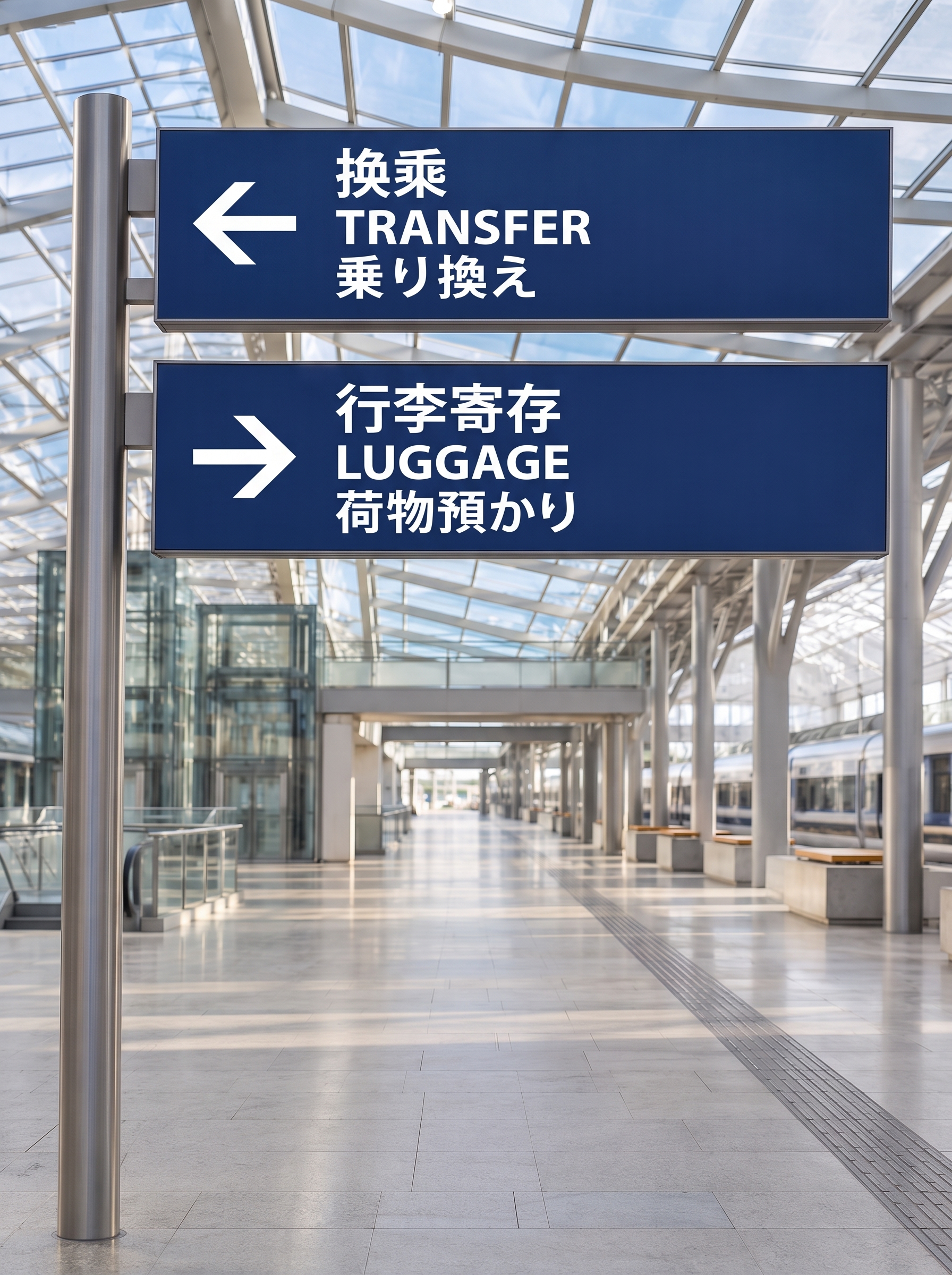
Both models handle short, exact copy well. Google lists text rendering and infographic layout among Nano Banana 2.1’s main improvements. In the station example from our Nano Banana 2.1 guide, the model rendered two signs with Chinese, English, and Japanese lines while preserving the original architecture:
GPT Image 2.5 rendered a bilingual night-market poster with five copy blocks correctly in all of our test outputs, including the Chinese line “今晚一起逛夜市”. The image below shows GPT Image 2 and both GPT Image 2.5 variants from our GPT Image 2.5 vs GPT Image 2 benchmark:

These are different briefs, so they show what each model can do rather than which one wins. For a fair comparison, send the same copy to both models at 2K, then zoom in and proofread every line. Nano Banana 2.1 is a strong first test for signs and labels in several scripts. GPT Image 2.5 is a strong first test for structured layouts that also need a transparent background or a custom size.
Editing: Masks, References, and Multi-Turn Revisions
Local edits. GPT Image 2.5 accepts a mask_url with a reference image, so you can limit the change to a region, such as curtains or a product label, and keep the rest of the image unchanged. Nano Banana 2.1 edits through natural language. Describe what to change and what to preserve, such as geometry, viewpoint, and lighting.
References. GPT Image 2.5 accepts up to 16 references, and Nano Banana 2.1 accepts up to 10. In both models, assign a clear role to each image, for example: “image 1 is the person, image 2 the outfit, image 3 the scene.”
Multi-turn consistency. Both models emphasize consistency across successive edits. Nano Banana 2.1 improves character consistency across editing turns. GPT Image 2.5 Sunburst is OpenAI’s variant for precise editing and reference fidelity. Our 10-step GPT Image 2.5 editing report shows how detail holds up over a long chain. In either model, save each intermediate image so you can return to an earlier version if a later edit fails.
Transparent Backgrounds, Sizes, and Wide Images
- Transparent assets: GPT Image 2.5 can output RGBA PNG or WebP with
background: "transparent". This works well for stickers, icons, and game sprite sheets. Nano Banana 2.1 does not list this option on Poyo. Generate on a plain background and remove it afterward. - Custom sizes: GPT Image 2.5 accepts custom
WIDTHxHEIGHTsizes at 2K and 4K, when both sides are divisible by 16. Nano Banana 2.1 uses ten fixed ratios plusautofor edits. - Wide 4K scenes: GPT Image 2.5 caps the longest side at 3840 px and the ratio at 3:1. Nano Banana 2.1 offers 21:9 at 4K; the volcanic coast example in the Nano Banana 2.1 guide came back at 6336 × 2688 px. For large panoramas and banners, Nano Banana 2.1 delivers more pixels per image.
Speed
In our GPT Image 2.5 benchmark at 1K medium, end-to-end turnaround had a median of 30.89 s for Flare and 35.06 s for Sunburst, including queuing and status polling. We have not published a timing benchmark for Nano Banana 2.1. Speed varies with resolution and load, so measure both models on your own requests before setting timeouts.
Which Model to Choose
| Use case | First model to test | Why |
|---|---|---|
| Multilingual signs, labels, and posters | Nano Banana 2.1 | Improved text rendering with a flat 2K price |
| Character storyboards and series | Nano Banana 2.1 | Improved consistency across editing turns |
| Wide banners and 4K panoramas | Nano Banana 2.1 | 21:9 at 4K with more pixels per image |
| Replacing one region while locking the rest | GPT Image 2.5 Sunburst | Masked inpainting with mask_url |
| Stickers, icons, sprites, and cutouts | GPT Image 2.5 | Native transparent PNG or WebP |
| Compositions with 11 to 16 references | GPT Image 2.5 | Accepts up to 16 references |
| High-volume drafts and social images | GPT Image 2.5 Flare | low and medium tiers cost less than $0.015 at 1K |
| Print and premium hero assets | GPT Image 2.5 xhigh/max, then compare with Nano Banana 2.1 at 4K |
Extra quality tiers versus a lower 4K price |
How to Run a Fair Test
Use the same five briefs on both models, with matched settings, such as Nano Banana 2.1 at 2K and GPT Image 2.5 medium at 2K, where the prices are equal:
- A poster with an exact headline and three information blocks.
- A sign or label with text in two or more scripts.
- A product photo with a reference package and a fixed logo.
- One character across four scenes.
- An edit that changes one object and leaves everything else unchanged.
Score text accuracy, reference fidelity, preservation in edits, visual quality, turnaround, and the number of attempts needed for an acceptable image. The model with the lowest cost per accepted image is the better choice for that workload, even if its list price is higher.
Both models use the same Poyo submission endpoint. A Nano Banana 2.1 request:
{
  "model": "nano-banana-2.1",
  "input": {
    "prompt": "Create a museum poster titled OCEAN & EARTH. Place the title at the top, a detailed ocean illustration in the center, and the subtitle Explore Our Blue Planet at the bottom. Use crisp readable typography, generous spacing, deep blue and warm ivory colors.",
    "size": "3:4",
    "resolution": "2K"
  }
}
The same brief on GPT Image 2.5 adds a quality tier and uses a custom 3:4 size:
{
  "model": "gpt-image-2.5-flare",
  "input": {
    "prompt": "Create a museum poster titled OCEAN & EARTH. Place the title at the top, a detailed ocean illustration in the center, and the subtitle Explore Our Blue Planet at the bottom. Use crisp readable typography, generous spacing, deep blue and warm ivory colors.",
    "size": "1536x2048",
    "resolution": "2K",
    "quality": "medium"
  }
}
Send either body to POST https://api.poyo.ai/api/generate/submit with your Poyo API key, read data.task_id, and poll GET https://api.poyo.ai/api/generate/status/YOUR_TASK_ID until data.status is finished. For edits, add image_urls to either request. For GPT Image 2.5, you can also add mask_url, or set background to transparent with output_format set to png.
Frequently Asked Questions
Which is cheaper, Nano Banana 2.1 or GPT Image 2.5?
It depends on the GPT Image 2.5 quality tier. At low and medium, GPT Image 2.5 costs the same as or less than Nano Banana 2.1 at every resolution: $0.01475 versus $0.02 at 1K, $0.02995 versus $0.03 at 2K, and $0.02905 versus $0.05 at 4K at medium. At high, xhigh, and max, Nano Banana 2.1 is cheaper.
Which is better for text in images?
Both render short multilingual copy reliably in our examples. Nano Banana 2.1 is a strong first choice for signs and labels in several scripts. GPT Image 2.5 is a strong first choice for layouts that also need transparency or custom sizes. Test your own copy and proofread every line before delivery.
Can Nano Banana 2.1 make transparent PNGs?
Poyo does not list a transparent background option for Nano Banana 2.1. If you need alpha transparency directly, use GPT Image 2.5 with background: "transparent". Otherwise, generate on a plain background with Nano Banana 2.1 and remove it afterward.
Should I use Flare or Sunburst?
Use Flare for fast iteration and high-volume generation. Use Sunburst for precise edits, masked inpainting, and reference fidelity. Both cost the same on Poyo. Our Flare vs Sunburst comparison has side-by-side outputs.
Which model supports more reference images?
GPT Image 2.5 accepts up to 16 references per request on Poyo, and Nano Banana 2.1 accepts up to 10.
Which model is better for 4K?
Both offer 4K. GPT Image 2.5 medium 4K costs $0.02905 and caps the longest side at 3840 px. Nano Banana 2.1 4K costs $0.05 and returns larger images at wide ratios, such as 6336 × 2688 px at 21:9. Choose by delivery size and the detail you need.
Can I use both models with one API key?
Yes. Both use Poyo’s /api/generate/submit endpoint and the same task status endpoint, so you can route each job to the model that suits it by changing model and the model-specific fields.
To compare them on your own brief, open the Nano Banana 2.1 and GPT Image 2.5 model pages and run the same prompt on both.